ELN Integration: What Research Teams Should Connect
Learn what an integrated ELN should connect, from samples and protocols to instruments and audit trails, and what to ask vendors before choosing.

Download Whitepaper
TL;DR
ELN integration connects an electronic lab notebook with samples, inventory, protocols, files, instruments, identity, and compliance controls so every experiment remains traceable, reproducible, and retrievable.
- ELN integration connects an electronic lab notebook with samples, inventory, protocols, files, instruments, identity systems, and compliance controls, so every experiment remains traceable, reproducible, and retrievable across connected laboratory research and operations platforms today.
- SciSure's native ELN and LIMS integration links experiment records to registered samples, quantities, storage locations, metadata, and lineage, using barcode and batch workflows to reduce transcription errors and keep materials traceable.
- Instrument outputs can reach the ELN through automated folder uploads, APIs, Marketplace add-ons, or direct attachment, while cloud storage services and protocols.io require individual evaluation because their synchronization behavior varies by platform.
- Compliance requirements span every connected system, requiring preserved identity, permissions, timestamps, signatures, witness approvals, and audit evidence, while laboratories remain responsible for validation, SOPs, training, and governance under 21 CFR Part 11, GxP, or EU GMP Annex 11.
- Research teams should phase ELN integration by risk, starting with canonical sample identifiers, current protocols, and access controls before adding barcode, instrument, cloud-file, and API automation based on operational value and readiness.
Ready to see SciSure in action?
No commitment · Free consultation
Introduction
If you're searching for an ELN, you probably started by testing the interface.
- Can your scientists take notes quickly?
- Does the layout make sense?
- Is the note-taking experience better than what you have now?
These are reasonable questions, but they miss the harder one that surfaces months into implementation: what does this system actually connect to?
An electronic lab notebook (ELN) that captures notes well but sits apart from samples, protocols, files, instruments, and permissions creates a second problem in place of the first. This is the gap that surfaces once you’re already using a system. It’s the work of linking experiment documentation to the samples being studied, the protocols that govern the work, the files and instrument outputs generated along the way, the permissions that determine who touched what, and the review evidence that auditors and collaborators will eventually need.
SciSure’s Scientific Management Platform brings ELN and LIMS capabilities into one environment, allowing experiment records to link natively to samples, inventory, protocols, files, and equipment records. External instruments, databases, and third-party systems can then be connected through Marketplace add-ons, APIs, or the SDK.
Why ELN integration matters for sample-heavy research
The gap in ELN sample management shows up quickly in sample-heavy research. An experiment record references a sample by name, or by a handwritten label written down mid-procedure, but the details that actually matter (where the sample is stored, what it descended from, how much of it remains, what metadata was captured at intake) live somewhere else entirely. Sometimes that somewhere else is a spreadsheet. Sometimes it’s nowhere at all, and the information exists only in a scientist's memory until someone asks for it.
A connected ELN closes this gap by treating samples as linked records rather than text references. Within SciSure, sample sections can link directly to samples registered in SciSure LIMS, so an experiment points to the actual material and its associated history rather than a manually entered sample name.
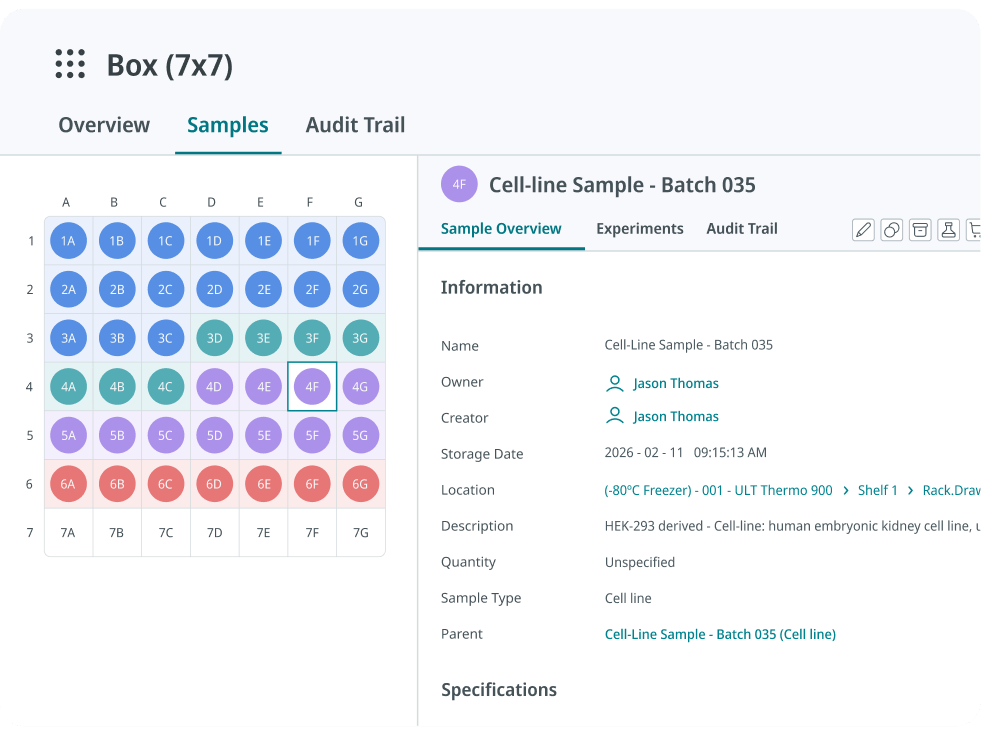
For example, barcode workflows let your scientists scan a labeled sample directly into an experiment record, removing the manual transcription step where errors tend to happen. Batch sample workflows extend this to higher-throughput environments, where logging samples one at a time is not realistic. Configurable sample views can surface relevant fields (such as quantity and storage information) within the experimental context, while the linked sample record provides access to its full metadata, location, and history.
Food Brewer AG is a useful example of what this looks like at scale. The company built end-to-end traceability across cell cultures, equipment, chemicals, and consumables through comprehensive barcoding, while using SciSure's SDK to automate steps like experiment creation, sample generation, and metadata updates.
By combining structured data management, barcoding, SDK-driven automation, and integrated analytics, Food Brewer reported a 60% productivity increase in R&D and a 40% increase in upstream processing. The implementation also reduced manual tracking, strengthened culture and material traceability, and made onboarding and knowledge transfer easier. Read the full Food Brewer AG story.
What breaks when your ELN isn’t connected
Disconnection often shows up as friction that compounds, one small workaround at a time, until the record itself becomes harder to trust.
Manual transcription creeps back in.
When a sample section doesn’t tie to a registered record, your scientists fall back to typing sample IDs or descriptions by hand, the exact error-prone step barcode workflows and LIMS software are meant to remove.
Files lose their connection to the record.
Instrument output or raw data that lands in a shared drive instead of the experiment it belongs to becomes something your reviewer has to track down later, cross-referencing file names and timestamps to reconstruct what came from where.
Signatures lock less than they appear to.
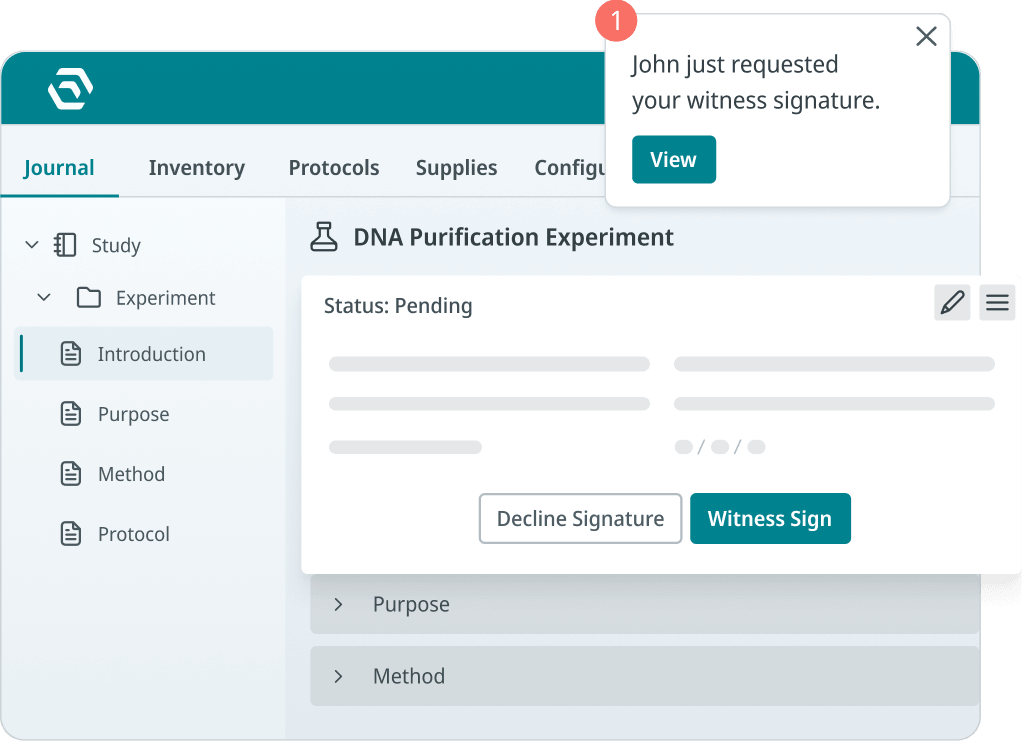
A signature that fixes the typed portion of a record but leaves linked files or imported data still editable is a weaker guarantee than it looks like on paper, and it’s often not obvious until an auditor tests it.
Audit prep turns into a scramble.
Without a connected trail, reconstructing what happened, who touched it, and when means pulling data from multiple systems and hoping the timestamps line up.
Inventory and procurement go dark.
If ordering and stock data live outside the ELN, your scientists can’t see what’s on hand or on order from inside the record they’re working in, which slows down the experiment and the reorder alike.
What should an integrated ELN connect to?
Samples and inventory
An experiment that references a sample by name or a handwritten label is a note. When your ELN connects to sample and inventory data, the experiment links to the actual biological or chemical material in question, its storage location, its remaining quantity, and its history. Without that link, your record describes work in the abstract.
ERP, procurement, and inventory ordering
Reagent and consumable levels rarely stay static, and running out often decides whether an experiment starts on schedule. SciSure’s Supplies functionality supports a product catalog, stock thresholds, shared shopping lists, reordering, and order-status tracking from request through fulfillment. The built-in module does not directly interface with third-party marketplace websites. Connections to an external ERP, supplier, or procurement platform should therefore be treated as custom integration work, with the method, implementation effort, and deployment requirements confirmed for the specific system. Here you can learn more about SciSure’s inventory and ordering capabilities.

Protocols and SOPs
Your experiments do not happen in isolation from the procedures that govern them. When you connect protocols and SOPs to the experiments that follow them, your reviewer can see what was recorded and which version of the procedure was in effect at the time. Disconnected protocols leave that context to memory or to a separate document that may or may not match what actually happened.
Check out our guides to digitalizing lab protocols and mastering lab standard operating procedures for a deep dive.
Files and instrument data
Raw outputs that live in a folder outside your ELN are one step removed from the experiment they belong to. A connected system keeps that data attached to the record it supports, so your reviewer is not left cross-referencing file names and dates to reconstruct what came from where.
Permissions and identity
Who accessed, edited, or signed a record is part of what makes that record credible. When identity and permissions are built into the connection itself, that attribution travels with the data as a permanent part of the record.
Review and approval workflows
A signature only means something if it locks the record it applies to. Connected review workflows turn sign-off into an attributable, time-stamped event tied to a specific version of the data.
Analytics, statistical, and project-management tools
Once experiment data is structured and connected, it becomes usable outside the ELN too. Custom export formats and the API let statistical or analytics tools pull data in the structure they expect. Project-management and communication tools connect differently, through triggers, automated notifications, and webhook alerts, for example to Slack or Teams. Whether a given analytics or PM tool is a standard connector or something built with the SDK depends on the specific tool and your deployment model.
How file, instrument, and equipment data enter the ELN
External data enters an experiment record through several distinct routes, and knowing which route applies to your use case matters more than treating "file integration" as one feature.
One-way upload and local file editing
SciSure supports two distinct desktop-file workflows. eLabSync can monitor a designated folder on a local computer and automatically upload new files to the ELN. Separately, eLabWebEdit lets a researcher open a file linked to an experiment in its associated desktop application and save the edited file back to the ELN as a new version within the original file history.
Cloud file integrations
Cloud integrations do not all behave the same way. Add-ons for Google Drive, Box, and Dropbox let users select and attach files from those services to SciSure. Don’t assume these connections provide continuous two-way file synchronization; for example, the Dropbox add-on uploads a separately tracked copy into the ELN.
Likewise, the Protocols.io current integration supports bidirectional synchronization, allowing protocols and their versions to remain aligned across SciSure and protocols.io.
Hybrid storage for large raw-data files
For large raw-data files, eLabHybrid keeps the files on a customer-hosted server while the ELN remains cloud-hosted. SciSure maintains the connection, file-authenticity information, and version history without requiring the complete dataset to be transferred to cloud storage. When properly configured, validated, and governed for the laboratory’s intended use, this architecture can support GxP and 21 CFR Part 11 workflows.
Equipment and sensor data
The Elemental Machines integration connects supported sensors with SciSure to capture environmental readings such as temperature, humidity, light, and pressure, along with the duration and magnitude of deviations. Equipment maintenance, calibration, and service scheduling are managed through SciSure’s separate equipment-management capabilities. The integration requires activation and configuration and is not a default sensor capability.
Lab instrument integration in practice
Robotics and connected medical record systems raise the stakes further, since a broken connection here stalls physical lab operations.
Boston University’s in-house COVID-19 testing lab shows what this looks like under real operational pressure. The university needed a system that could integrate reliably with its testing robots and with two separate electronic medical record systems, one for students and one for employees, sending sample orders from the EMRs to the lab and results back again. SciSure's APIs processed the files generated by the robots, and the lab was operational within two months of implementation. The integration also prevented duplicate barcodes from entering the system as the lab scaled up. Read the full Boston University story.
What APIs, SDKs, add-ons, and private workflows can support
Documented connectors are only the starting point. Below that layer sits an API and SDK system that extends what an ELN can do beyond its out-of-the-box configuration. SciSure’s API and SDK support programmatic data exchange, workflow automation, equipment and storage records, file operations, and custom ELN section types. The API can retrieve equipment records and update equipment status, while the SDK can extend the interface and introduce organization-specific experiment sections and actions.
Standard ELN exports are available in PDF, HTML, XML, and JSON. Customizable sample-column CSV exports are also available through a dedicated add-on, while APIs can be used when a downstream system requires programmatic data access. Excel experiment sections are delivered through the Office Online Server add-on and applicable Microsoft licensing; backend API support is also available for uploading Excel sections. Teams should confirm the required endpoint, add-on, licensing, and hosting combination before committing to a particular workflow.
The SciSure Marketplace is the route to public add-ons built for common workflows and ready to activate without custom development. For needs that do not fit a public Marketplace add-on, SciSure also supports private add-ons for organization-specific workflows. Private add-on development and installation are generally associated with Private Cloud or On-Premises deployments; Shared Cloud customers should confirm the available route with SciSure. Make sure you review the Marketplace and hosting options before assuming that the same customization is available in every environment.

Food Brewer AG's experience shows what this looks like in practice. The company used SciSure's SDK to build automation that triggers experiment creation and sample generation directly, cutting out manual multi-step processes.
The range from a one-click add-on to a fully custom connector is what marketplace integrations actually look like in practice. Before you commit to a vendor, ask which of your required integrations fall into which category.
What regulated teams should ask about signatures, audit trails, validation, and retention
Integration raises the stakes on ELN data integrity, since a record that pulls data from multiple connected sources still has to hold up to the same scrutiny as one entered by hand. If you’re a regulated team, you should be asking specific questions here.
Does the signature lock every part of the record, including connected data?
A signature should lock the record it applies to, turning an editable entry into a fixed, attributable one. Witness approvals add a second layer of attribution for steps that require independent confirmation. Ask whether this locking behavior still holds when the data in the record came from a connected system. A signature that locks typed notes but leaves linked file data editable is a weaker guarantee than it appears.
Will actions performed in the connected system show up in the SciSure audit trail, and what does the handoff record capture?
Automatic audit trails should capture relevant actions with timestamps and user attribution. In an integrated workflow, each system should preserve the audit evidence for actions performed inside it, while the integration should record the handoff clearly; for example, the transfer time, source and destination identifiers, service account, validation result, and any processing errors. Your team should not assume that actions performed in an external system automatically appear in the SciSure audit trail unless the integration was specifically designed to capture them.
Do linked files and sample records stay accessible for the same retention window as the ELN record itself?
Retention requirements determine how long a record has to stay usable, which raises a practical question for connected data: whether linked files and sample records remain accessible for that same window, or whether they depend on a separate system's own retention policy.
What has your lab validated, and what does the integration still leave to you?
Validation is your lab's own responsibility, tied to its specific intended use. Software documentation can support that process, but no vendor can perform validation on your behalf. Frameworks like 21 CFR Part 11, GxP compliance, and EU GMP Annex 11 are useful starting points for evaluating a system, but purchasing or configuring software does not by itself achieve compliance with any of them. Integration supports a compliant workflow. It does not replace the validation, SOPs, training, and governance controls you still have to own.
Where AI tools like the AI Protocol Generator enter the picture, the same caution applies: don’t submit sensitive or confidential information because its AI engine operates outside the SciSure environment. AI-generated protocols may also contain inaccuracies or bias and must always be reviewed and validated against trusted sources before use.
Questions to ask any ELN vendor about integration
Everything covered so far turns into a shorter, practical checklist at the point of vendor evaluation. Research teams, IT leads, and QA stakeholders should walk into a vendor conversation with these questions and expect specific answers, not general reassurances about connectivity.
Some of these questions test what the platform can technically do. Others test how it holds up under regulatory scrutiny once it's live. A vendor who can answer both sets clearly, with specifics, is a stronger signal than any feature list.
Connectivity and data handling
Compliance and audit readiness
Implementation sequencing
What is recommended to connect in the first 90 days is a different kind of question than the others, since it’s less about the platform's capabilities and more about how a vendor sequences a real rollout. A vendor with a clear, specific answer, naming which connections to prioritize and which to defer, has likely walked other labs through this exact decision before, and lab software ROI starts with implementation for a reason. A vague answer, or one that pushes everything toward day one, is worth treating as a warning sign, since it often means the vendor hasn't thought through how integration complexity compounds during onboarding.
This is worth asking even of vendors who score well on the questions above. A platform capable of connecting to everything is not the same as a platform with a sound plan for what to connect first.
What to connect first: a practical starting point for ELN integration
Trying to connect everything at once, before anyone on your team has used the system in practice, tends to slow implementation down. A phased approach works better, starting with a clear sense of what belongs in each phase.
- Connect immediately.
Sample sections and barcode workflows, protocols and SOPs, and permissions and access controls form the foundation. These are the connections that make the ELN function as a research record from day one, and delaying them means early experiments get documented without the traceability the system is meant to provide. - Phase in.
Cloud file integrations, instrument data connectors, and API-based automation can follow once the core workflow is stable. These add real value, but they are easier to configure correctly after your team has working habits already in place. - Plan for later.
Large-file hybrid storage, custom add-ons, and validation documentation for regulated workflows tend to depend on decisions that only become clear with real usage data, so building them too early risks designing around assumptions.
Sequencing decisions play out differently once real data and real teams are involved. Kaigene’s experience illustrates the value of moving from fragmented documentation to searchable experiment and inventory records.
Before SciSure, the company relied on Microsoft Office tools alongside physical notebooks, and dual documentation could take several hours or even an entire day. After implementation, Kaigene reported faster documentation, easier retrieval of previous results, better collaboration, and more efficient inventory management. Read the full Kaigene story.
How to know the integration is working
Integration keeps paying off, or stops, based on a handful of practical measures tracked before and after each phase.
Tracking these four before a rollout, and again a few months in, gives you a concrete, numbers-based answer on whether integration is working.
The decision that matters more than the interface
The interface is what you notice first during a demo. What determines whether the ELN holds up two years in is whether it connects to the samples, protocols, files, instruments, and permissions your lab already runs on, and whether it can prove that connection when someone asks for it.
Use the questions in this guide as a working checklist during vendor evaluation: what connects natively, what needs an add-on, what needs custom development, and how a vendor sequences the first 90 days. A vendor who answers all four in specific terms, with named connectors and a real timeline, is one worth building your research record around.
FAQ
What is electronic lab notebook integration?
ELN integration is the process of connecting an electronic lab notebook to the other systems, data sources, and workflows that make experiment records genuinely useful later. This includes samples, protocols, files, instruments, identity, and compliance documentation. Without these connections, an experiment record exists in isolation, which limits how reliably it can support retrieval, review, or audit down the line. Integration is what turns a note-taking tool into a connected research record teams can actually depend on.
How is ELN integration different from LIMS integration?
ELN LIMS integration is really two connected questions. A LIMS integration connects sample-level data and operational workflows, tracking where materials are, how much remains, and their lineage through the lab. ELN integration connects experimental documentation and scientific context instead, the record of what was done and why. When an ELN and LIMS are connected to each other, experiments reference the same samples the LIMS is already tracking, and that's the point at which both systems become more useful than either is on its own. For a closer side-by-side look at the two, see our guide on ELN vs LIMS.
What should an ELN API support?
A useful ELN API should provide secure, documented access to the records and actions required by the laboratory’s actual workflows. Depending on the use case, that may include experiments, samples, projects, files, equipment, storage records, signatures, and workflow triggers. It should also support appropriate authentication, token management, error handling, rate-limit handling, and traceability for automated actions. SciSure’s API and SDK cover a broad range of these workflows, but teams should confirm the exact endpoint, permissions, software version, and deployment availability during evaluation.
Can ELN integrations help with 21 CFR Part 11?
Integrations can either preserve or break Part 11 compliance, depending on whether they maintain audit trails, attribution, signature controls, and record integrity as data moves between systems. Buying an integrated platform supports a compliant workflow, but it doesn’t achieve compliance by itself. Regulated labs still need validation specific to their intended use, documented SOPs, staff training, and governance controls that a vendor cannot provide on the lab's behalf.
What should labs connect first?
Start with the records and controls required for the first production workflows: active samples, canonical identifiers, current protocols, permissions, file requirements, and review or signature rules. Barcode, instrument, cloud-file, and API-based automation can then be phased in according to operational value and technical readiness. Regulated teams should define validation and integration-testing requirements before go-live, while large-file storage should be decided early if it affects the system architecture.
If this sounds like the kind of lab you'd like to build or the support you need, get in touch with us. We'll walk you through how we can build a safer, more connected lab together.

Read more of our blogs about modern lab management
Discover the latest in lab operations, from sample management to AI innovations, designed to enhance efficiency and drive scientific breakthroughs.