ELN-Integration: Was Forschungsteams anbinden sollten
Erfahren Sie, was ein integriertes ELN verbinden sollte – von Proben und Protokollen bis hin zu Geräten und Audit-Trails – und welche Fragen Sie Anbietern vor der Auswahl stellen sollten.

Download Whitepaper
TL;DR
Die ELN-Integration verbindet ein elektronisches Laborbuch mit Proben, Inventar, Protokollen, Dateien, Geräten, Identitäts- und Compliance-Kontrollen, damit jedes Experiment nachvollziehbar, reproduzierbar und abrufbar bleibt.
- Die ELN-Integration verbindet ein elektronisches Laborbuch mit Proben, Inventar, Protokollen, Dateien, Geräten, Identitätssystemen und Compliance-Kontrollen, sodass jedes Experiment über vernetzte Laborforschungs- und Betriebsplattformen hinweg nachvollziehbar, reproduzierbar und abrufbar bleibt.
- Die native ELN- und LIMS-Integration von SciSure verknüpft Experimentdaten mit registrierten Proben, Mengen, Lagerorten, Metadaten und Herkunftsnachweisen. Durch den Einsatz von Barcode- und Chargen-Workflows werden Übertragungsfehler reduziert und die Rückverfolgbarkeit der Materialien sichergestellt.
- Gerätedaten können über automatisierte Ordner-Uploads, APIs, Marketplace-Add-ons oder direkte Anhänge in das ELN übertragen werden. Cloud-Speicherdienste und protocols.io erfordern jedoch eine individuelle Prüfung, da ihr Synchronisationsverhalten je nach Plattform variiert.
- Compliance-Anforderungen erstrecken sich über alle vernetzten Systeme und erfordern die Wahrung von Identitäten, Berechtigungen, Zeitstempeln, Signaturen, Zeugenfreigaben und Audit-Nachweisen. Die Labore bleiben dabei für Validierung, SOPs, Schulungen und Governance gemäß 21 CFR Part 11, GxP oder EU GMP Annex 11 verantwortlich.
- Forschungsteams sollten die ELN-Integration risikobasiert phasenweise umsetzen. Beginnen Sie mit kanonischen Probenidentifikatoren, aktuellen Protokollen und Zugriffskontrollen, bevor Sie Barcode-, Geräte-, Cloud-Datei- und API-Automatisierungen basierend auf dem operativen Mehrwert und der Einsatzbereitschaft hinzufügen.
Ready to see SciSure in action?
No commitment · Free consultation
Einführung
Wenn Sie auf der Suche nach einem ELN sind, haben Sie wahrscheinlich damit begonnen, die Benutzeroberfläche zu testen.
- Können Ihre Wissenschaftler schnell Notizen machen?
- Ist das Layout sinnvoll gestaltet?
- Ist die Notizfunktion besser als das, was Sie derzeit verwenden?
Das sind berechtigte Fragen, doch sie lassen die schwierigere Frage außer Acht, die erst Monate nach der Implementierung auftaucht: Womit ist dieses System eigentlich verbunden?
Ein elektronisches Laborjournal (ELN), das zwar Notizen gut erfasst, aber von Proben, Protokollen, Dateien, Geräten und Berechtigungen isoliert ist, schafft nur ein neues Problem anstelle des alten. Diese Lücke zeigt sich erst, wenn Sie das System bereits nutzen. Es geht darum, die Experimentdokumentation mit den untersuchten Proben, den geltenden Protokollen, den währenddessen erzeugten Dateien und Geräteausgaben, den Berechtigungen, die festlegen, wer worauf Zugriff hatte, sowie den Prüfnachweisen, die Auditoren und Kooperationspartner letztlich benötigen, zu verknüpfen.
Die Scientific Management Platform von SciSure vereint ELN- und LIMS-Funktionen in einer Umgebung. Dadurch können Experimentaufzeichnungen nativ mit Proben, Inventar, Protokollen, Dateien und Gerätedaten verknüpft werden. Externe Geräte, Datenbanken und Drittsysteme lassen sich zudem über Marketplace-Add-ons, APIs oder das SDK anbinden.
Warum die ELN-Integration für probenintensive Forschung entscheidend ist
Die Lücke im ELN-Probenmanagement wird in der probenintensiven Forschung schnell deutlich. Ein Experimentprotokoll verweist auf eine Probe per Name oder über ein während des Vorgangs handschriftlich notiertes Etikett, aber die wirklich wichtigen Details (wo die Probe gelagert ist, woher sie stammt, wie viel davon noch vorhanden ist, welche Metadaten bei der Aufnahme erfasst wurden) liegen ganz woanders. Manchmal ist dieser Ort eine Tabellenkalkulation. Manchmal existieren diese Informationen nirgendwo und nur im Gedächtnis eines Wissenschaftlers, bis jemand danach fragt.
Ein vernetztes ELN schließt diese Lücke, indem es Proben als verknüpfte Datensätze und nicht nur als Textverweise behandelt. Innerhalb von SciSure können Probenabschnitte direkt mit Proben verknüpft werden, die im SciSure LIMSregistriert sind. So verweist ein Experiment auf das tatsächliche Material und dessen zugehörige Historie anstatt auf einen manuell eingegebenen Probennamen.
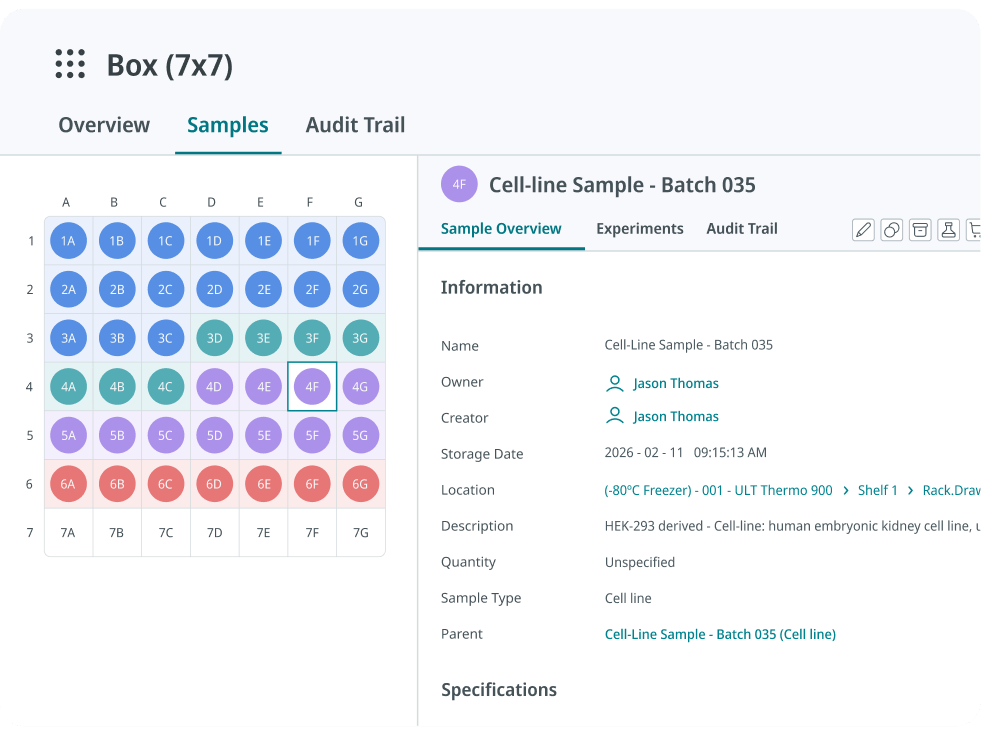
Barcode-Workflows ermöglichen es Ihren Wissenschaftlern beispielsweise, eine etikettierte Probe direkt in einen Experimentdatensatz einzuscannen. Dies eliminiert den manuellen Übertragungsschritt, bei dem häufig Fehler passieren. Batch-Proben-Workflows erweitern dies auf Umgebungen mit höherem Durchsatz, in denen das einzelne Erfassen von Proben nicht praktikabel ist. Konfigurierbare Probenansichten können relevante Felder (wie Menge und Lagerinformationen) direkt im experimentellen Kontext anzeigen, während der verknüpfte Probendatensatz Zugriff auf die vollständigen Metadaten, den Standort und die Historie bietet.
Food Brewer AG ist ein nützliches Beispiel dafür, wie dies in großem Maßstab aussieht. Das Unternehmen baute durchgängige Rückverfolgbarkeit über Zellkulturen, Geräte, Chemikalien und Verbrauchsmaterialien hinweg durch umfassende Barcodierung, während gleichzeitig das SDK von SciSure genutzt wird, um Schritte wie die Anlage von Experimenten, die Probengenerierung und Metadaten-Aktualisierungen zu automatisieren.
Durch die Kombination von strukturiertem Datenmanagement, Barcodierung, SDK-gestützter Automatisierung und integrierter Analytik konnte Food Brewer eine Produktivitätssteigerung von 60 % in der F&E und eine Steigerung von 40 % in der Upstream-Verarbeitung verzeichnen. Die Implementierung reduzierte zudem den manuellen Nachverfolgungsaufwand, stärkte die Rückverfolgbarkeit von Kulturen und Materialien und erleichterte das Onboarding sowie den Wissenstransfer. Lesen Sie die vollständige Erfolgsgeschichte der Food Brewer AG.
Was passiert, wenn Ihr ELN nicht vernetzt ist
Mangelnde Vernetzung äußert sich oft in Reibungsverlusten, die sich mit jedem kleinen Workaround summieren, bis die Verlässlichkeit der Aufzeichnungen selbst in Frage steht.
Manuelle Übertragungsfehler schleichen sich wieder ein.
Wenn ein Probenbereich nicht mit einem registrierten Datensatz verknüpft ist, greifen Ihre Wissenschaftler wieder auf die manuelle Eingabe von Proben-IDs oder Beschreibungen zurück – genau der fehleranfällige Schritt, den Barcode-Workflows und LIMS-Software eigentlich eliminieren sollen.
Dateien verlieren den Bezug zum Datensatz.
Geräteausgaben oder Rohdaten, die in einem freigegebenen Laufwerk landen, anstatt dem zugehörigen Experiment zugeordnet zu werden, müssen vom Prüfer mühsam nachverfolgt werden. Dabei müssen Dateinamen und Zeitstempel abgeglichen werden, um den Ursprung der Daten zu rekonstruieren.
Signaturen bieten weniger Sicherheit, als sie vermuten lassen.
Eine Signatur, die zwar den getippten Teil eines Datensatzes fixiert, verknüpfte Dateien oder importierte Daten jedoch bearbeitbar lässt, bietet eine schwächere Garantie, als es auf dem Papier scheint – was oft erst auffällt, wenn ein Auditor dies überprüft.
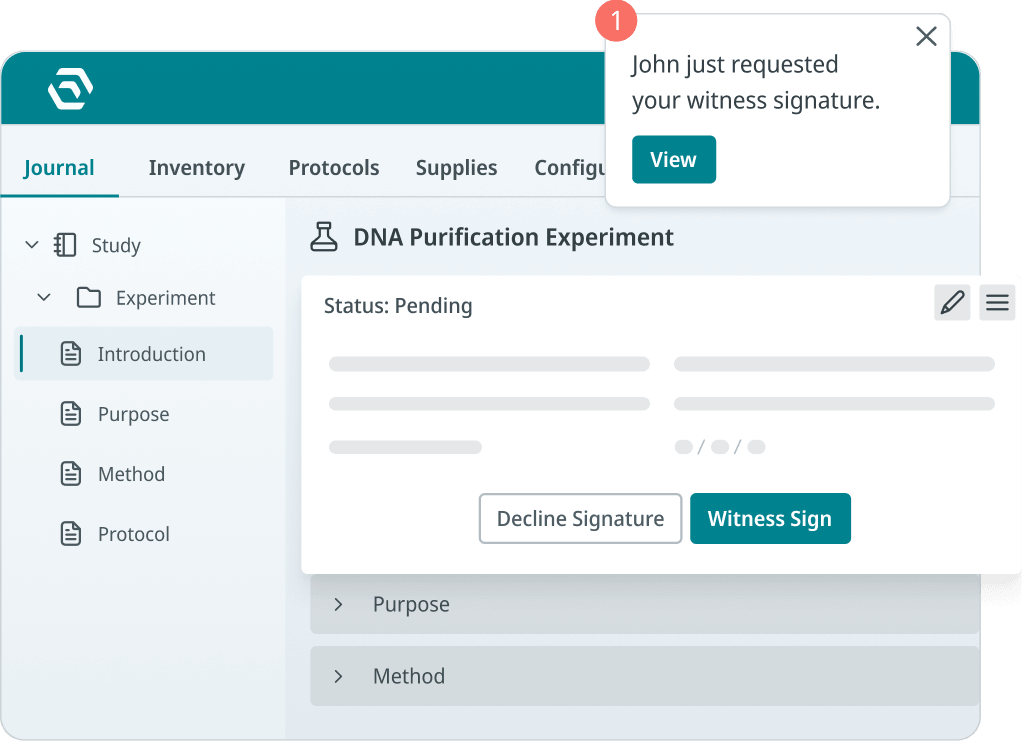
Die Prüfungsvorbereitung wird zum Wettlauf gegen die Zeit.
Ohne durchgängige Nachvollziehbarkeit bedeutet die Rekonstruktion der Vorgänge – wer hat was wann bearbeitet – das mühsame Zusammenführen von Daten aus verschiedenen Systemen in der Hoffnung, dass die Zeitstempel übereinstimmen.
Bestandsverwaltung und Beschaffung werden zum Blindflug.
Wenn Bestell- und Bestandsdaten außerhalb des ELN liegen, können Ihre Wissenschaftler innerhalb ihres Arbeitsbereichs nicht einsehen, was vorrätig oder bestellt ist. Das bremst sowohl das Experiment als auch den Nachbestellungsprozess aus.
Womit sollte ein integriertes ELN verbunden sein?
Proben und Inventar
Ein Experiment, das eine Probe nur namentlich oder per handschriftlichem Etikett referenziert, ist lediglich eine Notiz. Wenn Ihr ELN mit Proben- und Bestandsdaten verknüpft ist, verbindet sich das Experiment direkt mit dem tatsächlichen biologischen oder chemischen Material, dessen Lagerort, Restmenge und Historie. Ohne diese Verbindung bleibt Ihre Dokumentation rein abstrakt.
ERP, Beschaffung und Bestandsbestellung
Die Bestände an Reagenzien und Verbrauchsmaterialien sind selten statisch, und ein Engpass entscheidet oft darüber, ob ein Experiment planmäßig starten kann. Die Supplies-Funktionalität von SciSure unterstützt einen Produktkatalog, Bestandsschwellenwerte, gemeinsame Einkaufslisten, Nachbestellungen sowie die Verfolgung des Bestellstatus von der Anforderung bis zur Lieferung. Das integrierte Modul bietet keine direkte Schnittstelle zu externen Marktplatz-Websites. Verbindungen zu einem externen ERP-, Lieferanten- oder Beschaffungssystem sollten daher als kundenspezifische Integrationsarbeit betrachtet werden, wobei Methode, Implementierungsaufwand und Bereitstellungsanforderungen für das jeweilige System zu prüfen sind. Hier erfahren Sie mehr über die Funktionen von SciSure zur Bestandsverwaltung und Bestellung.

Protokolle und SOPs
Ihre Experimente finden nicht losgelöst von den geltenden Verfahren statt. Wenn Sie Protokolle und SOPs mit den entsprechenden Experimenten verknüpfen, kann Ihr Prüfer nachvollziehen, was aufgezeichnet wurde und welche Version des Verfahrens zu diesem Zeitpunkt gültig war. Nicht verknüpfte Protokolle überlassen diesen Kontext dem Gedächtnis oder einem separaten Dokument, das möglicherweise nicht mit dem tatsächlichen Ablauf übereinstimmt.
Lesen Sie unsere Leitfäden zur Digitalisierung von Laborprotokollen und zur Optimierung von Standardarbeitsanweisungen im Labor für einen tieferen Einblick.
Dateien und Gerätedaten
Rohdaten, die in einem Ordner außerhalb Ihres ELN liegen, sind vom zugehörigen Experiment entkoppelt. Ein vernetztes System hält diese Daten direkt mit dem entsprechenden Datensatz verbunden, sodass Ihr Prüfer nicht mühsam Dateinamen und Daten abgleichen muss, um den Ursprung nachzuvollziehen.
Berechtigungen und Identität
Wer auf einen Datensatz zugegriffen, ihn bearbeitet oder signiert hat, trägt maßgeblich zu dessen Glaubwürdigkeit bei. Wenn Identität und Berechtigungen direkt in die Verbindung integriert sind, bleibt diese Zuordnung als fester Bestandteil des Datensatzes erhalten.
Review- und Freigabeworkflows
Eine Signatur ist nur dann aussagekräftig, wenn sie den zugehörigen Datensatz unveränderbar macht. Vernetzte Review-Workflows machen die Freigabe zu einem nachvollziehbaren, zeitgestempelten Ereignis, das an eine spezifische Datenversion gebunden ist.
Analyse-, Statistik- und Projektmanagement-Tools
Sobald Experimentdaten strukturiert und vernetzt sind, lassen sie sich auch außerhalb des ELN nutzen. Über benutzerdefinierte Exportformate und die API können Statistik- oder Analysetools die Daten in der benötigten Struktur abrufen. Projektmanagement- und Kommunikationstools werden anders angebunden, etwa durch Trigger, automatisierte Benachrichtigungen und Webhook-Alerts, beispielsweise an Slack oder Teams. Ob ein bestimmtes Analyse- oder PM-Tool über einen Standard-Connector oder eine über das SDK erstellte Lösung angebunden wird, hängt vom jeweiligen Tool und Ihrem Bereitstellungsmodell ab.
Wie Datei-, Geräte- und Ausrüstungsdaten in das ELN gelangen
Externe Daten gelangen über verschiedene Wege in ein Experimentprotokoll. Es ist entscheidend zu wissen, welcher Weg für Ihren Anwendungsfall relevant ist, anstatt „Dateiintegration“ als ein einzelnes Feature zu betrachten.
Einseitiger Upload und lokale Dateibearbeitung
SciSure unterstützt zwei verschiedene Desktop-Datei-Workflows. eLabSync kann einen festgelegten Ordner auf einem lokalen Computer überwachen und neue Dateien automatisch in das ELN hochladen. Unabhängig davon ermöglicht eLabWebEdit es Forschenden, eine mit einem Experiment verknüpfte Datei in der zugehörigen Desktop-Anwendung zu öffnen und die bearbeitete Datei als neue Version innerhalb der ursprünglichen Dateihistorie direkt im ELN zu speichern.
Cloud-Dateiintegrationen
Cloud-Integrationen funktionieren nicht alle auf die gleiche Weise. Add-ons für Google Drive, Boxund Dropbox ermöglichen es Benutzern, Dateien aus diesen Diensten auszuwählen und an SciSure anzuhängen. Gehen Sie nicht davon aus, dass diese Verbindungen eine kontinuierliche bidirektionale Dateisynchronisierung bieten; das Dropbox-Add-on lädt beispielsweise eine separat nachverfolgte Kopie in das ELN hoch.
Ebenso unterstützt die Protocols.io -Integration eine bidirektionale Synchronisierung, wodurch Protokolle und deren Versionen zwischen SciSure und protocols.io abgeglichen bleiben.
Hybrid-Speicher für große Rohdatendateien
Für große Rohdatendateien eLabHybrid speichert die Dateien auf einem kundeneigenen Server, während das ELN in der Cloud gehostet wird. SciSure verwaltet die Verbindung, Informationen zur Dateiintegrität und die Versionshistorie, ohne dass der vollständige Datensatz in den Cloud-Speicher übertragen werden muss. Bei korrekter Konfiguration, Validierung und Steuerung für den beabsichtigten Verwendungszweck des Labors kann diese Architektur GxP- und 21 CFR Part 11-Workflows unterstützen.
Geräte- und Sensordaten
Die Elemental Machines-Integration verbindet unterstützte Sensoren mit SciSure, um Umgebungsmesswerte wie Temperatur, Luftfeuchtigkeit, Licht und Druck sowie Dauer und Ausmaß von Abweichungen zu erfassen. Wartung, Kalibrierung und Serviceplanung von Geräten werden über die separaten Geräteverwaltungsfunktionen von SciSure gesteuert. Die Integration erfordert eine Aktivierung und Konfiguration und ist keine standardmäßige Sensorfunktion.
Laborgeräteintegration in der Praxis
Robotik und vernetzte Krankenaktensysteme erhöhen den Einsatz weiter, da eine unterbrochene Verbindung hier den physischen Laborbetrieb zum Stillstand bringt.
Die Boston Universityzeigt mit ihrem internen COVID-19-Testlabor, wie dies unter realem betrieblichem Druck aussieht. Die Universität benötigte ein System, das zuverlässig mit ihren Testrobotern und zwei separaten elektronischen Patientenaktensystemen – eines für Studenten und eines für Mitarbeiter – integriert werden konnte, um Probenaufträge von den EMRs an das Labor zu senden und Ergebnisse zurückzuerhalten. Die APIs von SciSure verarbeiteten die von den Robotern generierten Dateien, und das Labor war innerhalb von zwei Monaten nach der Implementierung betriebsbereit. Die Integration verhinderte zudem, dass doppelte Barcodes in das System gelangten, als das Labor seine Kapazitäten erweiterte. Lesen Sie die vollständige Erfolgsgeschichte der Boston University.
Welche APIs, SDKs, Add-ons und privaten Workflows unterstützt werden können
Dokumentierte Konnektoren sind nur der Anfang. Unter dieser Ebene befindet sich ein API- und SDK-System, das die Funktionen eines ELN über die Standardkonfiguration hinaus erweitert. SciSures API und SDK unterstützen den programmatischen Datenaustausch, Workflow-Automatisierung, Geräte- und Lagerdatensätze, Dateioperationen sowie benutzerdefinierte ELN-Abschnittstypen. Die API kann Gerätedatensätze abrufen und den Gerätestatus aktualisieren, während das SDK die Benutzeroberfläche erweitern und organisationsspezifische Experimentabschnitte sowie Aktionen einführen kann.
Standard-ELN-Exporte sind in den Formaten PDF, HTML, XML und JSON verfügbar. Anpassbare CSV-Exporte für Probespalten sind ebenfalls über ein spezielles Add-on erhältlich, während APIs genutzt werden können, wenn ein nachgelagertes System einen programmatischen Datenzugriff erfordert. Excel-Experimentabschnitte werden über das Office Online Server-Add-on und die entsprechende Microsoft-Lizenzierung bereitgestellt; eine Backend-API-Unterstützung für das Hochladen von Excel-Abschnitten ist ebenfalls verfügbar. Teams sollten die erforderliche Kombination aus Endpunkt, Add-on, Lizenzierung und Hosting prüfen, bevor sie sich für einen bestimmten Workflow entscheiden.
Der SciSure Marketplace ist der Weg zu öffentlichen Add-ons, die für gängige Workflows entwickelt wurden und ohne individuelle Programmierung sofort aktiviert werden können. Für Anforderungen, die nicht durch ein öffentliches Marketplace-Add-on abgedeckt werden, unterstützt SciSure auch private Add-ons für organisationsspezifische Workflows. Die Entwicklung und Installation privater Add-ons ist in der Regel mit Private-Cloud- oder On-Premises-Bereitstellungen verbunden; Kunden der Shared Cloud sollten den verfügbaren Weg mit SciSure abklären. Bitte prüfen Sie den Marketplace und die Hosting-Optionen bevor Sie davon ausgehen, dass dieselbe Anpassung in jeder Umgebung verfügbar ist.

Die Erfahrung der Food Brewer AG zeigt, wie dies in der Praxis aussieht. Das Unternehmen nutzte das SDK von SciSure, um eine Automatisierung zu entwickeln, die die Erstellung von Experimenten und die Probengenerierung direkt auslöst und so manuelle, mehrstufige Prozesse überflüssig macht.
Das Spektrum vom Ein-Klick-Add-on bis hin zum vollständig maßgeschneiderten Konnektor ist das, was Marktplatz-Integrationen in der Praxis aussehen. Bevor Sie sich für einen Anbieter entscheiden, fragen Sie nach, welche Ihrer benötigten Integrationen in welche Kategorie fallen.
Was regulierte Teams über Signaturen, Audit-Trails, Validierung und Aufbewahrung wissen müssen
Integration erhöht die Anforderungen an die ELN-Datenintegrität, da ein Datensatz, der Informationen aus mehreren verbundenen Quellen bezieht, derselben Prüfung standhalten muss wie ein manuell eingegebener Datensatz. Wenn Sie in einem regulierten Umfeld arbeiten, sollten Sie hier gezielte Fragen stellen.
Sperrt die Signatur jeden Teil des Datensatzes, einschließlich der verknüpften Daten?
Eine Signatur sollte den Datensatz, auf den sie sich bezieht, sperren und einen bearbeitbaren Eintrag in einen fixierten, zuordenbaren Datensatz umwandeln. Zeugenfreigaben bieten eine zweite Ebene der Zuordnung für Schritte, die eine unabhängige Bestätigung erfordern. Fragen Sie nach, ob dieses Sperrverhalten auch dann gilt, wenn die Daten im Datensatz aus einem verbundenen System stammen. Eine Signatur, die getippte Notizen sperrt, aber verknüpfte Dateidaten bearbeitbar lässt, bietet eine schwächere Garantie, als es den Anschein hat.
Werden Aktionen, die im verbundenen System durchgeführt wurden, im SciSure-Audit-Trail angezeigt und was erfasst der Übergabedatensatz?
Automatische Audit-Trails sollten relevante Aktionen mit Zeitstempeln und Benutzerzuordnung erfassen. In einem integrierten Workflow sollte jedes System die Audit-Nachweise für die darin durchgeführten Aktionen bewahren, während die Integration die Übergabe klar dokumentieren sollte; zum Beispiel den Übertragungszeitpunkt, Quell- und Zielkennungen, das Dienstkonto, das Validierungsergebnis und etwaige Verarbeitungsfehler. Ihr Team sollte nicht davon ausgehen, dass Aktionen, die in einem externen System durchgeführt wurden, automatisch im SciSure-Audit-Trail erscheinen, es sei denn, die Integration wurde speziell dafür entwickelt, diese zu erfassen.
Bleiben verknüpfte Dateien und Probendatensätze für denselben Aufbewahrungszeitraum zugänglich wie der ELN-Datensatz selbst?
Aufbewahrungsanforderungen bestimmen, wie lange ein Datensatz nutzbar bleiben muss. Dies wirft eine praktische Frage für verbundene Daten auf: ob verknüpfte Dateien und Probendatensätze für denselben Zeitraum zugänglich bleiben oder ob sie von der eigenen Aufbewahrungsrichtlinie eines separaten Systems abhängen.
Was hat Ihr Labor validiert und was bleibt bei der Integration in Ihrer Verantwortung?
Die Validierung liegt in der Verantwortung Ihres Labors und ist an dessen spezifischen Verwendungszweck gebunden. Softwaredokumentationen können diesen Prozess unterstützen, aber kein Anbieter kann die Validierung für Sie durchführen. Rahmenwerke wie 21 CFR Part 11, GxP-Complianceund EU GMP Annex 11 sind nützliche Ausgangspunkte für die Bewertung eines Systems, aber der Kauf oder die Konfiguration von Software führt nicht automatisch zur Einhaltung dieser Vorgaben. Integration unterstützt einen konformen Workflow. Sie ersetzt jedoch nicht die Validierung, SOPs, Schulungen und Governance-Kontrollen, für die Sie weiterhin selbst verantwortlich sind.
Wo KI-Tools wie der KI-Protokoll-Generator ins Spiel kommen, gilt dieselbe Vorsicht: Übermitteln Sie keine sensiblen oder vertraulichen Informationen, da die KI-Engine außerhalb der SciSure-Umgebung arbeitet. KI-generierte Protokolle können zudem Ungenauigkeiten oder Verzerrungen enthalten und müssen vor der Verwendung immer überprüft und anhand vertrauenswürdiger Quellen validiert werden.
Fragen an ELN-Anbieter zur Integration
Alles bisher Besprochene lässt sich bei der Anbieterbewertung in einer kompakten, praxisorientierten Checkliste zusammenfassen. Forschungsteams, IT-Leiter und QA-Verantwortliche sollten mit diesen Fragen in das Gespräch gehen und konkrete Antworten erwarten – statt allgemeiner Beteuerungen zur Konnektivität.
Einige dieser Fragen prüfen die technischen Möglichkeiten der Plattform. Andere testen, wie sie sich unter regulatorischer Prüfung im laufenden Betrieb bewährt. Ein Anbieter, der beide Bereiche präzise und mit Details beantworten kann, ist ein stärkeres Indiz für Qualität als jede Feature-Liste.
Konnektivität und Datenverarbeitung
Compliance und Audit-Bereitschaft
Reihenfolge der Implementierung
Die Frage nach den empfohlenen Verbindungen für die ersten 90 Tage unterscheidet sich von den anderen, da es weniger um die technischen Fähigkeiten der Plattform geht, sondern darum, wie ein Anbieter einen echten Rollout strukturiert. Ein Anbieter mit einer klaren, spezifischen Antwort, der genau benennt, welche Verbindungen priorisiert und welche zurückgestellt werden sollten, hat diesen Prozess wahrscheinlich schon in anderen Laboren begleitet, und der ROI von Laborsoftware beginnt bei der Implementierung das aus gutem Grund. Eine vage Antwort oder der Versuch, alles auf den ersten Tag zu legen, sollte als Warnsignal gewertet werden, da dies oft bedeutet, dass der Anbieter nicht bedacht hat, wie sich die Komplexität der Integration während des Onboardings summiert.
Diese Frage lohnt sich auch bei Anbietern, die bei den vorherigen Punkten gut abgeschnitten haben. Eine Plattform, die technisch alles verbinden kann, ist nicht dasselbe wie eine Plattform mit einem fundierten Plan, was zuerst angebunden werden sollte.
Was zuerst verbinden: ein praktischer Ausgangspunkt für die ELN-Integration
Der Versuch, alles auf einmal zu verbinden, bevor das Team das System in der Praxis genutzt hat, verlangsamt die Implementierung meist. Ein phasenweiser Ansatz ist effektiver, sofern von Anfang an klar ist, was in welche Phase gehört.
- Sofort verbinden.
Probenbereiche und Barcode-Workflows, Protokolle und SOPs sowie Berechtigungen und Zugriffskontrollen bilden das Fundament. Diese Verbindungen sorgen dafür, dass das ELN vom ersten Tag an als Forschungsdokumentation fungiert. Werden sie aufgeschoben, werden frühe Experimente ohne die vom System vorgesehene Rückverfolgbarkeit dokumentiert. - Phasenweise einführen.
Cloud-Datei-Integrationen, Instrumenten-Daten-Konnektoren und API-basierte Automatisierungen können folgen, sobald der Kern-Workflow stabil ist. Diese bieten echten Mehrwert, lassen sich aber leichter korrekt konfigurieren, wenn sich die Arbeitsabläufe im Team bereits eingespielt haben. - Für später planen.
Hybridspeicher für große Dateien, maßgeschneiderte Add-ons und Validierungsdokumentationen für regulierte Arbeitsabläufe hängen oft von Entscheidungen ab, die erst durch echte Nutzungsdaten deutlich werden. Wer sie zu früh entwickelt, läuft Gefahr, auf Basis bloßer Annahmen zu planen.
Entscheidungen zur Abfolge von Arbeitsschritten wirken sich anders aus, sobald echte Daten und Teams im Spiel sind. Kaigenes Erfahrung verdeutlicht, wie wertvoll der Übergang von fragmentierter Dokumentation hin zu durchsuchbaren Experiment- und Inventaraufzeichnungen ist.
Vor SciSure verließ sich das Unternehmen auf Microsoft Office-Tools und physische Notizbücher; die doppelte Dokumentation konnte mehrere Stunden oder sogar einen ganzen Tag in Anspruch nehmen. Nach der Implementierung berichtete Kaigene von einer schnelleren Dokumentation, einem einfacheren Abruf früherer Ergebnisse, einer besseren Zusammenarbeit und einem effizienteren Bestandsmanagement. Lesen Sie die vollständige Erfolgsgeschichte von Kaigene.
Woran Sie erkennen, dass die Integration funktioniert
Ob sich eine Integration langfristig auszahlt oder nicht, hängt von einer Handvoll praktischer Kennzahlen ab, die vor und nach jeder Phase erfasst werden.
Wenn Sie diese vier Punkte vor der Einführung und einige Monate danach verfolgen, erhalten Sie eine konkrete, zahlenbasierte Antwort darauf, ob die Integration erfolgreich ist.
Die Entscheidung, die wichtiger ist als die Benutzeroberfläche
Die Benutzeroberfläche ist das Erste, was bei einer Demo auffällt. Was jedoch darüber entscheidet, ob ein ELN auch nach zwei Jahren noch überzeugt, ist die Anbindung an die Proben, Protokolle, Dateien, Geräte und Berechtigungen, mit denen Ihr Labor bereits arbeitet – und ob das System diese Verbindungen bei Bedarf auch nachweisen kann.
Nutzen Sie die Fragen in diesem Leitfaden als Checkliste bei der Anbieterauswahl: Was lässt sich nativ verbinden, was erfordert ein Add-on, was benötigt eine individuelle Entwicklung und wie plant der Anbieter die ersten 90 Tage? Ein Anbieter, der alle vier Punkte präzise beantwortet – mit konkreten Schnittstellen und einem realistischen Zeitplan –, ist ein Partner, auf dessen System Sie Ihre Forschungsdokumentation aufbauen können.
FAQ
Was ist eine elektronische Laborbuch-Integration?
ELN-Integration ist der Prozess, bei dem ein elektronisches Laborbuch mit anderen Systemen, Datenquellen und Arbeitsabläufen verknüpft wird, die Experimentaufzeichnungen erst wirklich wertvoll machen. Dazu gehören Proben, Protokolle, Dateien, Geräte, Identitätsmanagement und Compliance-Dokumentationen. Ohne diese Verbindungen existiert ein Experimenteintrag isoliert, was die Zuverlässigkeit bei späteren Abfragen, Überprüfungen oder Audits einschränkt. Erst durch die Integration wird aus einem reinen Notizwerkzeug eine vernetzte Forschungsdokumentation, auf die sich Teams wirklich verlassen können.
Worin unterscheidet sich die ELN-Integration von der LIMS-Integration?
Die ELN-LIMS-Integration umfasst eigentlich zwei miteinander verbundene Aspekte. Eine LIMS-Integration verknüpft Daten auf Probenebene mit operativen Arbeitsabläufen und verfolgt, wo sich Materialien befinden, wie viel davon noch vorhanden ist und wie ihre Historie im Labor aussieht. Eine ELN-Integration hingegen verbindet experimentelle Dokumentation und wissenschaftlichen Kontext – also die Aufzeichnung dessen, was getan wurde und warum. Wenn ELN und LIMS miteinander verbunden sind, beziehen sich Experimente auf dieselben Proben, die das LIMS bereits erfasst. Genau an diesem Punkt werden beide Systeme wertvoller, als sie es einzeln wären. Einen detaillierten Vergleich der beiden Systeme finden Sie in unserem Leitfaden zu ELN vs. LIMS.
Was sollte eine ELN-API unterstützen?
Eine nützliche ELN-API sollte sicheren und dokumentierten Zugriff auf die Datensätze und Aktionen bieten, die für die tatsächlichen Arbeitsabläufe im Labor erforderlich sind. Je nach Anwendungsfall kann dies Experimente, Proben, Projekte, Dateien, Geräte, Lagerbestandsdaten, Signaturen und Workflow-Trigger umfassen. Zudem sollte sie eine angemessene Authentifizierung, Token-Verwaltung, Fehlerbehandlung, Ratenbegrenzung sowie Rückverfolgbarkeit für automatisierte Aktionen unterstützen. Die API und das SDK von SciSure decken eine breite Palette dieser Arbeitsabläufe ab, doch sollten Teams während der Evaluierung die genauen Endpunkte, Berechtigungen, Softwareversionen und die Verfügbarkeit der Bereitstellung prüfen.
Können ELN-Integrationen bei 21 CFR Part 11 helfen?
Integrationen können die Compliance gemäß Part 11 entweder wahren oder gefährden, je nachdem, ob sie Audit-Trails, Zuordnungen, Signaturkontrollen und die Datenintegrität beim Datenaustausch zwischen Systemen aufrechterhalten. Der Erwerb einer integrierten Plattform unterstützt zwar einen konformen Arbeitsablauf, stellt die Compliance jedoch nicht von allein sicher. Regulierte Labore benötigen weiterhin eine Validierung für ihren spezifischen Verwendungszweck, dokumentierte SOPs, Personalschulungen und Governance-Kontrollen, die ein Anbieter nicht stellvertretend für das Labor übernehmen kann.
Was sollten Labore zuerst anbinden?
Beginnen Sie mit den Datensätzen und Kontrollen, die für die ersten Produktionsabläufe erforderlich sind: aktive Proben, kanonische Identifikatoren, aktuelle Protokolle, Berechtigungen, Dateianforderungen sowie Prüf- oder Signaturregeln. Barcode-, Geräte-, Cloud-Datei- und API-basierte Automatisierungen können anschließend schrittweise nach operativem Nutzen und technischer Bereitschaft eingeführt werden. Regulierte Teams sollten die Anforderungen an Validierung und Integrationstests vor dem Go-live definieren, während Entscheidungen zur Speicherung großer Dateien frühzeitig getroffen werden sollten, falls diese die Systemarchitektur beeinflussen.
Wenn das nach der Art von Labor klingt, das Sie aufbauen möchten, oder nach der Unterstützung, die Sie benötigen, nehmen Sie Kontakt mit uns auf. Wir zeigen Ihnen gerne, wie wir gemeinsam ein sichereres und besser vernetztes Labor aufbauen können.

Read more of our blogs about modern lab management
Discover the latest in lab operations, from sample management to AI innovations, designed to enhance efficiency and drive scientific breakthroughs.