The 5 Best Lab Management Software Tools for Research Labs in 2026: What Still Works When Your Lab Manager Leaves?
5 lab management software tools compared on one test: What still works for your lab when the lab manager or the safety contact leaves?

Download Whitepaper
TL;DR
Lab management software should make it easy for teams to find samples, manage inventory, maintain equipment, and access critical records, even when experienced staff leave. We compare five platforms to see how well they support these tasks, from everyday lab operations to safety management, especially when considering staff turnover.
- Each tool suits a different lab.
SciSure fits multi-lab research organizations that want the notebook, samples, equipment and lab safety in one place. Benchling fits molecular biology teams. Labguru fits growing biotech teams. SciNote fits teams starting with structured documentation, and LabArchives fits academic labs already using its notebook.
- Mobile and freezer search split the field.
Only SciSure and Labguru have a mobile app for checking samples at the freezer. SciSure, Labguru and LabArchives likewise let a new lab manager find free freezer space across boxes without asking anyone. These are the small, daily tasks that usually live in one person's head.
- Lab safety rarely sits with lab operations.
SciSure is the only tool here that covers safety training, inspections and safety data sheets (SDS), through SciSure Health & Safety. The other four leave safety to separate systems, so when the safety contact leaves, their records often stay scattered across spreadsheets and inboxes.
- Run a handover drill before you buy.
During your pilot, ask someone who isn't the lab manager to find a sample, find free freezer space, check what's about to expire, and pull up an equipment service record. If they can do all four without help, the knowledge lives in the system, not in one person.
Ready to see SciSure in action?
No commitment · Free consultation
What happens when your lab manager leaves?
Let's say your lab manager hands in their notice; two weeks later, a postdoc needs the last aliquot of a cell line and can't find the box. Or the -80 °C freezer alarm goes off twice, and nobody knows who services it. None of this was written down anywhere, because it never had to be.
That is the real test of lab management software. Most tools look good in a demo with the person who sets them up sitting next to you. The harder question is how much of your lab's knowledge is still there when that person is gone. As Lab Manager put it in a piece on turnover costs, the lab "loses everything the person knew and was working on".
This guide compares five lab management software tools on that single question: SciSure, Benchling, Labguru, SciNote and LabArchives. We scored each one on ten practical questions a new lab manager would ask in their first week, from "Where is this sample?" to "Who still needs safety training?"
If you're looking for broader advice on documenting procedures and sharing knowledge in the lab, start with our guide to managing turnover in the lab. This post is about the software side.
Who this guide is for
This guide is for lab managers, lab operations leads, principal investigators (PIs), and research IT teams in academic and commercial research labs. It's most useful if your lab has lived through a handover that went badly, or if one person currently holds the keys to your samples, stock, and equipment.
It's also useful if you're replacing spreadsheets, a freezer map on the wall, or a notebook tool that never connects to your inventory. A move to new software is the best moment to get knowledge out of people's heads and into a shared system.
How we compared these lab management tools: The handover test
We built the comparison around four moments that happen when someone leaves a lab. For each one, we asked what their replacement would need to do on day one without calling them.
- Can anyone find things?
Mobile access at the freezer, exact box positions, and free space across freezers.
- Does the lab keep running?
Automatic expiry and low-stock alerts, reagent and consumable tracking, automations a lab manager can set up without writing code, and equipment maintenance records.
- Is everything in one place?
Whether sample management and protocol calculations live in the same product as the notebook, or in a separate one.
- What happens when the safety contact leaves?
Whether the tool covers safety training, inspections, and safety data sheets (SDS).
We checked every answer against each vendor's public product pages, help centers, release notes, and pricing pages. The comparison reflects what we could confirm as of November 2026.
How we scored each answer
- ✓ means the feature is included and publicly documented.
- ✗ means that the feature is confirmed as unavailable
- Add-on means it costs extra or needs a higher plan.
- Separate product means it's sold as its own product.
- Preset only means built-in options you can switch on or off but not configure to your organization’s unique needs.
What we didn't measure
This comparison doesn't score price, ease of use, or validation for regulated (GxP) work. For ease of use and time to return on investment (ROI), see our comparison of the best electronic lab notebooks (ELNs). Features also change, and some sit behind plans we couldn't see, so treat this as a snapshot and confirm the details with each vendor.
The best lab management software for research labs in 2026, scored on the handover test
SciSure's lab safety coverage comes from SciSure Health & Safety, which is sold alongside SciSure's notebook and inventory tools in the US.
The right tool depends on your lab's size, your research, and who holds the most knowledge today. Here's where each one works best.
SciSure: Best for research organizations that want lab operations and lab safety in one place
SciSure is built for labs where knowledge of samples, stock and equipment can sit in a shared system, instead of depending on one or two people to remember it all. It combines an electronic lab notebook (ELN), a laboratory information management system (LIMS) for samples and inventory, equipment records, and lab safety.
A new lab manager can find things on day one
With SciSure, every sample has an exact position in a storage unit, from freezer to shelf, rack, box, slot, and more. Authorized team members can search across storage for free positions instead of opening freezer doors. The SciSure mobile app for Android and iOS lets people scan a sample, box, storage unit or piece of equipment and see where it belongs, move it, or check it in and out.
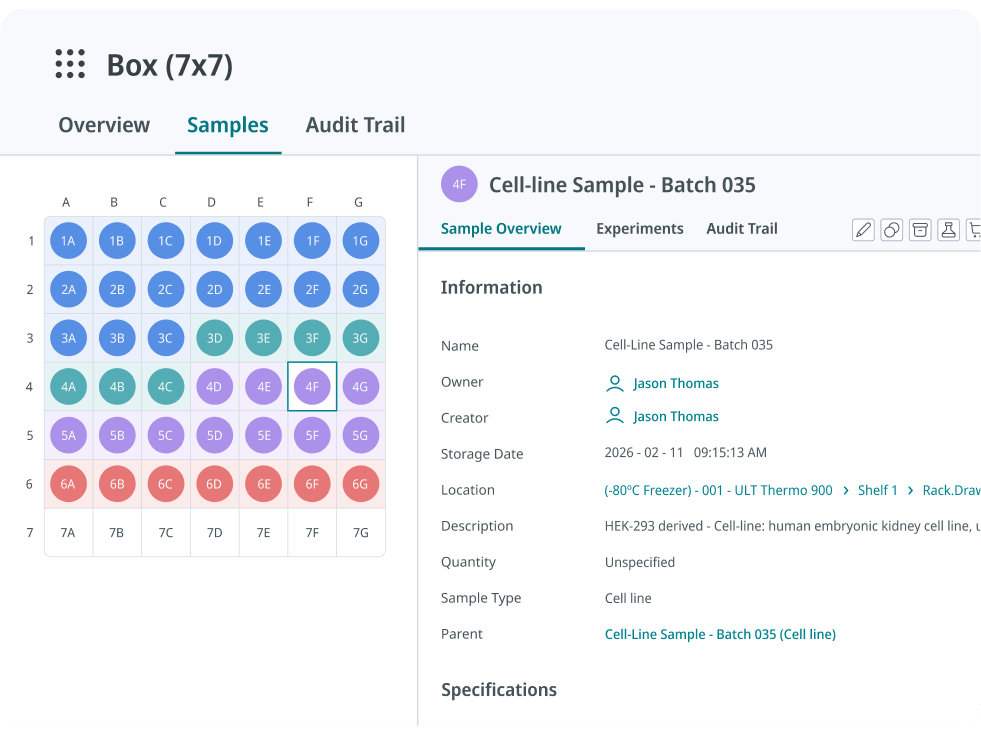
Each sample maintains a traceable history, which includes parent and child samples, associated experiments, who changed what and when. This helps teams understand how materials were created, used, and managed over time. When a lab manager or researcher leaves, their samples can be reassigned to a new owner instead of becoming orphaned rows in a spreadsheet.
The routine jobs keep running without one person remembering them
Quantity thresholds can notify the owner, add a linked product to the shopping list, or both. Expiry dates drive warnings, searches and reminders. Lab managers can build their own automations with a simple "trigger, condition, action" setup, such as "30 days before this reagent expires, email the team and create a task", without writing code.
Equipment records likewise hold the manual, specifications, validation schedule, booking calendar, and service status. So, the person who knew the centrifuge was due for service doesn't need to be there for the next one to find out.

Protocols keep the calculations, not just the steps
SciSure protocols can include dynamic fields and formulas that adjust quantities from user input. The calculation that someone used to do on the back of an envelope becomes part of a versioned protocol that the next person inserts straight into their experiment.
What this looks like in practice
Food Brewer, a cultivated cocoa company in Switzerland, set up SciSure with standard naming and a clear folder structure from the start, so new hires could find information quickly. The team barcoded cell cultures, equipment, chemicals, and consumables, with automated threshold alerts on inventory levels.
As a result, the team reported faster onboarding and knowledge transfer. With some help from the SciSure software development kit (SDK), they were able to automate repetitive steps, while also reporting productivity gains of 60% in R&D and 40% in upstream processing.
Benchling: Built for molecular biology teams that want notebook, registry, and inventory together
Benchling is an R&D cloud built around molecular biology. Inventory is one of several applications on the platform, alongside the notebook and registry, and Benchling positions it mainly around linking samples to their sequences, lineage and experimental results. It covers box positions and replenishment alerts, and the notebook has protocol calculations built in.
For a handover, the gaps are on the operations side. Benchling has no native mobile app for checking samples at the freezer. Free space is shown per box, but searching for free positions across boxes needs the API, which means code. Automation is sold as a separate product, Benchling Automation, aimed at instrument workflows.
One thing to confirm during evaluation: if your lab manager also handles equipment, stock and freezer space, ask how those tasks will run without extra tools or a developer.
For a closer look, see our guide to the best Benchling alternatives.
Labguru: Built for growing biotech teams that want a mobile-friendly inventory
Labguru's strength lies in day-to-day lab operations. Its mobile app tracks sample location, usage, and ownership. It shows exact box positions and supports searching for free positions. Expiry and low-stock alerts run automatically, and equipment records can live in the system.
Watch out: Labguru's dedicated sample management tool, Mosaic, is sold as a separate product. No-code automations and protocol calculations are add-ons, and some automations can still need code. Labguru also doesn't cover lab safety.
One thing to confirm during evaluation: list the features your lab manager uses every week, then ask which ones are in your plan, and which cost extra.
Check out our detailed comparison of SciSure to Labguru for more details.
SciNote: Built for small teams starting with structured documentation
SciNote is a notebook-first tool with inventories built in. You can track reagents, samples and equipment in the same product as your experiments, and its tables can run basic calculations inside protocol steps and results.
Much of the handover-critical inventory work sits in paid add-ons:
- Storage locations, with box grids, are a paid inventory add-on.
- Low-stock and expiry reminders come with the Stock Management add-on.
- Equipment scheduling, which covers maintenance and calibration events, is on the Professional and Platinum plans.
The SciNote mobile app focuses on tasks and protocols rather than inventory. Workspace automations update task, experiment and project statuses; owners can switch them on or off but can't build their own.
One thing to confirm during evaluation: price SciNote with the add-ons your lab manager would actually need, not the base plan.
LabArchives: Built for academic labs already using LabArchives Notebook
LabArchives is widely available at many universities, and its inventory tool covers a lot of a lab manager's routine. Freezer boxes show exact positions, and the Freezer Capacity Report lists open capacity across every freezer box. Lab managers can set low-stock and expiry notifications by email. The notebook also includes calculator widgets for routine calculations.
The handover gaps come from how the tools are split. LabArchives Inventory is sold on its own or bundled with the notebook, and equipment booking runs in LabArchives Scheduler, a separate product. There's no inventory mobile app: you scan QR codes through the phone's browser. Automations are limited to notifications. Items can hold safety sheets, but training and inspections sit elsewhere.
One thing to confirm during evaluation: if you already use LabArchives Notebook, check whether your license includes Inventory and Scheduler, and how records connect across the three.
What happens when the lab's safety contact leaves?
In many labs, the lab manager or a senior researcher is also the person who knows the safety side: which chemicals are in which cabinet, where the safety data sheets are, who still needs training, and which inspection finding was never closed. When they leave, that knowledge goes too, and it rarely shows up in a research tool.
This is the row where SciSure stands apart from the other four tools. Benchling, Labguru, SciNote and LabArchives can hold chemicals as inventory items, and LabArchives items can carry safety sheets. None of them cover safety training or inspections. Those usually live in a separate safety system, a shared drive, or one person's inbox.
In the US, the OSHA Laboratory Standard expects labs to keep a chemical hygiene plan and to train employees on the hazards in their work area. That's hard to keep up when the records walk out with the person who kept them. Our post on the costs of losing an EHS team member looks at this from the safety team's side.
How SciSure Health & Safety covers the handover
With SciSure Health & Safety, the safety records sit next to the people, labs and rooms they belong to:
- Chemical inventory at container level, with barcode or RFID tracking and safety data sheets matched to each container automatically.
- Training assigned by the hazards and activities each person works with, with renewal dates and overdue status.
- Inspections with findings, photos, corrective actions, and follow-up correspondence stored on the record.
- Door signs generated from each room's current hazards, contacts, and protective equipment.
- Incident and near-miss reports routed to the people who investigate them.
SmartLabs, which provides flexible lab space for biopharma companies, uses SciSure Health & Safety for chemical inventory, safety data sheets, inspections, equipment, biological registration and medical surveillance. Before SciSure, its chemical inventory and inspection systems were separate and not linked. Now a chemical inventory report that used to take half an hour takes about a minute, and the team uses SciSure to standardize safety practices across its sites.
How to choose lab management software that survives a handover
The best way to test a tool is to run a handover drill during your pilot. Ask someone who isn't your lab manager, such as a new PhD student or a technician from another group, to work through these tasks on their own. Note where they get stuck and who they have to ask.
- Find a sample from scratch
Can they find a specific aliquot, its exact box position and its parent sample, starting from just its name? Can they do it on a phone standing at the freezer? - Find space for new samples
Can they find free positions across all your freezers without opening doors or checking a wall chart? - Check what's running low or about to expire
Do alerts reach a shared list or a team, or only the person who sets them up? If that person left tomorrow, who would get the next low-stock email? - Pull up an equipment record
Can they find the manual, the last service date, and the next one due? Can they see who to call when it breaks? - Repeat a protocol, calculations included
Can they run a protocol with its calculations built in, without hunting for the spreadsheet someone used to keep on their desktop? - Reassign someone's records
When a person leaves, can an admin move their samples, experiments and tasks to someone else in a few clicks? Does the history stay intact? - Check who still needs safety training
Can they see which lab members are due for training, which inspection findings are still open, and where the safety data sheets are? - Count what each answer costs
For every task they could do, check whether it's in your plan, an add-on, or a separate product. A tool that passes the drill on its top plan may not pass it on yours.
FAQs
What is lab management software?
Lab management software is a shared system for running a lab's day-to-day operations: samples and storage, reagents and consumables, equipment, protocols and, in some tools, lab safety. It often connects to or includes an electronic lab notebook (ELN) for experiment records. The goal is that the lab runs on shared records instead of on what individual people remember.
What is the best lab management software for research labs in 2026?
Of the five tools compared here, SciSure is the only one that covers samples, stock, equipment, and lab safety in one place. Labguru came closest on day-to-day lab operations, and LabArchives is an option for academic labs already using its notebook. Run your own handover drill before you decide. Your software of choice will depend on how much your lab relies on a dedicated team to keep things running. If losing your lab manager would leave nobody who knows where samples are or when equipment is due for service, look for a tool that keeps that knowledge in shared records.
What's the difference between lab management software, an ELN and a LIMS?
An ELN records experiments: what was planned, done and found. A laboratory information management system (LIMS) tracks samples, storage, and their history. Lab management software is a broader term that usually covers samples, inventory, equipment and lab workflows, and sometimes includes the ELN too. SciSure combines all three, so experiments link directly to the samples and equipment they used.
How do you stop lab knowledge from leaving when people leave?
Write down the routine, then put it in a system everyone uses. Standard naming, shared protocols, alerts that go to a team rather than one inbox, and records that can be reassigned all help.
Does lab management software need to cover lab safety?
Not always, but it helps when the same people run both. In many research labs, the lab manager is also the safety contact. If your safety records live in a separate system or a spreadsheet, check that someone else can find training status, open inspection findings and safety data sheets without asking. SciSure Health & Safety covers these in the US.
What should academic labs look for in lab management software?
Academic labs see constant turnover as students graduate, and postdocs move on. Look for records that a new lab member can understand without the person who created them, easy reassignment of samples and experiments, and permissions that let PIs keep their independence. Funders are also asking for better records: the NIH Data Management and Sharing Policy ask NIH-funded researchers to plan how data will be managed and shared, and the FAIR Principles push for data that is findable, accessible, interoperable and reusable.
How does SciSure help labs keep knowledge when people leave?
With SciSure, samples, storage, stock, equipment records and protocols sit in one system, linked to the experiments that used them. Alerts and automations run on the records rather than on someone's memory, and records can be reassigned when a person leaves. SciSure Health & Safety adds chemical inventory, training, inspections and door signs, so the safety side of a handover is covered too.
Choose the tool your next lab manager can use without the last one
Every lab loses people. Students graduate, postdocs move on, and lab managers get promoted. The lab management software you choose decides how much of what they know stays behind. Test each tool with the person least likely to know the answers and count what each answer costs.
See how SciSure keeps samples, stock, equipment and safety records in one place for research labs that want to stay on track when people move on.
Learn more
- How to Implement an Electronic Lab Notebook (ELN) in an Existing Lab Without Slowing Research
- Best Sample Management and Tracking Software For Labs: 5 Platforms for Research Groups and Enterprise Organizations
- How To Choose ELN Software for Academic Labs: What To Consider Before Investing
- What Makes a LIMS User-Friendly for R&D Labs?
- ELN Software Advantages: Who Gets The Most Out of an ELN?

Read more of our blogs about modern lab management
Discover the latest in lab operations, from sample management to AI innovations, designed to enhance efficiency and drive scientific breakthroughs.