How to Migrate a Freezer Inventory from Spreadsheets in 9 Steps
Learn how to migrate your lab's freezer inventory from spreadsheets, from required fields and duplicate cleanup to pilot imports and reconciliation.

Download Whitepaper
TL;DR
To migrate a lab sample inventory from spreadsheets, set your required fields, clean up duplicates, confirm who owns every sample, map your freezers position by position, run a pilot import on one freezer, then reconcile the records against what's physically in storage before you retire the spreadsheet.
- Start with required fields.
Agree on the minimum every sample record must have before anything moves: a unique ID, sample type, owner, full storage location down to box position, date, quantity, and status. With SciSure, sample types can enforce these fields so gaps get caught at import instead of months later.
- Clean and claim first.
Duplicate rows, clashing box positions, and samples owned by people who've left are the main sources of a messy migration. Replace "discard anything unclaimed after a month" with a review-and-approval step that checks consent, agreements, and retention rules before anything is thrown out.
- Map, then pilot.
Mirror your physical storage in the system (freezer, shelf, rack, box, position) and test the import on one freezer or rack. The pilot shows where your spreadsheet breaks, so you fix the template once instead of cleaning up thousands of records later.
- Reconcile before cutover.
After each import wave, compare counts per box, spot-check freezers physically, clear any samples without a valid location, and have owners confirm their records. Only then set the spreadsheet to read-only.
Originally published in 2024, this 2026 update reframes the guide around spreadsheet migration, SciSure's review process, reconciliation steps, and updated social proof from Euroimmun US.
Ready to see SciSure in action?
No commitment · Free consultation
Why freezer inventory is the last thing labs digitize
Most labs move their experiment notes into an electronic system long before they touch the freezers. The freezer inventory is the bigger job: thousands of boxes, a master spreadsheet that three people edit, half-labeled tubes from students who graduated years ago, and nobody with a spare month to sort it out.
A while back I walked through a biotech lab with 14 full freezers, roughly 80,000 samples in each and about 1.1 million in total. Many of the people who created those samples had left the company, so the lab manager was emailing former colleagues to ask what was in the boxes and whether any of it still mattered. Once the inventory was sorted, the team decided about a third of the collection could go: roughly 373,000 samples and the equivalent of 4.6 freezers. They didn't need new freezers. They needed to know what they had.
That kind of cleanup is worth doing, but it has to be done carefully. Some samples can't be replaced, and some come with consent, agreement, or retention conditions that a quick deadline won't catch. The ownership step below replaces that rule.
The good news is that you don't have to plan the migration alone. With SciSure, our Customer Success team works with you on data migration as part of implementation, from shaping your spreadsheet into an import-ready format to checking the first test import. SciSure's LIMS (Laboratory Information Management System) capabilities are built for exactly this kind of inventory: the cell lines, tissue, DNA, proteins, compounds, and other research samples your experiments use, create, and store for later.
This guide is for lab managers, research operations leads, PIs (principal investigators), and core facility staff at universities, biotechs, and pharma R&D sites who are moving a legacy inventory out of spreadsheets.
Step 1: Gather every source of inventory data
Before you design anything, find out where your inventory actually lives. It's rarely one file. Look for:
- The master spreadsheet, plus any personal copies and old versions
- Freezer maps and box logs taped to freezer doors
- Exports from older software or a previous LIMS
- Paper notebooks with sample lists
- The people who "just know" where things are
Pull everything into one working folder and name a migration lead. One person should own the timeline, the decisions, and the final sign-off, with a small group of researchers, a lab manager, and someone from IT or research computing supporting them.
Step 2: Define your required fields
This is the step that makes or breaks the migration. If you import records that are missing an owner or a position, you've moved the mess into a new system.
Agree on the minimum every sample record must have:
Then add type-specific fields where they matter: passage number for cell lines, concentration for DNA and protein, a parent sample for aliquots, a consent or material transfer agreement (MTA) reference for human-derived material, and expiration dates for compounds.
In SciSure, each sample type works as a reusable template. You can mark fields as required, use dropdowns instead of free text, add validation and automatic numbering, and show extra fields only when they apply. That structure is what stops the next spreadsheet from forming inside your new system.
Step 3: Clean up duplicates before you import
Spreadsheets collect duplicates quietly. The usual suspects:
- The same sample in two tabs, often with slightly different names or dates
- Two tubes claiming the same box position, which usually means one record is wrong
- Aliquots logged as unrelated samples with no link back to the parent
- Inconsistent formatting such as "HEK 293", "HEK293", and "hek-293", or dates in three formats
Sort by location first to catch position clashes, then standardize names, units, and date formats. Where you find true duplicates, merge them and keep a note of what you merged. Don't delete aliquots that look like duplicates; record them as children of the parent sample instead. SciSure tracks parent-child relationships, so lineage stays visible after the move.
Step 4: Confirm ownership with a review-and-approval process
Every sample needs an accountable owner before it moves. Samples without one are where the hardest decisions sit, so give them a proper process instead of a deadline.
- Build an unclaimed list.
After your first pass, list every sample with no owner, an owner who has left, or contents nobody recognizes. - Share it with PIs and group leads.
Give them a clear response window. The window is for review, not automatic disposal. - Check for restrictions before deciding.
Human-derived material may carry consent terms. Some samples are covered by MTAs, ethics approvals, biosafety registrations, publication or IP (intellectual property) holds, or retention rules. - Decide one of four outcomes.
Kkeep and reassign, keep on hold for further review, transfer to another group, or dispose. - Get sign-off for disposal.
This should be from the PI or lab head, plus biosafety or EHS (environmental health and safety) where your institution requires it. - Record the decision first, then act.
Update the record, then dispose following your institution's waste and biosafety procedures.
If your organization manages a formal collection, the ISBER Best Practices for Repositories from the International Society for Biological and Environmental Repositories are a useful reference for writing your retention and disposal policy.
Step 5: Map your storage the way it physically exists
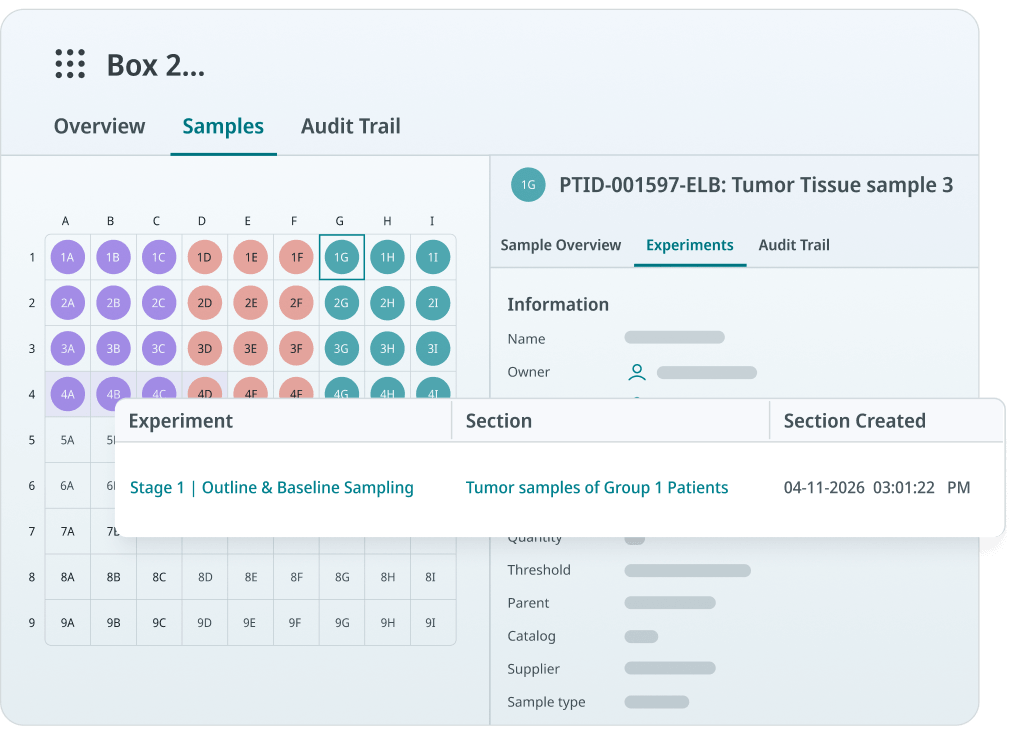
Your digital storage structure should match what someone sees when they open the freezer door. Walk the freezers and write down the hierarchy for each unit: building and room, freezer or liquid nitrogen tank, shelf, rack, box, and position.
A few rules make the import much easier:
- Use one naming convention for every freezer and rack, and label the physical units to match
- Number box positions consistently (A1 to I9, or 1 to 81) and convert them to numbers if your import needs it
- Flag shared or core-facility freezers early, since several groups will need access
- Note any unit that's due to be retired, so you don't map it twice
SciSure models freezers, refrigerators, liquid nitrogen storage, and cabinets as storage units with layers of shelves, racks, and boxes. You can build a template once, create compartments in bulk, and reserve boxes so nobody else fills a space you're still migrating into.
Step 6: Run a pilot import on one freezer or rack
Pick one freezer or rack that represents your typical mess: a few sample types, some old records, a couple of departed owners. Then:
- Build the import file for that unit, one file per sample type
- Import it and check the records in the system: counts, positions, owners, and field formats
- Open the freezer and spot-check a handful of boxes against the new records
- Fix the template and your cleanup rules based on what broke
Expect the pilot to surface problems you didn't plan for. That's the point. It's much cheaper to fix a template after 300 records than after 30,000. Write down what you learned; it becomes the SOP (standard operating procedure) for every wave after this one.
Step 7: Import in waves and set a cutover date
Once the pilot works, move the rest in waves: one freezer, one group, or one sample type at a time. Prioritize active projects, irreplaceable materials, and shared freezers first.
For each wave, set a cutover date. From that day, the spreadsheet for that freezer is read-only and new samples go straight into SciSure. Running both in parallel for more than a few days is how records drift apart again.
Step 8: Reconcile after every import
Reconciliation is what makes people trust the new system. After each wave:
- Compare counts per box and per freezer between the source file and the imported records
- Clear the unspecified-location list so every sample has a real position
- Spot-check physically by opening a set number of boxes per freezer and matching them to the records
- Ask owners to confirm their own samples; they'll spot errors faster than anyone
- Fix in bulk with SciSure's Sample Batch Update instead of editing records one by one
When the numbers match and owners have signed off, archive the spreadsheet as a read-only file. Keep it for reference, but stop using it.
Step 9: Keep the inventory accurate after go-live
A migration only pays off if the data stays right. Print barcode labels as you handle boxes, and use the SciSure mobile app to scan samples, check them in and out, and update locations at the freezer. Link samples to the experiments that use or create them so their history builds itself. Schedule a short audit of one freezer each quarter.
Also mark the milestones. Scientists rarely stop to notice progress, and a migration is a long, unglamorous project. When the first freezer is done, say so. Thank the people who did the work.
What SciSure is built for best
SciSure is strongest at tracking precious research materials in cold storage: samples used in experiments, samples created during experiments, and samples stored for future work. That covers cell lines, tissue, DNA, proteins, compounds, and similar materials across universities, biotech, and pharma research labs.
Some labs also track reagents and consumables in SciSure, and that works well alongside sample tracking. If your main problem is purchasing, supplier management, and stock replenishment, a dedicated procurement tool will likely serve you better.
How Euroimmun US moved sample management off spreadsheets
Euroimmun US, part of Revvity, supports teams across Scientific Affairs, Quality Control, Sales, and Technical Support. Before SciSure, its Technical Operations team managed samples with Excel and staff memory. As sample volumes grew, the status of a single sample could be spread across several versions of the same file, which made the inventory hard to trust.
After moving to SciSure, the team improved how samples were organized and retrieved, which:
- Reduced the chance of pulling the wrong sample,
- Cut unnecessary freeze-thaw cycles,
- Reduced the energy drawn by cold storage from faster retrieval (which meant freezer doors stayed open for less time)
- Enabled them to stay lean while handling sample requests for the whole organization, with search and filter becoming the most-used feature by staff.
Kiprian Gernat, Internal Application Scientist, says the platform has "dramatically reduced the time and resources required for all sample-related activities."
FAQs
How long does it take to migrate a freezer inventory from spreadsheets?
It depends on the number of samples, how many sources you have, and how clean the data is. Cleanup and ownership checks usually take longer than the import itself. A pilot on one freezer gives you a realistic estimate for the rest.
Do we need to clean our data before importing?
Yes. At minimum, fill your required fields, resolve duplicates and position clashes, and confirm owners. Importing unclean data moves the problem into a new system and makes it harder to fix.
What should we do with samples nobody claims?
Put them through a review-and-approval process. Share the list with PIs, check for consent, MTA, ethics, biosafety, and retention conditions, and get sign-off before disposal. A fixed "discard after a month" rule risks losing material that can't be replaced.
Can we import samples that belong to people who've left?
Yes. In SciSure, imports can reference former users' accounts so the original creator stays on record. You can then reassign those samples to an active owner or archive them.
Does SciSure help with data migration?
Yes. SciSure's onboarding and Customer Success teams support structured data migration from spreadsheets, older systems, and paper records. The exact scope depends on your deployment and plan, so ask about it during evaluation.
Can we track reagents and consumables in SciSure too?
Yes, alongside your samples. SciSure is strongest at tracking research samples in cold storage; if purchasing and stock replenishment are your main needs, consider pairing it with a procurement tool.
Should we barcode samples before or after the migration?
Do both where it makes sense. Existing barcodes can be imported as long as each one is unique. For unlabeled material, generate IDs during migration and print labels as you handle each box.
If this sounds like the kind of migration support you need, get in touch with us. We'll walk you through how we'll digitize your lab, one sample at a time, with ongoing support long after setup.
Keep reading

Read more of our blogs about modern lab management
Discover the latest in lab operations, from sample management to AI innovations, designed to enhance efficiency and drive scientific breakthroughs.