Wechsel von einem anderen ELN: Eine praxisorientierte Migrationsstrategie für Forschungslabore

So gelingt der Umstieg von einem alten ELN, Papier-Laborjournalen, Tabellenkalkulationen oder einer Mischlösung aus ELN und LIMS: Mit einem Migrationsplan, der historische Daten schützt, die Rückverfolgbarkeit von Proben sicherstellt und die Einführung des neuen Systems beschleunigt.

July 2, 2026
()
min read
A laboratory

Download Whitepaper

By submitting this form, you agree with our Privacy Policy.
Thank you! Download the file by clicking below:
Download
Oops! Something went wrong while submitting the form.

Table of Contents

Thank you! Your submission has been received!
Oops! Something went wrong while submitting the form.

Table of Contents

TL;DR

Der Wechsel von einem bestehenden ELN gelingt am besten, wenn der wissenschaftliche Kontext gewahrt bleibt, nur für die aktive Arbeit relevante Daten migriert werden und die Datenintegrität vor dem Go-live validiert wird – damit Teams dem neuen System vom ersten Tag an vertrauen können.

  • Analysieren Sie zuerst alles.
    Erfassen Sie Experimente, Proben, Protokolle, Anhänge, Benutzer, Berechtigungen, Integrationen und Papier-Laborjournale, bevor Sie ein altes ELN hinter sich lassen. Berücksichtigen Sie auch Arbeiten außerhalb des Systems, wie Excel-Tabellen, OneNote, Netzlaufwerke, E-Mail-Freigaben, Gefrierschrank-Pläne und Instrumenten-PCs. Diese versteckten Abhängigkeiten enthalten oft wichtige Informationen zu Probenherkunft, Zuständigkeiten und Kontext, die bei der Migration erhalten bleiben müssen.
  • Migrieren Sie mit System.
    Unterteilen Sie Inhalte in drei Kategorien: strukturierte Migration für aktive Studien und durchsuchbare Probendatensätze, schreibgeschützte Archive für historische signierte Aufzeichnungen und alte Laborjournale sowie neu erstellte Vorlagen für wiederkehrende Arbeitsabläufe. Priorisieren Sie aktuelle Protokolle, laufende Studien, Lagerorte, wichtige Anhänge und Freigabeprozesse, die in den ersten 30 bis 90 Tagen benötigt werden.
  • Schützen Sie die Datenintegrität.
    Stellen Sie sicher, dass migrierte Datensätze vollständig, korrekt, zuordenbar, lesbar, rückverfolgbar und abrufbar sind. Gleichen Sie Datensatzanzahlen, Proben-IDs, Aliase, Lagerorte, Signaturen, Zeitstempel, Audit-Trails, verknüpfte Dateien und Freigabehistorien ab. Richten Sie in regulierten Umgebungen Validierungs- und Transferprüfungen an 21 CFR Part 11, den FDA-Leitlinien zur Datenintegrität, den MHRA GxP-Richtlinien und dem EU GMP Annex 11 aus.
  • Schaffen Sie vernetzte Arbeitsabläufe.
    Definieren Sie kanonische Proben-IDs, Metadaten, Lagerpläne, Herkunftsregeln, Protokollvorlagen, Dateiverwaltung, Berechtigungen und Prüfprozesse, bevor die Konfiguration beginnt. Eine No-Code-Einrichtung senkt das Migrationsrisiko, wenn Teams standardisieren, was rückverfolgbar sein muss – wie Probenannahme, Assay-Durchführung, Freigaben und Barcode-gestützte Inventur –, ohne dabei ineffiziente Altprozesse in eine modernere Oberfläche zu übernehmen.
  • Setzen Sie auf eine phasenweise Einführung.
    Arbeiten Sie mit festen Verantwortlichen, Meilensteinen, Pilotmigrationen mit echten Daten, prozessorientierten Schulungen und einer klaren Unterstützung beim Go-live. Schulen Sie Wissenschaftler an realen Aufgaben wie dem Erstellen von Datensätzen, dem Verknüpfen von Proben, dem Anhängen von Instrumentendaten, dem Anfordern von Prüfungen und dem Abrufen früherer Arbeiten. SciSure unterstützt diesen Ansatz mit vernetzten ELN- und LIMS-Workflows, Migrationshilfe, Onboarding und Schulungen, die auf eine schnelle Akzeptanz ausgelegt sind.


Dieser Beitrag wurde ursprünglich 2023 verfasst und aktualisiert, um die Enterprise-Positionierung von SciSure, neuere regulatorische Standards und aktuelle Referenzen wie das Institut Pasteur zu berücksichtigen.

Wenn Sie ein elektronisches Laborjournal ersetzen, liegt das größte Risiko darin, den Kontext zu bewahren, der einen Datensatz später wertvoll macht: die Probe, die Protokollversion, den Anhang, die Instrumentendaten, den Prüfer, die Signatur, den Zeitstempel, den Lagerort und den Entscheidungspfad.

Dieser Kontext ist entscheidend für die tägliche Laborarbeit sowie für umfassendere Anforderungen an Datenintegrität, Reproduzierbarkeit, Audit-Bereitschaft, Finanzierung und elektronische Archivierung. Zum Beispiel:

Sie müssen nicht alles auf einmal umstellen. Aber Sie benötigen einen strukturierten Übergangsplan, der bei den bereits genutzten Arbeitsabläufen ansetzt, das neue System anhand echter Datensätze validiert und den Wissenschaftlern einen Grund gibt, dem Wandel zu vertrauen.

Mehr erfahrenDie 5 besten elektronischen Laborjournale (ELN) im Jahr 2026, bewertet nach Benutzerfreundlichkeit und ROI: Basierend auf echten Nutzerbewertungen

Warum scheitern ELN-Umstellungen?

ELN-Umstellungen scheitern, wenn Teams Datensätze migrieren, bevor sie den zugrunde liegenden Kontext definiert haben – also die Workflows, Datenbeziehungen, Verantwortlichkeiten, Validierungsprüfungen und Schulungspläne, die mit diesen Datensätzen verbunden sind.

Ein oberflächlicher Migrationsplan klingt meist einfach: Daten aus dem alten ELN exportieren, in das neue importieren, Nutzer schulen und live gehen. In der Praxis bleiben Labore jedoch stecken, weil das alte System mehr als nur Journaleinträge enthält. Es umfasst teilweise dokumentierte Workarounds, Ordnerstrukturen, Benennungskonventionen, Excel-Tracker, Gefrierschrank-Pläne, Gerätedateien, PDF-Exporte, Berechtigungen und das lokale Wissen der Personen, die das System bisher am Laufen gehalten haben.

Common failure points during an ELN transition.
  • Migrating old content without deciding which records still need to be searchable, editable, signed, archived, or retained.
  • Importing samples before cleaning names, IDs, storage locations, aliases, ownership, and material status.
  • Rebuilding every old workflow instead of improving the workflows that caused daily friction.
  • Training users on menus and features instead of the experiment, sample, and review tasks they perform each week.
  • Treating compliance as a final check instead of a design requirement for records, signatures, permissions, retention, and audit trails.
  • Skipping a pilot with real data, then discovering after go-live that attachments, protocol versions, sample links, or former user records are missing.

Der bessere Weg ist es, Ihre ELN-Umstellung als Projekt zur Optimierung von Labor-Workflows zu betrachten. Sie entscheiden dabei, wie Ihr Team künftig Experimente dokumentiert, Proben mit Ergebnissen verknüpft, Begleitdateien sichert, abgeschlossene Arbeiten prüft und Nachweise später wiederfindet.

Was sollten Sie prüfen, bevor Sie Ihr aktuelles ELN verlassen?

Bevor Sie Ihr aktuelles ELN verlassen, sollten Sie die Datensätze, Proben, Protokolle, Dateien, Benutzer, Berechtigungen, Integrationen, Papierarchive und Compliance-Anforderungen prüfen, die den Umzug überdauern müssen.

Beginnen Sie mit einer praktischen Bestandsaufnahme. Eine Tabelle reicht völlig aus, wenn dies der schnellste Weg ist, um Fakten zu sammeln. Es geht darum, versteckte Abhängigkeiten aufzudecken, bevor sie Sie mitten in der Migration überraschen.

Erfassen Sie diese Kategorien:

What to audit before transitioning from one ELN to another
Section Title What it covers
1 Experiments Active projects, completed studies, notebook entries, folder structures, record owners, signatures, and witness status.

Example: a CRISPR screen with linked plate maps, raw images, and reviewer comments.
2 Paper notebooks Notebook owner, date range, project, page count, location, retention requirement, and scan priority.

Example: 15 years of medicinal chemistry notebooks across three research sites.
3 Protocols Current versions, retired versions, SOP links, recurring templates, and approval status.

Example: a stability assay protocol that changed twice during a grant period.
4 Samples Sample IDs, aliases, material type, storage unit, rack, box, position, lineage, freeze-thaw history, and owner.

Example: cell lines stored across two freezers with duplicate spreadsheet IDs.
5 Attachments Instrument files, images, PDFs, spreadsheets, analysis exports, and file naming patterns.

Example: HPLC files saved outside the ELN but referenced in experiment notes.
6 Users and access Active users, alumni, collaborators, reviewers, admins, and role permissions.

Example: a former postdoc who owns records that still need to be searchable.
7 Integrations Instruments, APIs, file sync, barcode workflows, identity provider, and reporting tools.

Example: a balance, plate reader, or sequencing workflow feeding files into shared storage.
8 Compliance Retention rules, electronic signatures, audit trails, validation needs, and Part 11, GxP, GLP, or GMP scope.

Example: QA needing proof of who changed a record and when.

Fragen Sie auch Ihre Nutzer, wo sie außerhalb des aktuellen ELN arbeiten. Bei vielen Migrationen wird der eigentliche Arbeitsablauf übersehen, da der tägliche Workflow auf Excel-Tabellen, Notizbücher, OneNote-Seiten, PDFs, E-Mail-Freigaben, lokale Laborrechner und freigegebene Ordner verteilt ist.

Fügen Sie bei standortübergreifenden Migrationen Details auf Standortebene hinzu. Eine Forschungsorganisation mit drei Standorten sollte wissen, welcher Standort welche Journale besitzt, welche Namenskonventionen für Proben sich je nach Standort unterscheiden, welche Labore lokale Admin-Unterstützung benötigen und welche historischen Daten während der Umstellung verfügbar sein müssen.

Wie entscheiden Sie, was migriert, archiviert oder neu aufgebaut werden soll?

Entscheiden Sie für jeden Datensatz einzeln, ob er als strukturierte Daten migriert, als Archivdatensatz aufbewahrt oder im neuen ELN als verbesserte Workflow-Vorlage neu erstellt werden soll. Das hält die Umstellung praktikabel. Eine vollständige Migration jedes alten Feldes kann Monate dauern und führt oft nur dazu, dass ineffiziente Workflows übernommen werden. Eine selektive Migration ermöglicht es Ihnen, das Wesentliche zu bewahren, Veraltetes auszumustern und häufige Aufgaben in bessere Strukturen zu überführen.

Sie können drei Kategorien verwenden.

Migrate, archive, or rebuild: How to decide?
Section Bucket Use it for
1 Migrate as structured data Active work, reusable sample records, ongoing studies, and records that need search, links, permissions, or reporting. Example: active oncology experiments with samples that need to stay linked to storage locations and results.
2 Archive as read-only history Completed work that must be retained but does not need to become a live workflow. Example: signed legacy notebook entries exported as PDFs with an index, checksum record, and retrieval owner.
3 Rebuild as templates Repeating workflows that were inconsistent, hard to review, or difficult to search in the old system. Example: a qPCR workflow rebuilt with required fields for sample ID, primer lot, plate map, instrument file, and reviewer.

Für aktive Projektesollten Sie sicherstellen, dass die Datensätze und Datenobjekte priorisiert werden, die Wissenschaftler in den ersten 30 bis 90 Tagen benötigen: aktuelle Protokolle, aktive Probensätze, Gefrierfachstandorte, laufende Studien, aktuelle Experimente, wichtige Anhänge und Genehmigungsworkflows.

Für ältere Datensätzesollten Sie die Wiederauffindbarkeit sicherstellen. Ihr Team muss wissen, wo sich der Datensatz befindet, was er enthält, wer ihn verwaltet hat, wann er exportiert wurde, aus welchem System er stammt und wie er bei einem Audit, einer Manuskriptprüfung, einem Förderbericht, einer IP-Prüfung oder einer internen Untersuchung abgerufen werden kann.

Auf welche Migrationsdienste sollten Sie achten, wenn Sie von Papier, Tabellenkalkulationen oder einem alten ELN umsteigen?

Achten Sie auf Migrationsdienste, die Bestandsaufnahme, Digitalisierung von Papierunterlagen, Datenextraktion, Feldzuordnung, Probenbereinigung, Pilotimport, Validierung, Compliance-Dokumentation, Benutzerschulung und Planung kontrollierter Archive abdecken.

Wenn Sie 15 oder 20 Jahre an Papiernotizbüchern und Altdaten haben, ist der Migrationsdienst genauso wichtig wie das Ziel-ELN. Sie benötigen Unterstützung dabei, historisches Material in einen kontrollierten Datensatz umzuwandeln, ohne so zu tun, als könnte jede Seite in perfekt strukturierte Daten umgewandelt werden.

Nützliche Migrationsdienste umfassen:

  • Migrationsanalyse.
    Inventarsysteme, Papierarchive, Probenverfolgung, Anhänge, Signaturen, Aufbewahrungsanforderungen und standortspezifische Unterschiede, bevor die Konfiguration beginnt.
  • Digitalisierung und Indexierung von Papierunterlagen.
    Scannen von Notizbuchseiten, Erfassung von Metadaten wie Notizbuchinhaber, Projekt, Datumsbereich, Seitenbereich, Standort und Aufbewahrungskategorie sowie Erstellung eines Abrufindex.
  • Datenextraktion und -zuordnung.
    Zuordnung alter ELN-Felder, Tabellenspalten, Proben-IDs, Aliase, Protokollnamen und Dateireferenzen in die Struktur des neuen Systems.
  • Bereinigung von Proben und Lagerbeständen.
    Standardisieren Sie Probentypen, Gefriergerät-Standorte, Box-Positionen, Eigentumsverhältnisse, Materialstatus, Barcode-Werte und Abstammungslinien vor dem Import.
  • Archivierung historischer Daten.
    Bewahren Sie ältere Datensätze als schreibgeschützte Exporte auf, wenn eine strukturierte Migration mit höheren Kosten oder Risiken verbunden ist als der tägliche Nutzen rechtfertigt.
  • Pilotmigration.
    Importieren Sie zuerst einen repräsentativen Datensatz, einschließlich problematischer Einträge wie doppelter Probennamen, fehlender Lagerorte, großer Anhänge, inaktiver Benutzer und signierter Datensätze.
  • Validierung und Abgleich.
    Vergleichen Sie Datensätze zwischen Quelle und Ziel hinsichtlich Anzahl, Anhängen, Probenverknüpfungen, Metadaten, Zeitstempeln, Signaturen, Berechtigungen und Fehlerprotokollen.
  • Unterstützung bei Compliance-Paketen.
    Dokumentieren Sie Migrationsentscheidungen, Testnachweise, Abweichungen, Genehmigungen und Aufbewahrungsstrategien, damit QS, IT und Auditoren den Prozess überprüfen können.
  • Schulung und Unterstützung bei der Einführung.
    Schulen Sie Wissenschaftler arbeitsablaufbezogen, ernennen Sie Labor-Champions und etablieren Sie einen Support-Rhythmus nach dem Go-Live.

Für ein KI-gestütztes oder KI-fähiges ELN wird die Integrität historischer Daten noch wichtiger. KI-Ergebnisse sind nur dann nützlich, wenn die Quelldaten strukturiert, zuordenbar, zugriffsgeschützt und durch Menschen verifizierbar sind. Bevor Sie eine KI-Ebene für Suche, Zusammenfassungen, Protokollerstellung oder Analyseunterstützung einsetzen, stellen Sie sicher, dass Ihre Migration Herkunftsnachweise, kanonische Proben-IDs, Protokollversionen und Dateikontexte bewahrt. Der NIST AI Risk Management Framework kann Teams dabei helfen, über KI-Governance nachzudenken, aber regulierte Labore müssen dennoch sicherstellen, dass die zugrunde liegenden elektronischen Aufzeichnungen den Anforderungen von FDA, MHRA, EMA/EU oder internen Qualitätsvorgaben standhalten.

SciSure
Moving from paper notebooks, spreadsheets, or a legacy ELN?
SciSure helps you map your records, plan a phased migration, and gives your scientists a workflow they can trust before go-live.
Request a demo

How do you protect data integrity during an ELN migration?

You can protect data integrity by proving that migrated records remain complete, accurate, attributable, legible, traceable, and retrievable after the move.

This is where standards become practical. 21 CFR Part 11 calls for secure, computer-generated, time-stamped audit trails for electronic records in scope, plus authority checks so only authorized people can access, alter, or sign records. FDA's guidance on electronic systems, electronic records, and electronic signatures in clinical investigations focuses on whether electronic records and signatures can be trusted as reliable equivalents to paper records and handwritten signatures. FDA's data integrity guidance for drug CGMP emphasizes reliable and accurate data, with risk-based strategies to prevent and detect integrity issues.

For UK GxP environments, the MHRA GxP data integrity guidance is useful because it frames data integrity around the complete lifecycle of the data.

For EU GMP environments, EU GMP Annex 11 is especially relevant during migration because it states that validation should include checks that data are not altered in value or meaning during transfer to another format or system.

For clinical research, ICH E6(R3) Good Clinical Practice is also relevant because it reinforces fit-for-purpose systems, proportionate quality management, and reliable trial records.

Build these expectations into your migration checks:
  • Compare source and target record counts for experiments, samples, files, protocols, users, and archived notebooks.
  • Spot-check high-value records against the old ELN or scanned paper source, including attachments and linked samples.
  • Verify sample IDs, aliases, storage locations, parent-child relationships, and material status.
  • Confirm whether signatures, witness status, approval history, timestamps, and audit trails are migrated, archived, or retained in the legacy export.
  • Record which data was excluded, why it was excluded, who approved the decision, and where the record remains available.
  • Keep a migration log with export dates, import dates, responsible owners, exceptions, fixes, and sign-off.
  • Test retrieval with realistic prompts such as “find the experiment that used sample ABC-104 before the March 2024 protocol change” or “show all records linked to this freezer box before it was moved.”

If your lab is outside Part 11, GLP, GMP, or GCP scope, these checks still matter. They help you avoid losing scientific context, using the wrong sample, citing an outdated protocol, or spending hours proving that a record is the one you think it is.

How do you build a sample and digital strategy before the move?

Build a sample and digital strategy by defining how samples, metadata, protocols, experiments, files, and system access should connect before you configure the new ELN. Ideally, you should plan these before software configuration. In a real lab, experiments rarely stand alone. They depend on samples, reagents, cell lines, antibodies, plasmids, mouse colonies, freezer boxes, instruments, file outputs, and people who know the history.

Your sample strategy should answer:

  • Which sample types do you manage: cell lines, plasmids, proteins, antibodies, compounds, patient-derived materials, tissue, DNA, RNA, controls, reference materials, or environmental samples?
  • Which metadata fields are required for each type: source, passage, concentration, lot, storage temperature, hazard class, owner, project, consent restriction, expiration date, or chain-of-custody status?
  • Which identifiers should become canonical: old ELN ID, LIMS ID, barcode, freezer label, vendor lot, internal sample name, or study ID?
  • Which storage locations need cleanup before import: freezers, racks, boxes, shelves, rooms, instruments, off-site storage, or third-party repositories?
  • Which samples need lineage: parent material, aliquots, derivatives, pooled samples, generated strains, or downstream production batches?

Your digital strategy should answer:

  • How should projects, studies, experiments, protocols, datasets, and folders be named?
  • Which workflows should become templates because people repeat them every week?
  • Which files should be attached directly to records, and which should be linked from controlled storage?
  • Which users should be able to create, edit, review, sign, witness, archive, restore, or export records?
  • Which integrations matter now, and which can wait until the core workflow is stable?

This is also where future AI readiness becomes concrete. If your ELN records use consistent sample identifiers, protocol versions, required metadata, and searchable attachments, your team will be in a stronger position to reuse data later. FAIR starts when you decide whether a future scientist can find and understand the record.

How can no-code configuration reduce migration risk?

No-code configuration reduces migration risk when your team can build templates, fields, roles, sample types, and approval workflows around real lab work without waiting for custom software development.

For drug discovery, translational research, and platform biology teams, the question is often practical: can scientists and admins configure complex workflows without heavy custom coding?

Look for ELN options that let you configure:
  • Experiment templates for recurring assays, synthesis workflows, cell culture processes, stability studies, and sample intake.
  • Required fields for sample IDs, reagent lots, protocol versions, plate maps, concentrations, storage conditions, and reviewer notes.
  • Role-based permissions for scientists, lab managers, QA, collaborators, IT, and former users.
  • Review, approval, signature, and witness workflows for records that need formal sign-off.
  • Sample types, custom sample fields, storage maps, barcode labels, batch updates, and parent-child relationships.
  • Imports from spreadsheets and legacy systems with field mapping and reconciliation.

A configurable ELN still needs implementation discipline. If every lab group invents its own naming rules and templates, the new system can recreate the old mess in a cleaner interface. Use configuration to standardize the parts of the workflow that need traceability while leaving scientists enough flexibility to document real research.

SciSure
Ready to turn repeated lab workflows into structured, searchable records?
Explore SciSure ELN and SciSure LIMS to see how templates, permissions, sample management, barcodes, approvals, and linked experiment records can support a cleaner migration.
Request a demo

How should implementation be planned so scientists can adopt the new ELN?

Plan implementation around named owners, phased milestones, real lab workflows, test migration, and role-based training instead of a single go-live date.

Any ELN vendor can show a demo. A successful transition depends on the implementation process behind the software. Your plan should define who owns each decision, what gets configured first, how migration will be tested, who signs off, and how scientists will get help once they begin using the system.

A practical implementation plan includes:

  • Project setup: Name the project leader, system owner, lab champions, IT contact, QA or compliance contact, and key users from each site or group.
  • Workflow mapping: Pick the first workflows to configure, such as sample intake, experiment documentation, protocol reuse, assay results, review, and sign-off.
  • Configuration: Build projects, studies, templates, sample fields, storage locations, permissions, naming rules, and approval workflows.
  • Test migration: Import a small, representative dataset before the main migration. Include active experiments, samples, attachments, paper scans, and edge cases.
  • User acceptance: Ask scientists to complete real tasks and report friction before go-live.
  • Training: Train users by role and workflow, not by feature list.
  • Go-live support: Set a clear support channel, response owner, escalation path, and weekly review cadence for the first month.

With SciSure, implementation support can include onboarding to assemble a project team, create a project plan, set milestones, appoint key users, and create a training schedule. Our onboarding team can support structured data migration from existing ELNs, spreadsheets, and paper-based records through the SciSure ELN. That matters because scientists are being asked to trust a new way of recording work.

What does implementation for research labs look like in practice?

In research environments, successful implementation looks like phased rollout, local champions, hands-on training, and enough configuration support for scientists to use the system in daily work.

Institut Pasteur, for example, evaluated more than 20 ELNs across 12 research departments, with scientists from around 50 units involved in the final choice. The rollout was organized in four deployment waves, with presentations, follow-up meetings, review meetings, workshops, and monthly training sessions to support onboarding across staff and facilities.

The implementation lesson is specific: a large research organization should expect deployment waves, role-based support, and local users who can translate the system into the way each lab records experiments, samples, protocols, and files.

Institut Pasteur's digital transformation in numbers, with SciSure

How do you train users without slowing active experiments?

Train users with the exact tasks they need for active work: create a record, use a template, link a sample, attach a file, request review, sign or witness, and find the record later. On day one, your scientists need to know how to finish this week's work without losing time or creating compliance questions.

Keep training close to real work. A protein engineering team might practice documenting a construct design, linking plasmid samples, attaching sequencing results, and reviewing the completed record. A bioprocess team might practice linking cell culture samples to scale-up experiments and capturing bioreactor outputs. A core facility might practice sample intake, storage assignment, status updates, and report retrieval.

How should you test the new ELN before full rollout?

Test your new ELN with real workflows, representative migrated data, and the people who will use it every week.

A pilot should be small enough to manage and real enough to expose problems. Include clean sample data and the awkward cases: duplicate sample names, missing freezer positions, old file formats, signed records, external collaborators, inactive users, unusually large attachments, scanned paper notebooks, and experiments with many linked materials.

Use this pilot checklist:
  • Can a scientist create a new experiment from a template?
  • Can they link the correct samples, reagents, and inventory items?
  • Can they attach images, instrument files, spreadsheets, and analysis exports?
  • Can they find a prior experiment by project, sample, protocol, owner, keyword, date, or old notebook ID?
  • Can a reviewer approve, sign, or witness the record if your workflow requires it?
  • Can permissions prevent the wrong users from editing sensitive records?
  • Can sample locations and statuses be updated without breaking traceability?
  • Can admins export or retrieve records for audit, grant, IP, or publication support?
  • Can users tell what was migrated, what was archived, and what was rebuilt?

For regulated teams, document the test cases, expected results, actual results, deviations, fixes, and approval. For research teams outside regulated scope, the same habit gives you a useful project record and reduces uncertainty after launch.

What are some success metrics for an ELN migration?

These metrics help your team see whether adoption is happening in daily work after kickoff.

Good success metrics are concrete.
  • Percentage of active users who created at least one complete experiment.
  • Number of recurring workflows converted into templates.
  • Percentage of active samples with required metadata and storage locations.
  • Number of migrated records reconciled against source data.
  • Average time to find a sample, protocol, or prior experiment.
  • Number of support issues by category: access, template setup, migration, training, integrations, or data cleanup.
  • Percentage of completed records reviewed, signed, or archived according to your policy.
  • Percentage of legacy notebooks indexed and retrievable by project, owner, site, date range, or study.

What can SciSure add to an ELN transition?

SciSure can be a strong option when you need implementation support plus connected ELN, LIMS, sample, inventory, permission, signature, and audit-ready workflows in one platform. You should still evaluate every platform against your lab's workflows, regulatory scope, IT needs, migration risk, and user adoption requirements. The strongest option is the one whose platform and implementation team can help you move from scattered records to usable, trusted workflows.

With SciSure, you can use verified ELN capabilities such as experiment documentation, real-time collaboration, experiment templates, advanced search, instrument integration, approval workflows, version control, variable parameters, mobile access, support and training, and regulatory support for GxP and FDA 21 CFR Part 11 through SciSure ELN. You can also link experiments to samples and inventory, attach files, images, and datasets, and manage configurable roles and permissions.
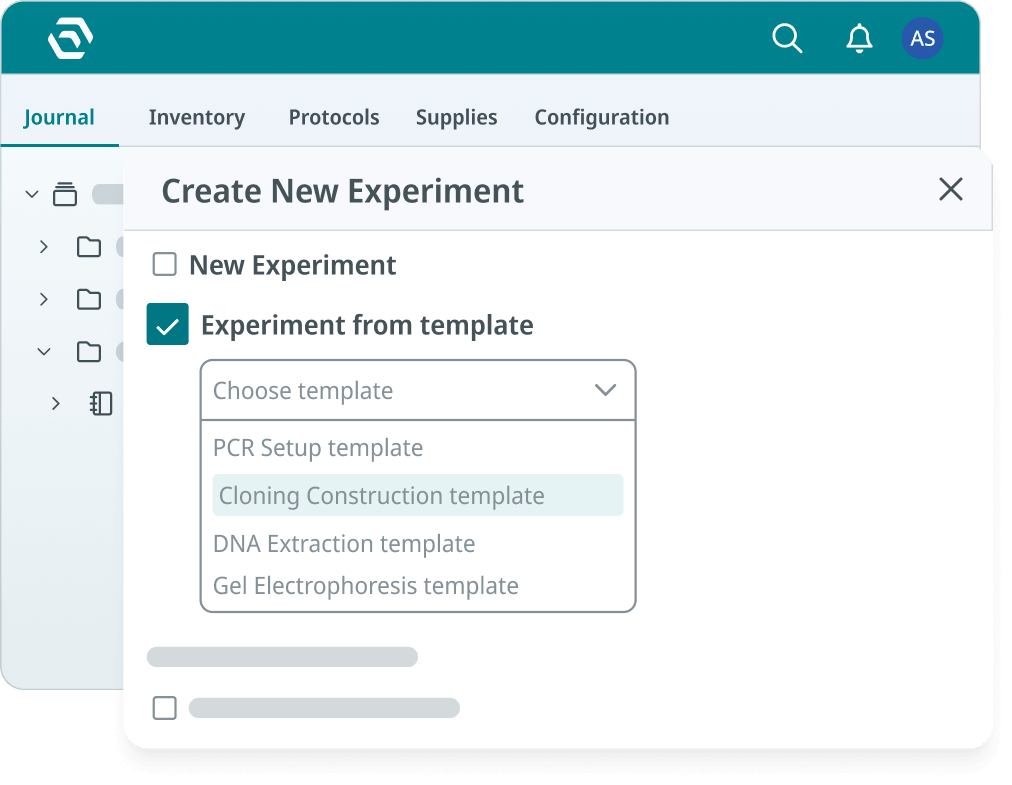
SciSure ELN experimental template

With SciSure LIMS, you can manage samples, inventory, equipment, storage units, order workflows, barcode labels, custom sample fields, sample history, batch updates, and links between samples and experiments. For transition planning, that matters when your old ELN pain is connected to sample traceability, freezer lookup, inventory status, or manual spreadsheets.
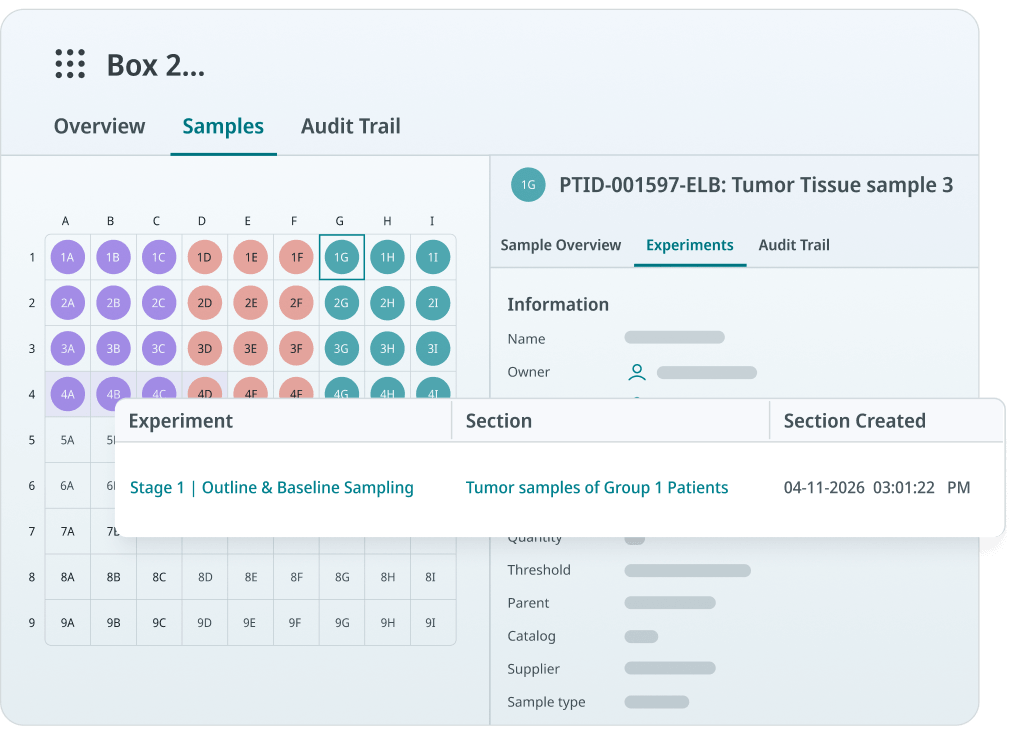
Inventory management in the SciSure LIMS platform

For transition planning, SciSure's practical advantage is the implementation process around the platform. The combination of onboarding, technical implementation, migration support, key-user training, and end-user training can help labs move from "we exported records" to "scientists can use the new workflow."

The lesson for an ELN transition is specific: start with the bottleneck your team already feels. If scientists waste time finding samples, start with sample cleanup and traceability. If protocols vary by person, start with templates and versioned methods. If QA struggles to review completed records, start with signatures, approvals, and audit trails. Implementation succeeds when the first workflow proves value at the bench.

SciSure
Migrate your historical ELN data with ease
Talk to a SciSure specialist about implementation, data migration, and training before you start exporting records.
Request a demo

What should happen to the old ELN after go-live?

After go-live, preserve the old ELN as a controlled source of historical records until retention, audit, IP, and retrieval requirements are satisfied. Keep the old system controlled after users begin working in the new one. Decide how long it remains accessible, who can access it, whether users can edit it, and how records will be exported or archived. Your retention plan should account for grant records, publication support, patent evidence, regulated studies, employment changes, institutional policy, and site-level requirements.

If you keep both systems active for too long, users may split their work and create a new traceability problem. If you shut the old system down without a retrieval plan, you may lose context you need later. Aim for a clear transition window and a documented archive.

How do you know your ELN transition is working?

Your ELN transition is working when scientists can complete active work in the new system, find old context when needed, and trust the record during review, reuse, or audit. Look for these signs in daily workflows:

You know your ELN transition is working when...
  • Scientists create complete experiment records without reverting to side spreadsheets.
  • Samples are searchable by ID, metadata, storage location, owner, or project.
  • Protocol templates are reused instead of recreated from memory.
  • Attachments and instrument outputs are stored or linked where reviewers expect them.
  • Reviewers can see who changed a record, when, and why.
  • New team members can follow a workflow without asking who built the old folder structure.
  • Lab managers can answer sample, inventory, and equipment questions without opening five separate files.
  • Compliance or QA stakeholders can retrieve evidence without rebuilding a timeline from emails.

The end state should feel concrete. A scientist can repeat a workflow. A lab manager can locate a sample. A reviewer can trust the record. An admin can control access. A future teammate can understand what happened without tracking down the person who did the work.

FAQ: what should labs know before migrating ELNs?

Use these answers to align lab users, IT, QA, and leadership before you commit to a migration timeline.

Should you migrate every record from your old ELN?

You should prioritize migrating active records and structured data that need to stay searchable, linked, editable, or reportable. Archive older completed records in a controlled, retrievable format when full structured migration does not add value.

How do you migrate 15 or 20 years of paper lab notebooks?

Start by inventorying notebook owners, date ranges, projects, sites, retention needs, and scan priority. Then digitize the highest-value notebooks, index them with searchable metadata, preserve page-level integrity, and connect the archive to active projects or sample records where needed. Do not promise that every historical page will become clean structured data. For many labs, the safer approach is a controlled digital archive plus structured migration for active records, samples, protocols, and high-value datasets.

What migration services help with FDA, MHRA, and EMA expectations?

Look for services that include migration planning, source-data inventory, data mapping, validated test imports, reconciliation logs, exception handling, access-control design, signature and audit-trail review, archive planning, and documented sign-off. FDA, MHRA, and EMA/EU expectations all come back to the same practical question: can your lab prove that records are trustworthy, complete, traceable, secure, and retrievable after the move?

How long does an ELN transition take?

The timeline depends on data volume, data quality, paper archive size, regulatory scope, integrations, validation needs, and how many teams or sites are included. A contained pilot can start faster than an all-lab migration because you only need the first workflow, first template set, first sample dataset, and first user group to prove the approach.

What is the biggest data migration risk?

The biggest risk is losing relationships between records. A notebook entry may still exist after migration, but it loses value if the linked sample, protocol version, attachment, signature, reviewer, instrument output, or storage location is missing.

What should you consider before moving to an AI-powered ELN?

Before you adopt an AI-powered or AI-enabled ELN, make sure your source records are structured, permissioned, traceable, and human-verifiable. AI can only help if the underlying data has reliable sample IDs, protocol versions, metadata, attachments, and provenance. For regulated or audit-sensitive labs, AI outputs should not replace controlled source records, human review, or validated recordkeeping processes.

What no-code ELN options matter for pharmaceutical workflows?

For pharmaceutical workflows, prioritize configurable experiment templates, custom fields, sample types, storage maps, approval workflows, permissions, signatures, barcode workflows, imports, and audit trails. These no-code or low-code controls help admins support complex workflows such as assay execution, sample intake, synthesis, stability testing, formulation, review, and sign-off without creating custom software for every process.

What standards should you consider before changing ELNs?

Wann sollten Sie ELN plus LIMS anstelle eines reinen ELN in Betracht ziehen?

Ziehen Sie ELN plus LIMS in Betracht, wenn die Experimentdokumentation stark von Probenverfolgung, Inventar, Lagerung, Ausrüstung, Bestellstatus, Barcode-Erfassung oder Chargen-Workflows abhängt. Wenn Ihre größte Herausforderung darin besteht, die richtige Probe zu finden, die Herkunft nachzuweisen, Gefrierlagerplätze zu verwalten oder Materialien mit Ergebnissen zu verknüpfen, kann ein vernetzter ELN- und LIMS-Workflow den manuellen Abgleich reduzieren.

Was sollten Sie einen ELN-Anbieter vor Vertragsabschluss fragen?

Fragen Sie, wie der Anbieter mit Datenmigration, Papierunterlagen, Probenverknüpfungen, Dateianhängen, Vorlagen, Berechtigungen, Audit-Trails, Signaturen, Schulungen, Support, Validierungsnachweisen, Integrationen, Backups, historischen Archiven und der Benutzerakzeptanz nach dem Go-Live umgeht. Bitten Sie um Beispiele anhand Ihrer Workflows und Ihrer Datenstruktur.

Wenn es mit Ihrem aktuellen ELN schwierig ist, Datensätze zu finden, Proben nachzuverfolgen, Protokolle zu standardisieren, abgeschlossene Arbeiten zu überprüfen oder sich auf Audits vorzubereiten, zeigen sich die Kosten des Verbleibs bereits in kleinen Details. Ein sorgfältiger Umstieg bietet Ihnen die Möglichkeit, diese Probleme Workflow für Workflow zu beheben.

Wenn Sie den Wechsel von einem anderen ELN, Papiernotizbüchern oder veralteten Forschungssystemen planen, buchen Sie eine SciSure-Demo um den Migrationsumfang, die Implementierungsunterstützung, die Probenrückverfolgbarkeit und die Akzeptanzplanung für Ihr Labor zu besprechen.

Mehr lesen:

Falls Sie Benchling ersetzen oder als Vergleich heranziehen, nutzen Sie unseren Vergleich potenzieller Benchling-Alternativen bevor Sie die Migration planen.

Ready to see SciSure in action?

Get a personalized demo and see how SciSure fits your lab's workflows.
Request demo

No commitment · Free consultation

Wenn Sie ein elektronisches Laborjournal ersetzen, liegt das größte Risiko darin, den Kontext zu bewahren, der einen Datensatz später wertvoll macht: die Probe, die Protokollversion, den Anhang, die Instrumentendaten, den Prüfer, die Signatur, den Zeitstempel, den Lagerort und den Entscheidungspfad.

Dieser Kontext ist entscheidend für die tägliche Laborarbeit sowie für umfassendere Anforderungen an Datenintegrität, Reproduzierbarkeit, Audit-Bereitschaft, Finanzierung und elektronische Archivierung. Zum Beispiel:

Sie müssen nicht alles auf einmal umstellen. Aber Sie benötigen einen strukturierten Übergangsplan, der bei den bereits genutzten Arbeitsabläufen ansetzt, das neue System anhand echter Datensätze validiert und den Wissenschaftlern einen Grund gibt, dem Wandel zu vertrauen.

Mehr erfahrenDie 5 besten elektronischen Laborjournale (ELN) im Jahr 2026, bewertet nach Benutzerfreundlichkeit und ROI: Basierend auf echten Nutzerbewertungen

Warum scheitern ELN-Umstellungen?

ELN-Umstellungen scheitern, wenn Teams Datensätze migrieren, bevor sie den zugrunde liegenden Kontext definiert haben – also die Workflows, Datenbeziehungen, Verantwortlichkeiten, Validierungsprüfungen und Schulungspläne, die mit diesen Datensätzen verbunden sind.

Ein oberflächlicher Migrationsplan klingt meist einfach: Daten aus dem alten ELN exportieren, in das neue importieren, Nutzer schulen und live gehen. In der Praxis bleiben Labore jedoch stecken, weil das alte System mehr als nur Journaleinträge enthält. Es umfasst teilweise dokumentierte Workarounds, Ordnerstrukturen, Benennungskonventionen, Excel-Tracker, Gefrierschrank-Pläne, Gerätedateien, PDF-Exporte, Berechtigungen und das lokale Wissen der Personen, die das System bisher am Laufen gehalten haben.

Common failure points during an ELN transition.
  • Migrating old content without deciding which records still need to be searchable, editable, signed, archived, or retained.
  • Importing samples before cleaning names, IDs, storage locations, aliases, ownership, and material status.
  • Rebuilding every old workflow instead of improving the workflows that caused daily friction.
  • Training users on menus and features instead of the experiment, sample, and review tasks they perform each week.
  • Treating compliance as a final check instead of a design requirement for records, signatures, permissions, retention, and audit trails.
  • Skipping a pilot with real data, then discovering after go-live that attachments, protocol versions, sample links, or former user records are missing.

Der bessere Weg ist es, Ihre ELN-Umstellung als Projekt zur Optimierung von Labor-Workflows zu betrachten. Sie entscheiden dabei, wie Ihr Team künftig Experimente dokumentiert, Proben mit Ergebnissen verknüpft, Begleitdateien sichert, abgeschlossene Arbeiten prüft und Nachweise später wiederfindet.

Was sollten Sie prüfen, bevor Sie Ihr aktuelles ELN verlassen?

Bevor Sie Ihr aktuelles ELN verlassen, sollten Sie die Datensätze, Proben, Protokolle, Dateien, Benutzer, Berechtigungen, Integrationen, Papierarchive und Compliance-Anforderungen prüfen, die den Umzug überdauern müssen.

Beginnen Sie mit einer praktischen Bestandsaufnahme. Eine Tabelle reicht völlig aus, wenn dies der schnellste Weg ist, um Fakten zu sammeln. Es geht darum, versteckte Abhängigkeiten aufzudecken, bevor sie Sie mitten in der Migration überraschen.

Erfassen Sie diese Kategorien:

What to audit before transitioning from one ELN to another
Section Title What it covers
1 Experiments Active projects, completed studies, notebook entries, folder structures, record owners, signatures, and witness status.

Example: a CRISPR screen with linked plate maps, raw images, and reviewer comments.
2 Paper notebooks Notebook owner, date range, project, page count, location, retention requirement, and scan priority.

Example: 15 years of medicinal chemistry notebooks across three research sites.
3 Protocols Current versions, retired versions, SOP links, recurring templates, and approval status.

Example: a stability assay protocol that changed twice during a grant period.
4 Samples Sample IDs, aliases, material type, storage unit, rack, box, position, lineage, freeze-thaw history, and owner.

Example: cell lines stored across two freezers with duplicate spreadsheet IDs.
5 Attachments Instrument files, images, PDFs, spreadsheets, analysis exports, and file naming patterns.

Example: HPLC files saved outside the ELN but referenced in experiment notes.
6 Users and access Active users, alumni, collaborators, reviewers, admins, and role permissions.

Example: a former postdoc who owns records that still need to be searchable.
7 Integrations Instruments, APIs, file sync, barcode workflows, identity provider, and reporting tools.

Example: a balance, plate reader, or sequencing workflow feeding files into shared storage.
8 Compliance Retention rules, electronic signatures, audit trails, validation needs, and Part 11, GxP, GLP, or GMP scope.

Example: QA needing proof of who changed a record and when.

Fragen Sie auch Ihre Nutzer, wo sie außerhalb des aktuellen ELN arbeiten. Bei vielen Migrationen wird der eigentliche Arbeitsablauf übersehen, da der tägliche Workflow auf Excel-Tabellen, Notizbücher, OneNote-Seiten, PDFs, E-Mail-Freigaben, lokale Laborrechner und freigegebene Ordner verteilt ist.

Fügen Sie bei standortübergreifenden Migrationen Details auf Standortebene hinzu. Eine Forschungsorganisation mit drei Standorten sollte wissen, welcher Standort welche Journale besitzt, welche Namenskonventionen für Proben sich je nach Standort unterscheiden, welche Labore lokale Admin-Unterstützung benötigen und welche historischen Daten während der Umstellung verfügbar sein müssen.

Wie entscheiden Sie, was migriert, archiviert oder neu aufgebaut werden soll?

Entscheiden Sie für jeden Datensatz einzeln, ob er als strukturierte Daten migriert, als Archivdatensatz aufbewahrt oder im neuen ELN als verbesserte Workflow-Vorlage neu erstellt werden soll. Das hält die Umstellung praktikabel. Eine vollständige Migration jedes alten Feldes kann Monate dauern und führt oft nur dazu, dass ineffiziente Workflows übernommen werden. Eine selektive Migration ermöglicht es Ihnen, das Wesentliche zu bewahren, Veraltetes auszumustern und häufige Aufgaben in bessere Strukturen zu überführen.

Sie können drei Kategorien verwenden.

Migrate, archive, or rebuild: How to decide?
Section Bucket Use it for
1 Migrate as structured data Active work, reusable sample records, ongoing studies, and records that need search, links, permissions, or reporting. Example: active oncology experiments with samples that need to stay linked to storage locations and results.
2 Archive as read-only history Completed work that must be retained but does not need to become a live workflow. Example: signed legacy notebook entries exported as PDFs with an index, checksum record, and retrieval owner.
3 Rebuild as templates Repeating workflows that were inconsistent, hard to review, or difficult to search in the old system. Example: a qPCR workflow rebuilt with required fields for sample ID, primer lot, plate map, instrument file, and reviewer.

Für aktive Projektesollten Sie sicherstellen, dass die Datensätze und Datenobjekte priorisiert werden, die Wissenschaftler in den ersten 30 bis 90 Tagen benötigen: aktuelle Protokolle, aktive Probensätze, Gefrierfachstandorte, laufende Studien, aktuelle Experimente, wichtige Anhänge und Genehmigungsworkflows.

Für ältere Datensätzesollten Sie die Wiederauffindbarkeit sicherstellen. Ihr Team muss wissen, wo sich der Datensatz befindet, was er enthält, wer ihn verwaltet hat, wann er exportiert wurde, aus welchem System er stammt und wie er bei einem Audit, einer Manuskriptprüfung, einem Förderbericht, einer IP-Prüfung oder einer internen Untersuchung abgerufen werden kann.

Auf welche Migrationsdienste sollten Sie achten, wenn Sie von Papier, Tabellenkalkulationen oder einem alten ELN umsteigen?

Achten Sie auf Migrationsdienste, die Bestandsaufnahme, Digitalisierung von Papierunterlagen, Datenextraktion, Feldzuordnung, Probenbereinigung, Pilotimport, Validierung, Compliance-Dokumentation, Benutzerschulung und Planung kontrollierter Archive abdecken.

Wenn Sie 15 oder 20 Jahre an Papiernotizbüchern und Altdaten haben, ist der Migrationsdienst genauso wichtig wie das Ziel-ELN. Sie benötigen Unterstützung dabei, historisches Material in einen kontrollierten Datensatz umzuwandeln, ohne so zu tun, als könnte jede Seite in perfekt strukturierte Daten umgewandelt werden.

Nützliche Migrationsdienste umfassen:

  • Migrationsanalyse.
    Inventarsysteme, Papierarchive, Probenverfolgung, Anhänge, Signaturen, Aufbewahrungsanforderungen und standortspezifische Unterschiede, bevor die Konfiguration beginnt.
  • Digitalisierung und Indexierung von Papierunterlagen.
    Scannen von Notizbuchseiten, Erfassung von Metadaten wie Notizbuchinhaber, Projekt, Datumsbereich, Seitenbereich, Standort und Aufbewahrungskategorie sowie Erstellung eines Abrufindex.
  • Datenextraktion und -zuordnung.
    Zuordnung alter ELN-Felder, Tabellenspalten, Proben-IDs, Aliase, Protokollnamen und Dateireferenzen in die Struktur des neuen Systems.
  • Bereinigung von Proben und Lagerbeständen.
    Standardisieren Sie Probentypen, Gefriergerät-Standorte, Box-Positionen, Eigentumsverhältnisse, Materialstatus, Barcode-Werte und Abstammungslinien vor dem Import.
  • Archivierung historischer Daten.
    Bewahren Sie ältere Datensätze als schreibgeschützte Exporte auf, wenn eine strukturierte Migration mit höheren Kosten oder Risiken verbunden ist als der tägliche Nutzen rechtfertigt.
  • Pilotmigration.
    Importieren Sie zuerst einen repräsentativen Datensatz, einschließlich problematischer Einträge wie doppelter Probennamen, fehlender Lagerorte, großer Anhänge, inaktiver Benutzer und signierter Datensätze.
  • Validierung und Abgleich.
    Vergleichen Sie Datensätze zwischen Quelle und Ziel hinsichtlich Anzahl, Anhängen, Probenverknüpfungen, Metadaten, Zeitstempeln, Signaturen, Berechtigungen und Fehlerprotokollen.
  • Unterstützung bei Compliance-Paketen.
    Dokumentieren Sie Migrationsentscheidungen, Testnachweise, Abweichungen, Genehmigungen und Aufbewahrungsstrategien, damit QS, IT und Auditoren den Prozess überprüfen können.
  • Schulung und Unterstützung bei der Einführung.
    Schulen Sie Wissenschaftler arbeitsablaufbezogen, ernennen Sie Labor-Champions und etablieren Sie einen Support-Rhythmus nach dem Go-Live.

Für ein KI-gestütztes oder KI-fähiges ELN wird die Integrität historischer Daten noch wichtiger. KI-Ergebnisse sind nur dann nützlich, wenn die Quelldaten strukturiert, zuordenbar, zugriffsgeschützt und durch Menschen verifizierbar sind. Bevor Sie eine KI-Ebene für Suche, Zusammenfassungen, Protokollerstellung oder Analyseunterstützung einsetzen, stellen Sie sicher, dass Ihre Migration Herkunftsnachweise, kanonische Proben-IDs, Protokollversionen und Dateikontexte bewahrt. Der NIST AI Risk Management Framework kann Teams dabei helfen, über KI-Governance nachzudenken, aber regulierte Labore müssen dennoch sicherstellen, dass die zugrunde liegenden elektronischen Aufzeichnungen den Anforderungen von FDA, MHRA, EMA/EU oder internen Qualitätsvorgaben standhalten.

SciSure
Moving from paper notebooks, spreadsheets, or a legacy ELN?
SciSure helps you map your records, plan a phased migration, and gives your scientists a workflow they can trust before go-live.
Request a demo

How do you protect data integrity during an ELN migration?

You can protect data integrity by proving that migrated records remain complete, accurate, attributable, legible, traceable, and retrievable after the move.

This is where standards become practical. 21 CFR Part 11 calls for secure, computer-generated, time-stamped audit trails for electronic records in scope, plus authority checks so only authorized people can access, alter, or sign records. FDA's guidance on electronic systems, electronic records, and electronic signatures in clinical investigations focuses on whether electronic records and signatures can be trusted as reliable equivalents to paper records and handwritten signatures. FDA's data integrity guidance for drug CGMP emphasizes reliable and accurate data, with risk-based strategies to prevent and detect integrity issues.

For UK GxP environments, the MHRA GxP data integrity guidance is useful because it frames data integrity around the complete lifecycle of the data.

For EU GMP environments, EU GMP Annex 11 is especially relevant during migration because it states that validation should include checks that data are not altered in value or meaning during transfer to another format or system.

For clinical research, ICH E6(R3) Good Clinical Practice is also relevant because it reinforces fit-for-purpose systems, proportionate quality management, and reliable trial records.

Build these expectations into your migration checks:
  • Compare source and target record counts for experiments, samples, files, protocols, users, and archived notebooks.
  • Spot-check high-value records against the old ELN or scanned paper source, including attachments and linked samples.
  • Verify sample IDs, aliases, storage locations, parent-child relationships, and material status.
  • Confirm whether signatures, witness status, approval history, timestamps, and audit trails are migrated, archived, or retained in the legacy export.
  • Record which data was excluded, why it was excluded, who approved the decision, and where the record remains available.
  • Keep a migration log with export dates, import dates, responsible owners, exceptions, fixes, and sign-off.
  • Test retrieval with realistic prompts such as “find the experiment that used sample ABC-104 before the March 2024 protocol change” or “show all records linked to this freezer box before it was moved.”

If your lab is outside Part 11, GLP, GMP, or GCP scope, these checks still matter. They help you avoid losing scientific context, using the wrong sample, citing an outdated protocol, or spending hours proving that a record is the one you think it is.

How do you build a sample and digital strategy before the move?

Build a sample and digital strategy by defining how samples, metadata, protocols, experiments, files, and system access should connect before you configure the new ELN. Ideally, you should plan these before software configuration. In a real lab, experiments rarely stand alone. They depend on samples, reagents, cell lines, antibodies, plasmids, mouse colonies, freezer boxes, instruments, file outputs, and people who know the history.

Your sample strategy should answer:

  • Which sample types do you manage: cell lines, plasmids, proteins, antibodies, compounds, patient-derived materials, tissue, DNA, RNA, controls, reference materials, or environmental samples?
  • Which metadata fields are required for each type: source, passage, concentration, lot, storage temperature, hazard class, owner, project, consent restriction, expiration date, or chain-of-custody status?
  • Which identifiers should become canonical: old ELN ID, LIMS ID, barcode, freezer label, vendor lot, internal sample name, or study ID?
  • Which storage locations need cleanup before import: freezers, racks, boxes, shelves, rooms, instruments, off-site storage, or third-party repositories?
  • Which samples need lineage: parent material, aliquots, derivatives, pooled samples, generated strains, or downstream production batches?

Your digital strategy should answer:

  • How should projects, studies, experiments, protocols, datasets, and folders be named?
  • Which workflows should become templates because people repeat them every week?
  • Which files should be attached directly to records, and which should be linked from controlled storage?
  • Which users should be able to create, edit, review, sign, witness, archive, restore, or export records?
  • Which integrations matter now, and which can wait until the core workflow is stable?

This is also where future AI readiness becomes concrete. If your ELN records use consistent sample identifiers, protocol versions, required metadata, and searchable attachments, your team will be in a stronger position to reuse data later. FAIR starts when you decide whether a future scientist can find and understand the record.

How can no-code configuration reduce migration risk?

No-code configuration reduces migration risk when your team can build templates, fields, roles, sample types, and approval workflows around real lab work without waiting for custom software development.

For drug discovery, translational research, and platform biology teams, the question is often practical: can scientists and admins configure complex workflows without heavy custom coding?

Look for ELN options that let you configure:
  • Experiment templates for recurring assays, synthesis workflows, cell culture processes, stability studies, and sample intake.
  • Required fields for sample IDs, reagent lots, protocol versions, plate maps, concentrations, storage conditions, and reviewer notes.
  • Role-based permissions for scientists, lab managers, QA, collaborators, IT, and former users.
  • Review, approval, signature, and witness workflows for records that need formal sign-off.
  • Sample types, custom sample fields, storage maps, barcode labels, batch updates, and parent-child relationships.
  • Imports from spreadsheets and legacy systems with field mapping and reconciliation.

A configurable ELN still needs implementation discipline. If every lab group invents its own naming rules and templates, the new system can recreate the old mess in a cleaner interface. Use configuration to standardize the parts of the workflow that need traceability while leaving scientists enough flexibility to document real research.

SciSure
Ready to turn repeated lab workflows into structured, searchable records?
Explore SciSure ELN and SciSure LIMS to see how templates, permissions, sample management, barcodes, approvals, and linked experiment records can support a cleaner migration.
Request a demo

How should implementation be planned so scientists can adopt the new ELN?

Plan implementation around named owners, phased milestones, real lab workflows, test migration, and role-based training instead of a single go-live date.

Any ELN vendor can show a demo. A successful transition depends on the implementation process behind the software. Your plan should define who owns each decision, what gets configured first, how migration will be tested, who signs off, and how scientists will get help once they begin using the system.

A practical implementation plan includes:

  • Project setup: Name the project leader, system owner, lab champions, IT contact, QA or compliance contact, and key users from each site or group.
  • Workflow mapping: Pick the first workflows to configure, such as sample intake, experiment documentation, protocol reuse, assay results, review, and sign-off.
  • Configuration: Build projects, studies, templates, sample fields, storage locations, permissions, naming rules, and approval workflows.
  • Test migration: Import a small, representative dataset before the main migration. Include active experiments, samples, attachments, paper scans, and edge cases.
  • User acceptance: Ask scientists to complete real tasks and report friction before go-live.
  • Training: Train users by role and workflow, not by feature list.
  • Go-live support: Set a clear support channel, response owner, escalation path, and weekly review cadence for the first month.

With SciSure, implementation support can include onboarding to assemble a project team, create a project plan, set milestones, appoint key users, and create a training schedule. Our onboarding team can support structured data migration from existing ELNs, spreadsheets, and paper-based records through the SciSure ELN. That matters because scientists are being asked to trust a new way of recording work.

What does implementation for research labs look like in practice?

In research environments, successful implementation looks like phased rollout, local champions, hands-on training, and enough configuration support for scientists to use the system in daily work.

Institut Pasteur, for example, evaluated more than 20 ELNs across 12 research departments, with scientists from around 50 units involved in the final choice. The rollout was organized in four deployment waves, with presentations, follow-up meetings, review meetings, workshops, and monthly training sessions to support onboarding across staff and facilities.

The implementation lesson is specific: a large research organization should expect deployment waves, role-based support, and local users who can translate the system into the way each lab records experiments, samples, protocols, and files.

Institut Pasteur's digital transformation in numbers, with SciSure

How do you train users without slowing active experiments?

Train users with the exact tasks they need for active work: create a record, use a template, link a sample, attach a file, request review, sign or witness, and find the record later. On day one, your scientists need to know how to finish this week's work without losing time or creating compliance questions.

Keep training close to real work. A protein engineering team might practice documenting a construct design, linking plasmid samples, attaching sequencing results, and reviewing the completed record. A bioprocess team might practice linking cell culture samples to scale-up experiments and capturing bioreactor outputs. A core facility might practice sample intake, storage assignment, status updates, and report retrieval.

How should you test the new ELN before full rollout?

Test your new ELN with real workflows, representative migrated data, and the people who will use it every week.

A pilot should be small enough to manage and real enough to expose problems. Include clean sample data and the awkward cases: duplicate sample names, missing freezer positions, old file formats, signed records, external collaborators, inactive users, unusually large attachments, scanned paper notebooks, and experiments with many linked materials.

Use this pilot checklist:
  • Can a scientist create a new experiment from a template?
  • Can they link the correct samples, reagents, and inventory items?
  • Can they attach images, instrument files, spreadsheets, and analysis exports?
  • Can they find a prior experiment by project, sample, protocol, owner, keyword, date, or old notebook ID?
  • Can a reviewer approve, sign, or witness the record if your workflow requires it?
  • Can permissions prevent the wrong users from editing sensitive records?
  • Can sample locations and statuses be updated without breaking traceability?
  • Can admins export or retrieve records for audit, grant, IP, or publication support?
  • Can users tell what was migrated, what was archived, and what was rebuilt?

For regulated teams, document the test cases, expected results, actual results, deviations, fixes, and approval. For research teams outside regulated scope, the same habit gives you a useful project record and reduces uncertainty after launch.

What are some success metrics for an ELN migration?

These metrics help your team see whether adoption is happening in daily work after kickoff.

Good success metrics are concrete.
  • Percentage of active users who created at least one complete experiment.
  • Number of recurring workflows converted into templates.
  • Percentage of active samples with required metadata and storage locations.
  • Number of migrated records reconciled against source data.
  • Average time to find a sample, protocol, or prior experiment.
  • Number of support issues by category: access, template setup, migration, training, integrations, or data cleanup.
  • Percentage of completed records reviewed, signed, or archived according to your policy.
  • Percentage of legacy notebooks indexed and retrievable by project, owner, site, date range, or study.

What can SciSure add to an ELN transition?

SciSure can be a strong option when you need implementation support plus connected ELN, LIMS, sample, inventory, permission, signature, and audit-ready workflows in one platform. You should still evaluate every platform against your lab's workflows, regulatory scope, IT needs, migration risk, and user adoption requirements. The strongest option is the one whose platform and implementation team can help you move from scattered records to usable, trusted workflows.

With SciSure, you can use verified ELN capabilities such as experiment documentation, real-time collaboration, experiment templates, advanced search, instrument integration, approval workflows, version control, variable parameters, mobile access, support and training, and regulatory support for GxP and FDA 21 CFR Part 11 through SciSure ELN. You can also link experiments to samples and inventory, attach files, images, and datasets, and manage configurable roles and permissions.

SciSure ELN experimental template

With SciSure LIMS, you can manage samples, inventory, equipment, storage units, order workflows, barcode labels, custom sample fields, sample history, batch updates, and links between samples and experiments. For transition planning, that matters when your old ELN pain is connected to sample traceability, freezer lookup, inventory status, or manual spreadsheets.

Inventory management in the SciSure LIMS platform

For transition planning, SciSure's practical advantage is the implementation process around the platform. The combination of onboarding, technical implementation, migration support, key-user training, and end-user training can help labs move from "we exported records" to "scientists can use the new workflow."

The lesson for an ELN transition is specific: start with the bottleneck your team already feels. If scientists waste time finding samples, start with sample cleanup and traceability. If protocols vary by person, start with templates and versioned methods. If QA struggles to review completed records, start with signatures, approvals, and audit trails. Implementation succeeds when the first workflow proves value at the bench.

SciSure
Migrate your historical ELN data with ease
Talk to a SciSure specialist about implementation, data migration, and training before you start exporting records.
Request a demo

What should happen to the old ELN after go-live?

After go-live, preserve the old ELN as a controlled source of historical records until retention, audit, IP, and retrieval requirements are satisfied. Keep the old system controlled after users begin working in the new one. Decide how long it remains accessible, who can access it, whether users can edit it, and how records will be exported or archived. Your retention plan should account for grant records, publication support, patent evidence, regulated studies, employment changes, institutional policy, and site-level requirements.

If you keep both systems active for too long, users may split their work and create a new traceability problem. If you shut the old system down without a retrieval plan, you may lose context you need later. Aim for a clear transition window and a documented archive.

How do you know your ELN transition is working?

Your ELN transition is working when scientists can complete active work in the new system, find old context when needed, and trust the record during review, reuse, or audit. Look for these signs in daily workflows:

You know your ELN transition is working when...
  • Scientists create complete experiment records without reverting to side spreadsheets.
  • Samples are searchable by ID, metadata, storage location, owner, or project.
  • Protocol templates are reused instead of recreated from memory.
  • Attachments and instrument outputs are stored or linked where reviewers expect them.
  • Reviewers can see who changed a record, when, and why.
  • New team members can follow a workflow without asking who built the old folder structure.
  • Lab managers can answer sample, inventory, and equipment questions without opening five separate files.
  • Compliance or QA stakeholders can retrieve evidence without rebuilding a timeline from emails.

The end state should feel concrete. A scientist can repeat a workflow. A lab manager can locate a sample. A reviewer can trust the record. An admin can control access. A future teammate can understand what happened without tracking down the person who did the work.

FAQ: what should labs know before migrating ELNs?

Use these answers to align lab users, IT, QA, and leadership before you commit to a migration timeline.

Should you migrate every record from your old ELN?

You should prioritize migrating active records and structured data that need to stay searchable, linked, editable, or reportable. Archive older completed records in a controlled, retrievable format when full structured migration does not add value.

How do you migrate 15 or 20 years of paper lab notebooks?

Start by inventorying notebook owners, date ranges, projects, sites, retention needs, and scan priority. Then digitize the highest-value notebooks, index them with searchable metadata, preserve page-level integrity, and connect the archive to active projects or sample records where needed. Do not promise that every historical page will become clean structured data. For many labs, the safer approach is a controlled digital archive plus structured migration for active records, samples, protocols, and high-value datasets.

What migration services help with FDA, MHRA, and EMA expectations?

Look for services that include migration planning, source-data inventory, data mapping, validated test imports, reconciliation logs, exception handling, access-control design, signature and audit-trail review, archive planning, and documented sign-off. FDA, MHRA, and EMA/EU expectations all come back to the same practical question: can your lab prove that records are trustworthy, complete, traceable, secure, and retrievable after the move?

How long does an ELN transition take?

The timeline depends on data volume, data quality, paper archive size, regulatory scope, integrations, validation needs, and how many teams or sites are included. A contained pilot can start faster than an all-lab migration because you only need the first workflow, first template set, first sample dataset, and first user group to prove the approach.

What is the biggest data migration risk?

The biggest risk is losing relationships between records. A notebook entry may still exist after migration, but it loses value if the linked sample, protocol version, attachment, signature, reviewer, instrument output, or storage location is missing.

What should you consider before moving to an AI-powered ELN?

Before you adopt an AI-powered or AI-enabled ELN, make sure your source records are structured, permissioned, traceable, and human-verifiable. AI can only help if the underlying data has reliable sample IDs, protocol versions, metadata, attachments, and provenance. For regulated or audit-sensitive labs, AI outputs should not replace controlled source records, human review, or validated recordkeeping processes.

What no-code ELN options matter for pharmaceutical workflows?

For pharmaceutical workflows, prioritize configurable experiment templates, custom fields, sample types, storage maps, approval workflows, permissions, signatures, barcode workflows, imports, and audit trails. These no-code or low-code controls help admins support complex workflows such as assay execution, sample intake, synthesis, stability testing, formulation, review, and sign-off without creating custom software for every process.

What standards should you consider before changing ELNs?

Wann sollten Sie ELN plus LIMS anstelle eines reinen ELN in Betracht ziehen?

Ziehen Sie ELN plus LIMS in Betracht, wenn die Experimentdokumentation stark von Probenverfolgung, Inventar, Lagerung, Ausrüstung, Bestellstatus, Barcode-Erfassung oder Chargen-Workflows abhängt. Wenn Ihre größte Herausforderung darin besteht, die richtige Probe zu finden, die Herkunft nachzuweisen, Gefrierlagerplätze zu verwalten oder Materialien mit Ergebnissen zu verknüpfen, kann ein vernetzter ELN- und LIMS-Workflow den manuellen Abgleich reduzieren.

Was sollten Sie einen ELN-Anbieter vor Vertragsabschluss fragen?

Fragen Sie, wie der Anbieter mit Datenmigration, Papierunterlagen, Probenverknüpfungen, Dateianhängen, Vorlagen, Berechtigungen, Audit-Trails, Signaturen, Schulungen, Support, Validierungsnachweisen, Integrationen, Backups, historischen Archiven und der Benutzerakzeptanz nach dem Go-Live umgeht. Bitten Sie um Beispiele anhand Ihrer Workflows und Ihrer Datenstruktur.

Wenn es mit Ihrem aktuellen ELN schwierig ist, Datensätze zu finden, Proben nachzuverfolgen, Protokolle zu standardisieren, abgeschlossene Arbeiten zu überprüfen oder sich auf Audits vorzubereiten, zeigen sich die Kosten des Verbleibs bereits in kleinen Details. Ein sorgfältiger Umstieg bietet Ihnen die Möglichkeit, diese Probleme Workflow für Workflow zu beheben.

Wenn Sie den Wechsel von einem anderen ELN, Papiernotizbüchern oder veralteten Forschungssystemen planen, buchen Sie eine SciSure-Demo um den Migrationsumfang, die Implementierungsunterstützung, die Probenrückverfolgbarkeit und die Akzeptanzplanung für Ihr Labor zu besprechen.

Mehr lesen:

Falls Sie Benchling ersetzen oder als Vergleich heranziehen, nutzen Sie unseren Vergleich potenzieller Benchling-Alternativen bevor Sie die Migration planen.

About the author:

Ethan Sagin

Ethan Sagin is Director of Customer Engagement for North America at SciSure, the scientific management platform formed by the 2024 merger of eLabNext and SciShield. He joined eLabNext in 2020 as the company's first global customer success hire, supporting over 200 labs across the Americas single-handedly before growing and leading a regional team. In subsequent roles, he introduced eLabNext's first standardized onboarding program, redesigned the renewal pipeline, and served as developer consultant for more than 50 customers and partners building integrations with the platform. He was also a member of the core integration team that merged eLabNext and SciShield. Ethan combines a hands-on background in web development with a customer success practice grounded in cross-functional collaboration between engineering and commercial teams.

See all posts from this author

Melde dich für unseren Newsletter an

Holen Sie sich die neuesten Tipps, Artikel und exklusiven Inhalte zum modernen Labormanagement in Ihren Posteingang.
Danke! Deine Einreichung ist eingegangen!
Please check your email to verify your submission.
Hoppla! Beim Absenden des Formulars ist etwas schief gelaufen.