How to Implement an Electronic Lab Notebook (ELN) in an Existing Lab Without Slowing Research

Erfahren Sie, wie Sie ein elektronisches Laborbuch erfolgreich in Ihr bestehendes Labor einführen – mit minimaler Unterbrechung und hoher Teamakzeptanz.

July 3, 2026
()
min read
A laboratory

Download Whitepaper

By submitting this form, you agree with our Privacy Policy.
Thank you! Download the file by clicking below:
Download
Oops! Something went wrong while submitting the form.

Table of Contents

Thank you! Your submission has been received!
Oops! Something went wrong while submitting the form.

Table of Contents

TL;DR

Rolling out an electronic lab notebook (ELN) in an active lab works best as a phased change rather than an all-at-once switch: map current records and hidden dependencies, pilot one team or workflow, then expand once templates, sample links, and permissions are proven.

  • The hard part in an active lab is hidden dependencies.
    These could be freezer inventory spreadsheets one person updates, paper notebooks holding sample IDs, unversioned protocol PDFs, instrument files on local computers, and former users who still own records. Map these first, then name owners across science, lab operations, IT, and QA.

  • Structure, then name.
    SciSure’s implementation process organizes work as Group, Project, Study, and Experiment, so teams decide where records live before creating hundreds of them. Pick naming conventions with project or study IDs instead of memory-based labels like "final final." Use project and study custom fields for grant IDs, material transfer agreements, publication identifiers, and DOIs (Digital Object Identifiers).

  • Configure Inventory early.
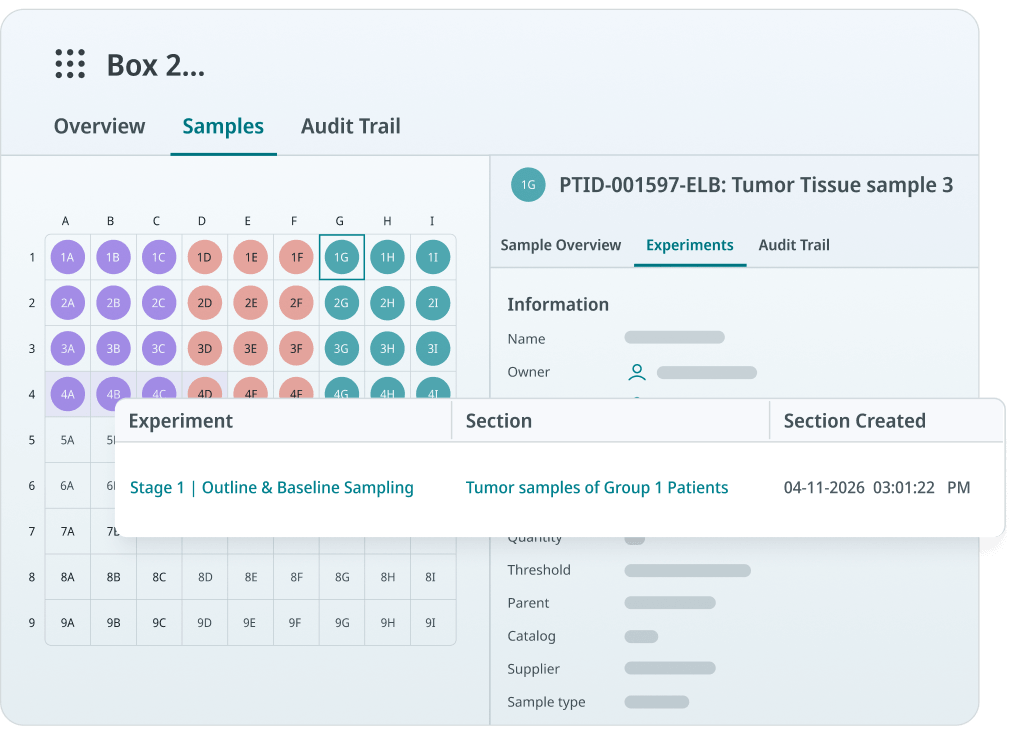
    Set up storage units, compartment layers, standardized sample types, mandatory metadata fields, and barcodes before go-live, so imported samples stay searchable. SciSure's Inventory Browser shows storage location, compartments, and sample details in one place, with saved filter templates for repeat searches like expired or checked-out materials.

  • Migrate and templatize.
    Move active studies, current protocols, and priority samples first, then archive older records in a retrievable format instead of copying every page. SciSure provides bulk import templates for samples, catalog items, and equipment. You can build experiment templates from strong past experiments, and manage protocols with labels and version control.

  • Control access and prove value.
    Define level-based permissions, experiment and witness signing, sample audit trails, and SAML single sign-on (Microsoft Entra ID, Okta) before broad rollout. These controls answer NIH Data Management and Sharing, FAIR, and 21 CFR Part 11 expectations. Run a phased 90-day rollout with concrete metrics, as growth-stage biotech Kaigene did to cut recording time.

This post was originally published in 2023 and has been updated to reflect current regulatory standards governing research, SciSure's updated implementation process, and the Kaigene customer story.

Keeping track of samples, reagents, protocols, experiments, instrument files, and research decisions is necessary for every lab. The hard part is that most existing labs already have a system, even if that system is a mix of paper notebooks, Excel files, freezer maps, shared folders, OneNote pages, emails, and a few people who know where everything lives.

That makes ELN implementation different in an active lab than in a brand-new lab. Rather than starting from a blank page, you're now asking scientists to change how they record work while experiments, sample handoffs, grant deadlines, QA reviews, collaborations, and inventory needs keep moving.

A successful electronic lab notebook rollout feel like a controlled workflow change: current records are mapped, priority use cases are selected, samples and protocols stay traceable, permissions are clear, and scientists learn the system through the tasks they already perform. Your goal is to make research records easier to find, repeat, review, protect, and reuse.

Why does rolling out an ELN successfully matter?

The approach you take matters because research record expectations have changed. For example: 

  • The NIH Data Management and Sharing Policy asks funded researchers to plan how scientific data will be managed and shared.
  • Likewise, the FAIR Principles push teams toward data that is findable, accessible, interoperable, and reusable.
  • FDA-regulated teams also need to consider trustworthy electronic records, audit trails, access controls, and electronic signatures under 21 CFR Part 11 and FDA guidance on electronic systems, electronic records, and electronic signatures in clinical investigations.

Even when your lab isn't formally regulated, the same implementation questions are useful: can your team find the record, understand the context, trace the sample, identify the protocol version, and trust who changed what?

Why is implementing an ELN harder in an active lab?

Implementing an ELN is harder in an active lab because your current workflow might contain real dependencies that may not be obvious until you map them. Beyond just replacing notebooks, your scientists are also replacing habits, naming conventions, informal review paths, spreadsheet trackers, sample lookup routines, and local knowledge.

Here are some common dependencies you'll run into (or might have already!)

  • A freezer inventory spreadsheet that only one lab manager updates.
  • Paper notebooks that contain sample IDs referenced in active studies.
  • Protocol PDFs stored in a shared drive with unclear version control.
  • Instrument outputs saved on local computers and copied manually into reports.
  • Experiments documented in both a paper notebook and a Word file.
  • Former users who still own important records.
  • Compliance or IP expectations that require completed work to be retrievable later.

If you skip this discovery step, the ELN can become one more place to copy data. That's the failure mode to avoid. Your rollout should reduce duplication, rather than formalizing it. So start by asking where the lab loses time or context today:

Issues an ELN audit can help you uncover
Implementation question What it helps you uncover
Which records are hardest to find? Search, metadata, project structure, and archive needs
Which samples are most likely to be misplaced or misidentified? Sample type fields, storage maps, barcodes, and lineage needs
Which workflows are repeated every week? Experiment templates and protocol standardization opportunities
Which records need review, signatures, or audit trails? Compliance, permissions, and approval workflow requirements
Which systems contain source data? Migration, integration, file attachment, and retention scope
Which teams need access? Role-based permissions, collaboration settings, and training groups

This is also the moment to name your implementation owners. A practical project team usually includes a scientific lead, lab operations or lab manager, IT or systems owner, QA or compliance stakeholder if applicable, and a few key users who understand daily bench work.

What should you do before choosing or expanding an ELN?

Before choosing or expanding an ELN, make sure you define what the system must support in daily work: experiment documentation, sample traceability, protocol control, collaboration, signatures, inventory, migration, and retrieval. Start with workflow evidence; for each priority workflow, document:

  • The experiment or process name.
  • The samples, reagents, consumables, and equipment used.
  • The protocol or SOP version.
  • The files that support the record, such as images, spreadsheets, instrument outputs, or analysis exports.
  • The metadata scientists need to search later.
  • The people who create, review, approve, sign, witness, or archive the record.
  • The source systems that currently hold historical information.

Then convert that into implementation requirements.

How to map an ELN implementation to your workflows
Workflow need ELN implementation decision
Scientists repeat the same assay every week Build an experiment template with required sections and fields
Samples are difficult to locate Standardize sample types, storage locations, barcode strategy, and search filters
Protocols change over time Use controlled protocol naming, labels, permissions, versioning, and sign-off
Records require review Configure approval, signature, witness, and locked-record workflows
Teams collaborate across projects Define project, study, experiment, and user permissions before go-live
Historical records matter Decide what to migrate as structured data and what to archive as read-only history

The practical point is simple: if your lab's ELN rollout depends on sample traceability, configure the sample and inventory model early. Don't wait until after scientists have started creating experiment records.

SciSure
Start with a connected foundation
SciSure's ELN/LIMS helps your team connect experiments, templates, samples, inventory, files, approvals, barcodes, audit trails, version control, and signatures right from the start.
Request a demo

How should you structure the ELN for an existing lab?

Structure the ELN around how your lab organizes real work: groups, projects, studies, experiments, protocols, samples, storage units, and equipment. For example, SciSure's implementation process frames the ELN hierarchy as:

  • Group.
    The team's working environment.
  • Project.
    The space where team-based, program-based, grant-based, or product-based work is stored.
  • Study.
    A subfolder within a project for organizing related experimental records.
  • Experiment.
    The experimental record itself.

That structure is useful because it forces the team to decide where work should live before hundreds of records are created.

For an existing lab, choose naming conventions that scientists can follow without guessing. A good convention usually includes a project ID or study ID, a descriptive name, a year or date where useful, and initials or owner information only when ownership matters. Avoid names that depend on memory, such as "new assay," "final final," or "Jane's old notebook."

Here's another pro tip from SciSure's implementation process: use project and study custom fields for relevant research context such as grant IDs, material transfer agreements, collaboration agreements, publication identifiers, or DOI information. This makes records more searchable and useful later, especially when teams need to support a grant report, manuscript, audit, IP review, or internal handoff.

For the first rollout, keep the structure small enough to govern:

  • Configure one or two active projects.
  • Create studies for the pilot workflow.
  • Build experiment templates for recurring work.
  • Define a short list of required metadata fields.
  • Decide which collaborators should be added automatically.
  • Test whether a new user can find a prior experiment without asking the original scientist.

If the structure works for real work, expand it. If users cannot find records during the pilot, fix the structure before rollout.

How do you configure samples and inventory before go-live?

Configure samples and inventory before go-live by defining storage locations, sample types, required metadata, barcode needs, and search filters. In an active lab, sample tracking is often the place where paper and spreadsheet workflows become risky. A scientist may need to search a freezer, check a shared tracker, ask a teammate, and open an old notebook before they know whether a sample is available, where it is stored, and which experiment used it.

Here's the SciSure way - configure your inventory in these stages:

  • Storage units and storage-unit templates.
  • Compartment layers such as shelves, racks, boxes, towers, or drawers.
  • Standardized sample types.
  • Custom metadata fields, mandatory fields, and input validation.
  • Samples created manually or imported in bulk.
  • Equipment records where relevant.
SciSure LIMS inventory management

That sequence matters because samples need a stable home. If storage units and sample types are not designed first, imported sample records can become hard to search, hard to trust, or hard to connect to experiments.

For an existing lab, your sample strategy should answer:

  • Which sample types matter first: compounds, cell lines, antibodies, plasmids, proteins, tissues, DNA, RNA, environmental samples, controls, or reference materials?
  • Which metadata fields are required for each sample type?
  • Which identifiers should become canonical: old notebook ID, spreadsheet ID, LIMS ID, barcode, vendor lot, freezer label, or internal sample name?
  • Which storage locations need cleanup before import?
  • Which samples need lineage, parent-child relationships, checkout status, expiration dates, or audit history?

SciSure's Inventory Browser gives teams one place to view storage location, storage compartment, sample lists, and sample information. Sample search can use stored sample information across fields, including default fields and custom sample fields. Your team can also save and share filter templates for repeat searches, such as expired samples, checked-out materials, or a specific sample type in a specific freezer.

That is an immediate adoption win. When a scientist can find a sample faster, link it to an experiment, and trust the storage context, the ELN stops feeling abstract.

SciSure
Ready to clean up your scattered inventory records?
SciSure LIMS can help centralize sample tracking, storage locations, barcode workflows, custom fields, batch updates, and sample history so inventory becomes part of the research record from day one.
Request a demo

How should you migrate data from paper, spreadsheets, or another system?

Migrate data selectively: move active work and critical structured records first, then archive older material in a controlled, retrievable format when full migration would add cost without practical value.

For many existing labs, the source material includes:

  • Paper notebooks.
  • Word documents and PDFs.
  • Excel sample trackers.
  • Freezer maps.
  • Shared-drive folders.
  • Instrument output folders.
  • Legacy ELN or LIMS exports.
  • Protocol libraries.
  • Product catalog, equipment, or inventory files.

Not all of that should become live structured data. A completed paper notebook from 2012 may need to be indexed and retrievable, but it may not need every page transformed into editable ELN content. Active samples, current protocols, open studies, and recent experiments usually deserve more structure.

Use these three migration buckets:

3 ways to migrate your scientific data from analog to digital
Migration approach Use it for
Structured migration Active work, reusable sample records, ongoing studies, and records that need search, links, permissions, or reporting.

Example: active oncology experiments with samples that need to stay linked to storage locations and results.
Flat file archive Completed projects, legacy records, and historical data you rarely edit but must keep for reference or compliance.

Example: closed studies from five years ago that you need to retain for audits but no longer actively update.
Hybrid approach A mix of active and historical data, where you migrate current work as structured records and store the rest as read-only archives.

Example: an ongoing research program where recent experiments move into the ELN and older results are archived as searchable files.

SciSure provides bulk data migration through import templates for samples or sample series, product catalog items, and equipment. Sample import is intended for initial migration when you set up new groups, while batch import and update tools can support larger sample creation and maintenance needs.

Before migration, clean the fields that will matter later:

  • Sample names and aliases.
  • Sample type and owner.
  • Storage unit, rack, box, and position.
  • Barcode or external barcode.
  • Quantity and unit.
  • Expiration date.
  • Parent-child relationships or lineage where needed.
  • Related project, study, or experiment.
  • Historical ID from the source system.

Then test with a small, representative dataset. Include clean examples and awkward ones: duplicate sample names, missing freezer positions, former users, large attachments, old file formats, and samples used across multiple projects.

How do you turn current lab workflows into templates?

You can turn current workflows into templates by identifying repeated work, required data, sample links, protocol steps, expected files, and review requirements. Templates are one of the fastest ways to reduce resistance because they make the ELN look like the work scientists already recognize. For each recurring workflow, consider:

  • What sections should every record include?
  • Which fields are required?
  • Which sample or inventory section should be included?
  • Which equipment should be captured?
  • Which protocol should be linked?
  • Which file types should be attached?
  • Which calculations, variables, or dynamic fields are needed?
  • Who reviews or signs the record?

With SciSure, you can build experiment templates from scratch or created from existing experiments. That second path is useful for existing labs: take a strong prior experiment, clean up the structure, remove one-off details, and turn it into a reusable template.
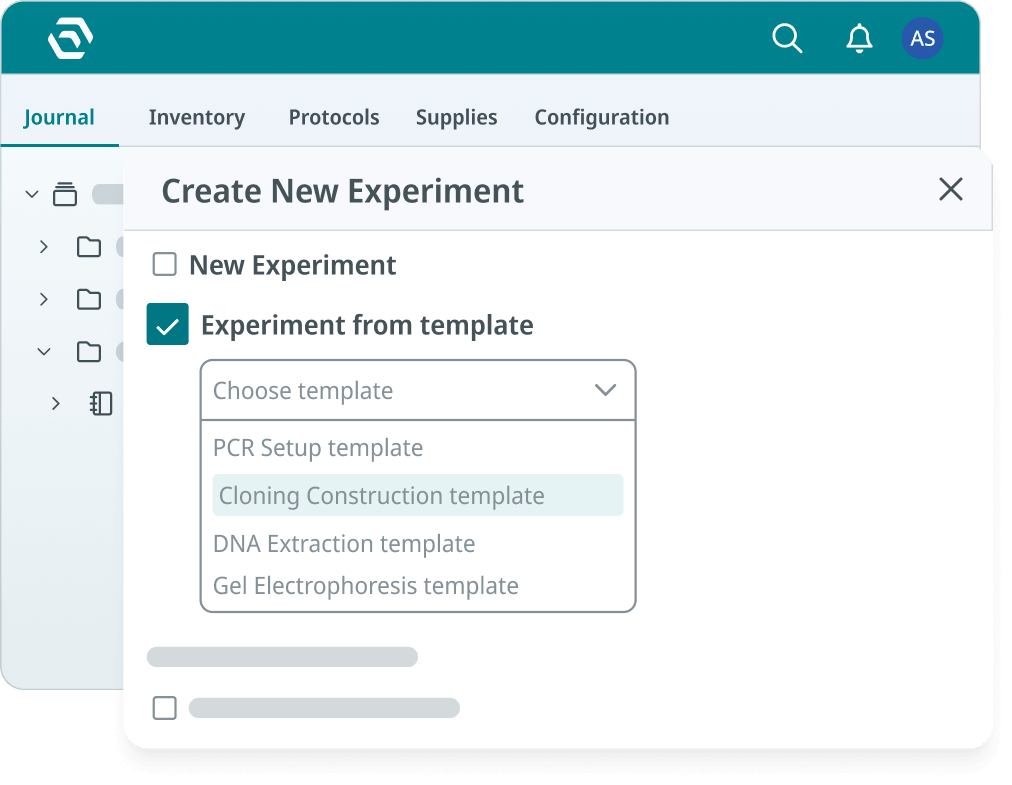
SciSure ELN experimental template

Protocols should get the same attention. Make sure you're using consistent protocol naming, labels for categorization, role and permission management, and defined authority for signing or witnessing protocols. The protocol module can support standard operating procedures, lab protocols, dynamic fields, automatic calculations, and version control.

This is where reproducibility becomes practical. A new team member should be able to open a template, follow the active protocol version, link the right sample, attach the expected output, and create a record that another scientist can understand months later.

How should permissions, signatures, and compliance be configured?

Configure permissions, signatures, and compliance before broad rollout so users know who can view, edit, delete, review, sign, witness, archive, or restore records. Your lab managers need to know that sample and inventory data will not be accidentally damaged. QA or compliance stakeholders need to know that completed records can be reviewed and protected.

Here's another SciSure implementation best practice: prioritize role and permission planning early in group configuration. For teams with more than five members, level-based permissions may scale better than permissions based only on job titles. A practical model can separate group admins, advanced users, elevated users, standard users, limited users, and view-only users.

For regulated or audit-sensitive labs, define:

  • Who can create and edit experiments.
  • Who can create or modify templates.
  • Who can manage sample types, storage units, and inventory.
  • Who can sign experiments or protocols.
  • Whether witness signatures are required.
  • Whether completed records should be locked.
  • How former users' records remain accessible.
  • Which actions should be visible through audit trails.

With SciSure, you can automate experiment signing, witness signing, and sample audit trails. You can lock signed experiments into read-only mode with a visible digital signature and timestamp. If you enable witness signing, a witness can approve and sign, or decline and unlock the record with a note so the creator can adjust and resubmit. Sample audit trails show who changed sample information, when the change was made, and what data was modified.
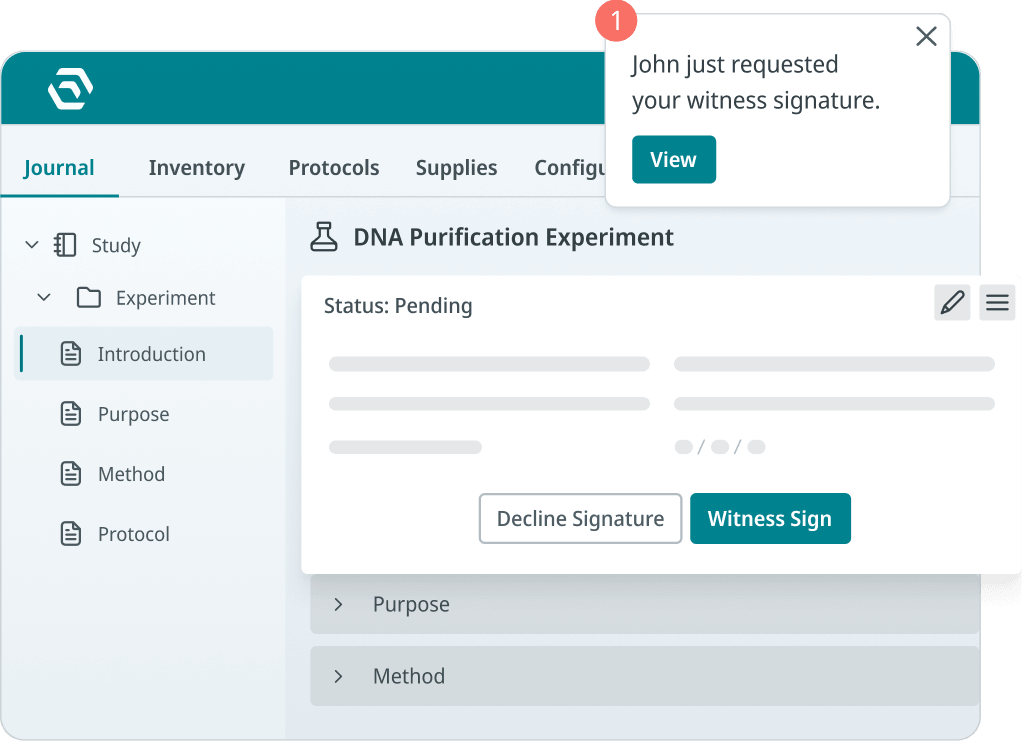
Signature permissions on the SciSure ELN

For identity and access, SciSure also supports SAML single sign-on in supported configurations, including identity-provider workflows such as Microsoft Entra ID, AD FS, Okta, OneLogin, Keycloak, and SimpleSAMLphp.

You don't need a regulated environment to benefit from these controls. They help any lab answer the same basic question: can we trust the record later?

What should the first 90 days of ELN implementation look like?

The first 90 days should move from discovery to pilot to expansion, with clear success metrics at each stage.

90-day ELN implementation timeline
Timeline What to complete
Days 1–30 Map current workflows, name project owners, choose the pilot group, define projects and studies, clean priority sample data, and draft templates
Days 31–60 Configure storage units, sample types, experiment templates, protocols, permissions, and pilot imports; train key users with real tasks
Days 61–90 Expand to the next team or workflow, migrate the next priority dataset, monitor support issues, retire duplicate trackers, and review adoption metrics

Good metrics are concrete:

  • Number of active users who created a complete experiment.
  • Number of recurring workflows converted into templates.
  • Percentage of priority samples with required metadata and storage location.
  • Number of migrated records reconciled against source files.
  • Average time to find a sample, protocol, or prior experiment.
  • Number of support issues by category, such as access, templates, migration, training, or sample cleanup.
  • Percentage of completed records reviewed, signed, witnessed, or archived according to policy.
  • Number of legacy notebooks, spreadsheets, or exports indexed and retrievable.

If your scientists still maintain side spreadsheets after go-live, treat that as useful feedback. It usually means something is missing: a field, report, filter, template, integration, permission, or confidence in the new workflow.

How can SciSure support implementation beyond software setup?

SciSure can support implementation through onboarding, technical implementation, data migration, user training, and ongoing support. Our implementation path includes assembling a project team, creating a project plan, setting milestones, appointing key users, and creating a training schedule. For private cloud and on-premises examples, our Customer Success roadmap also includes technical implementation, optional test migration on an acceptance environment, migration to the new environment, and training for key users, group administrators, and end users.

That matters because ELN implementation succeeds or fails in the handoff between configuration and daily use. The system can have the right capabilities, but scientists still need to know how to complete their actual workflow:

  • Create an experiment from a template.
  • Link the correct sample.
  • Attach the right instrument file.
  • Use the active protocol version.
  • Search prior work.
  • Request review.
  • Sign or witness where required.
  • Retrieve the record later.

With SciSure, the product and implementation process can support that workflow through connected ELN, LIMS, sample, inventory, permissions, signatures, audit trails, integrations, support resources, and training.

Kaigene: Moving away from fragmented documentation with SciSure

Kaigene, a growth-stage biotech had been using Microsoft Office tools alongside physical lab notebooks to record research plans, experiment results, and reports. That dual documentation created the kind of burden many active labs recognize: researchers had to maintain records in more than one format, and documentation could take several hours or even a full day. Data retrieval was also difficult, both for individual researchers looking for their own prior work and for colleagues who needed access to shared research context.

After adopting SciSure, Kaigene: 

  • Reduced time spent on data recording,
  • Made past experimental data easier to retrieve,
  • and used inventory management to better organize research materials.

The implementation lesson is practical: start with the work that is visibly slowing scientists down. In Kaigene's case, the pain was redundant documentation, hard-to-retrieve records, and inventory tracking. Those are exactly the kinds of bottlenecks an ELN rollout should solve first.

For your lab, the first win might be different. It might be sample lookup, protocol versioning, signature workflows, paper notebook archiving, or reducing the number of places a scientist has to copy the same result. The best pilot is the workflow where better structure will be felt immediately.

SciSure
Migrating 15 years of historical data from 100+ spreadsheets?
Talk to a SciSure specialist about implementation, migration scope, templates, sample traceability, and user training before rollout.
Request a demo

How do you train users without disrupting experiments?

Train users by role and workflow, not by feature list. Your scientists need to know how to complete this week's work without losing time or creating recordkeeping problems. Use these hands-on scenarios as a guiding light:

  • A scientist starts a new experiment from a template, links samples, attaches data, and submits for review.
  • A lab manager creates or updates a sample record, moves it into the correct storage location, and confirms search filters.
  • A reviewer checks a completed experiment, verifies attachments and sample links, and signs or witnesses the record.
  • An admin adds a user, assigns permissions, and confirms the person can see only the appropriate projects and samples.
  • A key user collects rollout friction and updates templates, fields, or support notes.

Keep training close to the pilot workflow. A protein engineering team might practice construct documentation, plasmid sample links, sequencing attachments, and review. Or a cell culture team might practice passage records, freezer locations, batch updates, and protocol versions. A core facility might practice sample intake, storage assignment, status updates, and report retrieval.

Then keep support visible after go-live. Adoption improves when users know where to ask questions, who owns fixes, and when feedback will be reviewed.

How do you know the ELN implementation is working?

Your ELN implementation is working when scientists complete active work in the system, managers can find samples and inventory context, reviewers can trust completed records, and old workarounds begin to disappear.

You know your ELN implementation is working when...
  • Scientists create complete experiment records without reverting to side spreadsheets.
  • Samples are searchable by ID, metadata, storage location, owner, or project.
  • Protocol templates are reused instead of recreated from memory.
  • Attachments and instrument outputs are stored or linked where reviewers expect them.
  • Reviewers can see who changed a record, when, and why.
  • New team members can follow a workflow without asking who built the old folder structure.
  • Lab managers can answer sample, inventory, and equipment questions without opening five separate files.
  • Compliance or QA stakeholders can retrieve evidence without rebuilding a timeline from emails.

The end state should feel ordinary in the best way. A scientist knows where to record work, a lab manager knows where materials are, a reviewer knows what changed, or a future teammate can understand what happened.

FAQ: implementing an ELN in an existing lab

Should an existing lab implement an ELN all at once?

Usually no. A phased rollout is safer. Start with one team, one project, one study, or one recurring workflow. Use the pilot to prove templates, sample links, permissions, migration approach, and training before expanding.

What should we migrate first?

Migrate active studies, current protocols, priority samples, recent experiments, high-value attachments, and records needed in the first 30 to 90 days. Archive older completed records in a controlled, retrievable format when structured migration would not improve daily work.

How do we avoid recreating our messy paper or spreadsheet process?

Don't copy old structure blindly. Use migration as a cleanup point. Standardize sample types, storage names, project naming, metadata fields, protocol labels, and templates before importing large volumes of data.

What is the biggest ELN implementation risk?

The biggest risk is losing context. A notebook entry is less useful if it is separated from the sample, protocol version, attachment, reviewer, timestamp, storage location, or decision trail that explains it.

Who should be involved in ELN implementation?

Include scientific users, lab managers, IT, QA or compliance stakeholders where relevant, and key users from each group or site. Scientists know the workflow. Lab managers know the operational pain. IT and QA help make the system trustworthy and supportable.

How much training do scientists need?

Training should be practical and role-based. Scientists need to practice creating experiments, using templates, linking samples, attaching files, searching records, and submitting for review. Lab managers, admins, and reviewers need different training paths.

When should we connect ELN and LIMS workflows?

Connect ELN and LIMS workflows early if experiments depend heavily on samples, inventory, storage, equipment, barcoding, or batch updates. If your team spends time reconciling notebooks with sample trackers, a connected ELN and LIMS rollout can reduce duplicate work.

What should we ask an ELN vendor before rollout?

Ask how the vendor supports workflow mapping, data migration, paper records, sample links, templates, permissions, signatures, audit trails, training, support, integrations, backups, historical archives, and post-go-live adoption.

If your current process makes it hard to find records, trace samples, use the right protocol, review completed work, or onboard new scientists, the cost of staying put is already showing up. A thoughtful ELN implementation gives your lab a way to fix those problems one workflow at a time.

If your lab is ready to replace paper notebooks, spreadsheets, or disconnected research systems, book a SciSure demo. Let's discuss how we can support you in implementing a new ELN, migrating your data, keeping your samples traceable, and planning a rollout your scientists actually trust.

Read More:

Ready to see SciSure in action?

Get a personalized demo and see how SciSure fits your lab's workflows.
Request demo

No commitment · Free consultation

Keeping track of samples, reagents, protocols, experiments, instrument files, and research decisions is necessary for every lab. The hard part is that most existing labs already have a system, even if that system is a mix of paper notebooks, Excel files, freezer maps, shared folders, OneNote pages, emails, and a few people who know where everything lives.

That makes ELN implementation different in an active lab than in a brand-new lab. Rather than starting from a blank page, you're now asking scientists to change how they record work while experiments, sample handoffs, grant deadlines, QA reviews, collaborations, and inventory needs keep moving.

A successful electronic lab notebook rollout feel like a controlled workflow change: current records are mapped, priority use cases are selected, samples and protocols stay traceable, permissions are clear, and scientists learn the system through the tasks they already perform. Your goal is to make research records easier to find, repeat, review, protect, and reuse.

Why does rolling out an ELN successfully matter?

The approach you take matters because research record expectations have changed. For example: 

  • The NIH Data Management and Sharing Policy asks funded researchers to plan how scientific data will be managed and shared.
  • Likewise, the FAIR Principles push teams toward data that is findable, accessible, interoperable, and reusable.
  • FDA-regulated teams also need to consider trustworthy electronic records, audit trails, access controls, and electronic signatures under 21 CFR Part 11 and FDA guidance on electronic systems, electronic records, and electronic signatures in clinical investigations.

Even when your lab isn't formally regulated, the same implementation questions are useful: can your team find the record, understand the context, trace the sample, identify the protocol version, and trust who changed what?

Why is implementing an ELN harder in an active lab?

Implementing an ELN is harder in an active lab because your current workflow might contain real dependencies that may not be obvious until you map them. Beyond just replacing notebooks, your scientists are also replacing habits, naming conventions, informal review paths, spreadsheet trackers, sample lookup routines, and local knowledge.

Here are some common dependencies you'll run into (or might have already!)

  • A freezer inventory spreadsheet that only one lab manager updates.
  • Paper notebooks that contain sample IDs referenced in active studies.
  • Protocol PDFs stored in a shared drive with unclear version control.
  • Instrument outputs saved on local computers and copied manually into reports.
  • Experiments documented in both a paper notebook and a Word file.
  • Former users who still own important records.
  • Compliance or IP expectations that require completed work to be retrievable later.

If you skip this discovery step, the ELN can become one more place to copy data. That's the failure mode to avoid. Your rollout should reduce duplication, rather than formalizing it. So start by asking where the lab loses time or context today:

Issues an ELN audit can help you uncover
Implementation question What it helps you uncover
Which records are hardest to find? Search, metadata, project structure, and archive needs
Which samples are most likely to be misplaced or misidentified? Sample type fields, storage maps, barcodes, and lineage needs
Which workflows are repeated every week? Experiment templates and protocol standardization opportunities
Which records need review, signatures, or audit trails? Compliance, permissions, and approval workflow requirements
Which systems contain source data? Migration, integration, file attachment, and retention scope
Which teams need access? Role-based permissions, collaboration settings, and training groups

This is also the moment to name your implementation owners. A practical project team usually includes a scientific lead, lab operations or lab manager, IT or systems owner, QA or compliance stakeholder if applicable, and a few key users who understand daily bench work.

What should you do before choosing or expanding an ELN?

Before choosing or expanding an ELN, make sure you define what the system must support in daily work: experiment documentation, sample traceability, protocol control, collaboration, signatures, inventory, migration, and retrieval. Start with workflow evidence; for each priority workflow, document:

  • The experiment or process name.
  • The samples, reagents, consumables, and equipment used.
  • The protocol or SOP version.
  • The files that support the record, such as images, spreadsheets, instrument outputs, or analysis exports.
  • The metadata scientists need to search later.
  • The people who create, review, approve, sign, witness, or archive the record.
  • The source systems that currently hold historical information.

Then convert that into implementation requirements.

How to map an ELN implementation to your workflows
Workflow need ELN implementation decision
Scientists repeat the same assay every week Build an experiment template with required sections and fields
Samples are difficult to locate Standardize sample types, storage locations, barcode strategy, and search filters
Protocols change over time Use controlled protocol naming, labels, permissions, versioning, and sign-off
Records require review Configure approval, signature, witness, and locked-record workflows
Teams collaborate across projects Define project, study, experiment, and user permissions before go-live
Historical records matter Decide what to migrate as structured data and what to archive as read-only history

The practical point is simple: if your lab's ELN rollout depends on sample traceability, configure the sample and inventory model early. Don't wait until after scientists have started creating experiment records.

SciSure
Start with a connected foundation
SciSure's ELN/LIMS helps your team connect experiments, templates, samples, inventory, files, approvals, barcodes, audit trails, version control, and signatures right from the start.
Request a demo

How should you structure the ELN for an existing lab?

Structure the ELN around how your lab organizes real work: groups, projects, studies, experiments, protocols, samples, storage units, and equipment. For example, SciSure's implementation process frames the ELN hierarchy as:

  • Group.
    The team's working environment.
  • Project.
    The space where team-based, program-based, grant-based, or product-based work is stored.
  • Study.
    A subfolder within a project for organizing related experimental records.
  • Experiment.
    The experimental record itself.

That structure is useful because it forces the team to decide where work should live before hundreds of records are created.

For an existing lab, choose naming conventions that scientists can follow without guessing. A good convention usually includes a project ID or study ID, a descriptive name, a year or date where useful, and initials or owner information only when ownership matters. Avoid names that depend on memory, such as "new assay," "final final," or "Jane's old notebook."

Here's another pro tip from SciSure's implementation process: use project and study custom fields for relevant research context such as grant IDs, material transfer agreements, collaboration agreements, publication identifiers, or DOI information. This makes records more searchable and useful later, especially when teams need to support a grant report, manuscript, audit, IP review, or internal handoff.

For the first rollout, keep the structure small enough to govern:

  • Configure one or two active projects.
  • Create studies for the pilot workflow.
  • Build experiment templates for recurring work.
  • Define a short list of required metadata fields.
  • Decide which collaborators should be added automatically.
  • Test whether a new user can find a prior experiment without asking the original scientist.

If the structure works for real work, expand it. If users cannot find records during the pilot, fix the structure before rollout.

How do you configure samples and inventory before go-live?

Configure samples and inventory before go-live by defining storage locations, sample types, required metadata, barcode needs, and search filters. In an active lab, sample tracking is often the place where paper and spreadsheet workflows become risky. A scientist may need to search a freezer, check a shared tracker, ask a teammate, and open an old notebook before they know whether a sample is available, where it is stored, and which experiment used it.

Here's the SciSure way - configure your inventory in these stages:

  • Storage units and storage-unit templates.
  • Compartment layers such as shelves, racks, boxes, towers, or drawers.
  • Standardized sample types.
  • Custom metadata fields, mandatory fields, and input validation.
  • Samples created manually or imported in bulk.
  • Equipment records where relevant.
SciSure LIMS inventory management

That sequence matters because samples need a stable home. If storage units and sample types are not designed first, imported sample records can become hard to search, hard to trust, or hard to connect to experiments.

For an existing lab, your sample strategy should answer:

  • Which sample types matter first: compounds, cell lines, antibodies, plasmids, proteins, tissues, DNA, RNA, environmental samples, controls, or reference materials?
  • Which metadata fields are required for each sample type?
  • Which identifiers should become canonical: old notebook ID, spreadsheet ID, LIMS ID, barcode, vendor lot, freezer label, or internal sample name?
  • Which storage locations need cleanup before import?
  • Which samples need lineage, parent-child relationships, checkout status, expiration dates, or audit history?

SciSure's Inventory Browser gives teams one place to view storage location, storage compartment, sample lists, and sample information. Sample search can use stored sample information across fields, including default fields and custom sample fields. Your team can also save and share filter templates for repeat searches, such as expired samples, checked-out materials, or a specific sample type in a specific freezer.

That is an immediate adoption win. When a scientist can find a sample faster, link it to an experiment, and trust the storage context, the ELN stops feeling abstract.

SciSure
Ready to clean up your scattered inventory records?
SciSure LIMS can help centralize sample tracking, storage locations, barcode workflows, custom fields, batch updates, and sample history so inventory becomes part of the research record from day one.
Request a demo

How should you migrate data from paper, spreadsheets, or another system?

Migrate data selectively: move active work and critical structured records first, then archive older material in a controlled, retrievable format when full migration would add cost without practical value.

For many existing labs, the source material includes:

  • Paper notebooks.
  • Word documents and PDFs.
  • Excel sample trackers.
  • Freezer maps.
  • Shared-drive folders.
  • Instrument output folders.
  • Legacy ELN or LIMS exports.
  • Protocol libraries.
  • Product catalog, equipment, or inventory files.

Not all of that should become live structured data. A completed paper notebook from 2012 may need to be indexed and retrievable, but it may not need every page transformed into editable ELN content. Active samples, current protocols, open studies, and recent experiments usually deserve more structure.

Use these three migration buckets:

3 ways to migrate your scientific data from analog to digital
Migration approach Use it for
Structured migration Active work, reusable sample records, ongoing studies, and records that need search, links, permissions, or reporting.

Example: active oncology experiments with samples that need to stay linked to storage locations and results.
Flat file archive Completed projects, legacy records, and historical data you rarely edit but must keep for reference or compliance.

Example: closed studies from five years ago that you need to retain for audits but no longer actively update.
Hybrid approach A mix of active and historical data, where you migrate current work as structured records and store the rest as read-only archives.

Example: an ongoing research program where recent experiments move into the ELN and older results are archived as searchable files.

SciSure provides bulk data migration through import templates for samples or sample series, product catalog items, and equipment. Sample import is intended for initial migration when you set up new groups, while batch import and update tools can support larger sample creation and maintenance needs.

Before migration, clean the fields that will matter later:

  • Sample names and aliases.
  • Sample type and owner.
  • Storage unit, rack, box, and position.
  • Barcode or external barcode.
  • Quantity and unit.
  • Expiration date.
  • Parent-child relationships or lineage where needed.
  • Related project, study, or experiment.
  • Historical ID from the source system.

Then test with a small, representative dataset. Include clean examples and awkward ones: duplicate sample names, missing freezer positions, former users, large attachments, old file formats, and samples used across multiple projects.

How do you turn current lab workflows into templates?

You can turn current workflows into templates by identifying repeated work, required data, sample links, protocol steps, expected files, and review requirements. Templates are one of the fastest ways to reduce resistance because they make the ELN look like the work scientists already recognize. For each recurring workflow, consider:

  • What sections should every record include?
  • Which fields are required?
  • Which sample or inventory section should be included?
  • Which equipment should be captured?
  • Which protocol should be linked?
  • Which file types should be attached?
  • Which calculations, variables, or dynamic fields are needed?
  • Who reviews or signs the record?

With SciSure, you can build experiment templates from scratch or created from existing experiments. That second path is useful for existing labs: take a strong prior experiment, clean up the structure, remove one-off details, and turn it into a reusable template.

SciSure ELN experimental template

Protocols should get the same attention. Make sure you're using consistent protocol naming, labels for categorization, role and permission management, and defined authority for signing or witnessing protocols. The protocol module can support standard operating procedures, lab protocols, dynamic fields, automatic calculations, and version control.

This is where reproducibility becomes practical. A new team member should be able to open a template, follow the active protocol version, link the right sample, attach the expected output, and create a record that another scientist can understand months later.

How should permissions, signatures, and compliance be configured?

Configure permissions, signatures, and compliance before broad rollout so users know who can view, edit, delete, review, sign, witness, archive, or restore records. Your lab managers need to know that sample and inventory data will not be accidentally damaged. QA or compliance stakeholders need to know that completed records can be reviewed and protected.

Here's another SciSure implementation best practice: prioritize role and permission planning early in group configuration. For teams with more than five members, level-based permissions may scale better than permissions based only on job titles. A practical model can separate group admins, advanced users, elevated users, standard users, limited users, and view-only users.

For regulated or audit-sensitive labs, define:

  • Who can create and edit experiments.
  • Who can create or modify templates.
  • Who can manage sample types, storage units, and inventory.
  • Who can sign experiments or protocols.
  • Whether witness signatures are required.
  • Whether completed records should be locked.
  • How former users' records remain accessible.
  • Which actions should be visible through audit trails.

With SciSure, you can automate experiment signing, witness signing, and sample audit trails. You can lock signed experiments into read-only mode with a visible digital signature and timestamp. If you enable witness signing, a witness can approve and sign, or decline and unlock the record with a note so the creator can adjust and resubmit. Sample audit trails show who changed sample information, when the change was made, and what data was modified.

Signature permissions on the SciSure ELN

For identity and access, SciSure also supports SAML single sign-on in supported configurations, including identity-provider workflows such as Microsoft Entra ID, AD FS, Okta, OneLogin, Keycloak, and SimpleSAMLphp.

You don't need a regulated environment to benefit from these controls. They help any lab answer the same basic question: can we trust the record later?

What should the first 90 days of ELN implementation look like?

The first 90 days should move from discovery to pilot to expansion, with clear success metrics at each stage.

90-day ELN implementation timeline
Timeline What to complete
Days 1–30 Map current workflows, name project owners, choose the pilot group, define projects and studies, clean priority sample data, and draft templates
Days 31–60 Configure storage units, sample types, experiment templates, protocols, permissions, and pilot imports; train key users with real tasks
Days 61–90 Expand to the next team or workflow, migrate the next priority dataset, monitor support issues, retire duplicate trackers, and review adoption metrics

Good metrics are concrete:

  • Number of active users who created a complete experiment.
  • Number of recurring workflows converted into templates.
  • Percentage of priority samples with required metadata and storage location.
  • Number of migrated records reconciled against source files.
  • Average time to find a sample, protocol, or prior experiment.
  • Number of support issues by category, such as access, templates, migration, training, or sample cleanup.
  • Percentage of completed records reviewed, signed, witnessed, or archived according to policy.
  • Number of legacy notebooks, spreadsheets, or exports indexed and retrievable.

If your scientists still maintain side spreadsheets after go-live, treat that as useful feedback. It usually means something is missing: a field, report, filter, template, integration, permission, or confidence in the new workflow.

How can SciSure support implementation beyond software setup?

SciSure can support implementation through onboarding, technical implementation, data migration, user training, and ongoing support. Our implementation path includes assembling a project team, creating a project plan, setting milestones, appointing key users, and creating a training schedule. For private cloud and on-premises examples, our Customer Success roadmap also includes technical implementation, optional test migration on an acceptance environment, migration to the new environment, and training for key users, group administrators, and end users.

That matters because ELN implementation succeeds or fails in the handoff between configuration and daily use. The system can have the right capabilities, but scientists still need to know how to complete their actual workflow:

  • Create an experiment from a template.
  • Link the correct sample.
  • Attach the right instrument file.
  • Use the active protocol version.
  • Search prior work.
  • Request review.
  • Sign or witness where required.
  • Retrieve the record later.

With SciSure, the product and implementation process can support that workflow through connected ELN, LIMS, sample, inventory, permissions, signatures, audit trails, integrations, support resources, and training.

Kaigene: Moving away from fragmented documentation with SciSure

Kaigene, a growth-stage biotech had been using Microsoft Office tools alongside physical lab notebooks to record research plans, experiment results, and reports. That dual documentation created the kind of burden many active labs recognize: researchers had to maintain records in more than one format, and documentation could take several hours or even a full day. Data retrieval was also difficult, both for individual researchers looking for their own prior work and for colleagues who needed access to shared research context.

After adopting SciSure, Kaigene: 

  • Reduced time spent on data recording,
  • Made past experimental data easier to retrieve,
  • and used inventory management to better organize research materials.

The implementation lesson is practical: start with the work that is visibly slowing scientists down. In Kaigene's case, the pain was redundant documentation, hard-to-retrieve records, and inventory tracking. Those are exactly the kinds of bottlenecks an ELN rollout should solve first.

For your lab, the first win might be different. It might be sample lookup, protocol versioning, signature workflows, paper notebook archiving, or reducing the number of places a scientist has to copy the same result. The best pilot is the workflow where better structure will be felt immediately.

SciSure
Migrating 15 years of historical data from 100+ spreadsheets?
Talk to a SciSure specialist about implementation, migration scope, templates, sample traceability, and user training before rollout.
Request a demo

How do you train users without disrupting experiments?

Train users by role and workflow, not by feature list. Your scientists need to know how to complete this week's work without losing time or creating recordkeeping problems. Use these hands-on scenarios as a guiding light:

  • A scientist starts a new experiment from a template, links samples, attaches data, and submits for review.
  • A lab manager creates or updates a sample record, moves it into the correct storage location, and confirms search filters.
  • A reviewer checks a completed experiment, verifies attachments and sample links, and signs or witnesses the record.
  • An admin adds a user, assigns permissions, and confirms the person can see only the appropriate projects and samples.
  • A key user collects rollout friction and updates templates, fields, or support notes.

Keep training close to the pilot workflow. A protein engineering team might practice construct documentation, plasmid sample links, sequencing attachments, and review. Or a cell culture team might practice passage records, freezer locations, batch updates, and protocol versions. A core facility might practice sample intake, storage assignment, status updates, and report retrieval.

Then keep support visible after go-live. Adoption improves when users know where to ask questions, who owns fixes, and when feedback will be reviewed.

How do you know the ELN implementation is working?

Your ELN implementation is working when scientists complete active work in the system, managers can find samples and inventory context, reviewers can trust completed records, and old workarounds begin to disappear.

You know your ELN implementation is working when...
  • Scientists create complete experiment records without reverting to side spreadsheets.
  • Samples are searchable by ID, metadata, storage location, owner, or project.
  • Protocol templates are reused instead of recreated from memory.
  • Attachments and instrument outputs are stored or linked where reviewers expect them.
  • Reviewers can see who changed a record, when, and why.
  • New team members can follow a workflow without asking who built the old folder structure.
  • Lab managers can answer sample, inventory, and equipment questions without opening five separate files.
  • Compliance or QA stakeholders can retrieve evidence without rebuilding a timeline from emails.

The end state should feel ordinary in the best way. A scientist knows where to record work, a lab manager knows where materials are, a reviewer knows what changed, or a future teammate can understand what happened.

FAQ: implementing an ELN in an existing lab

Should an existing lab implement an ELN all at once?

Usually no. A phased rollout is safer. Start with one team, one project, one study, or one recurring workflow. Use the pilot to prove templates, sample links, permissions, migration approach, and training before expanding.

What should we migrate first?

Migrate active studies, current protocols, priority samples, recent experiments, high-value attachments, and records needed in the first 30 to 90 days. Archive older completed records in a controlled, retrievable format when structured migration would not improve daily work.

How do we avoid recreating our messy paper or spreadsheet process?

Don't copy old structure blindly. Use migration as a cleanup point. Standardize sample types, storage names, project naming, metadata fields, protocol labels, and templates before importing large volumes of data.

What is the biggest ELN implementation risk?

The biggest risk is losing context. A notebook entry is less useful if it is separated from the sample, protocol version, attachment, reviewer, timestamp, storage location, or decision trail that explains it.

Who should be involved in ELN implementation?

Include scientific users, lab managers, IT, QA or compliance stakeholders where relevant, and key users from each group or site. Scientists know the workflow. Lab managers know the operational pain. IT and QA help make the system trustworthy and supportable.

How much training do scientists need?

Training should be practical and role-based. Scientists need to practice creating experiments, using templates, linking samples, attaching files, searching records, and submitting for review. Lab managers, admins, and reviewers need different training paths.

When should we connect ELN and LIMS workflows?

Connect ELN and LIMS workflows early if experiments depend heavily on samples, inventory, storage, equipment, barcoding, or batch updates. If your team spends time reconciling notebooks with sample trackers, a connected ELN and LIMS rollout can reduce duplicate work.

What should we ask an ELN vendor before rollout?

Ask how the vendor supports workflow mapping, data migration, paper records, sample links, templates, permissions, signatures, audit trails, training, support, integrations, backups, historical archives, and post-go-live adoption.

If your current process makes it hard to find records, trace samples, use the right protocol, review completed work, or onboard new scientists, the cost of staying put is already showing up. A thoughtful ELN implementation gives your lab a way to fix those problems one workflow at a time.

If your lab is ready to replace paper notebooks, spreadsheets, or disconnected research systems, book a SciSure demo. Let's discuss how we can support you in implementing a new ELN, migrating your data, keeping your samples traceable, and planning a rollout your scientists actually trust.

Read More:

About the author:

Apsara Ghising

Apsara Ghising is an Implementation Specialist at SciSure, where she guides new labs through onboarding and setup. She joined eLabNext, now part of SciSure, in 2023 and has spent more than three years working directly with research teams, first in customer success and now in implementation. Before moving into lab software, she worked in patient care as a surgical assistant, cardiac stress technician, and medical coordinator. She holds a Bachelor of Science in Biology from the University of Hartford.

See all posts from this author

Melde dich für unseren Newsletter an

Holen Sie sich die neuesten Tipps, Artikel und exklusiven Inhalte zum modernen Labormanagement in Ihren Posteingang.
Danke! Deine Einreichung ist eingegangen!
Please check your email to verify your submission.
Hoppla! Beim Absenden des Formulars ist etwas schief gelaufen.